

In this article, I will explain the use of the TOP WITH TIES Clause in SQL Server. In SQL Server, TOP WITH TIES, additional rows will be included if their values match, or tie, the values of the last row. So let's take a look at a practical example of how to use the TOP WITH TIES Clause in SQL Server. The example is developed in SQL Server 2012 using the SQL Server Management Studio.
The WITH TIES can be used only with the following clause:
-
Select Statemnet
-
Order by clause is necessary for using this clause
-
PERCENT clause
Creating a table in SQL Server
Now we create a table named employee using:
Create table Employee
(
EmpID int,
EmpName varchar(30),
EmpSalary int
)
The following is the sample data for the employee Table:
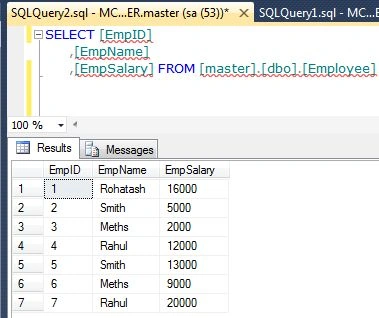
Top Clause
The SELECT TOP N query always returns exactly N records. The following example defines the TOP clause.
Example
SELECT [EmpID]
,[EmpName]
,[EmpSalary]
FROM [master].[dbo].[Employee]
Go
Select top(3) [EmpName] from [Employee]
order by [EmpName]
Output

Problem
In the above example, we can encounter the situation in which use of the top clause returns exactly N records and drops any record(s) arbitrarily that has the same value as the last record in the result set. Suppose the employee table has EmpName Rahul and the table contains one more EmpName with the same name, but it will not be in the result since they are ignored by the TOP clause.
Select Query Using TOP WITH TIES Clause
To see those recrods add the WITH TIES clause:
SELECT [EmpID]
,[EmpName]
,[EmpSalary]
FROM [master].[dbo].[Employee]
Go
Select top(3) [EmpName] from [Employee]
order by [EmpName]
Go
Select top(3) with ties [EmpName] from [Employee]
order by [EmpName]
Output

Join the conversation! Your thoughts help the community grow.