

Introduction
This article demonstrates an interesting and very useful concept in Entity Framework.
Question: What is no tracking?
In simple terms "This is a new extension method, that can be used on entity classes when querying on a large quantity of data, that in turn may result in better query performance".
Step 1: Create a new web application
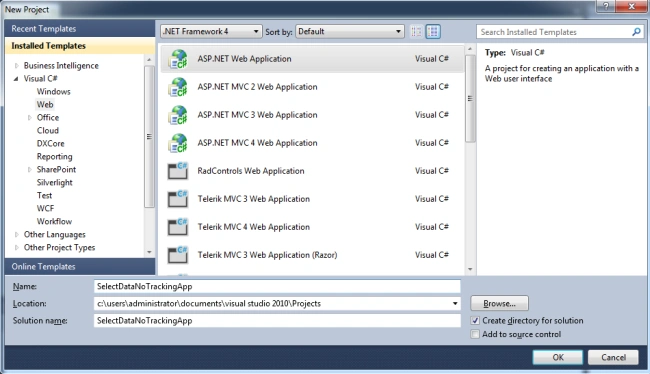
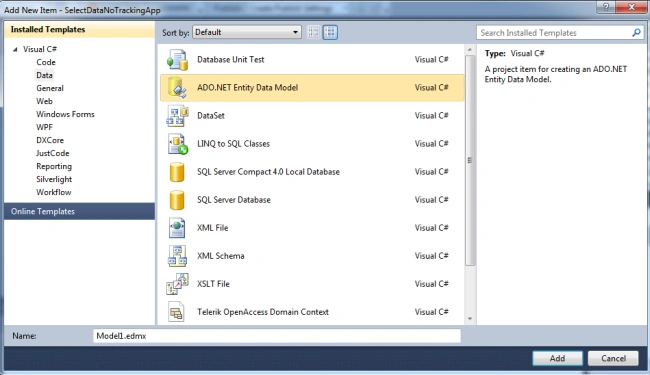
Step 2: Adding a new Entity Framework:
Step 3: The complete code of WebForm1.aspx is as in the following:
<%@ Page Language="C#" AutoEventWireup="true" CodeBehind="WebForm1.aspx.cs" Inherits="SelectDataNoTrackingApp.WebForm1" %>
<!DOCTYPE html PUBLIC "-//W3C//DTD XHTML 1.0 Transitional//EN" "http://www.w3.org/TR/xhtml1/DTD/xhtml1-transitional.dtd">
<html xmlns="http://www.w3.org/1999/xhtml">
<head id="Head1" runat="server">
<title></title>
</head>
<body>
<form id="form1" runat="server">
<center>
<div>
<table>
<tr>
<td colspan="2" align="center">
<asp:Label ID="Label1" runat="server" Text="Select Data - No Tracking" Font-Bold="true"
Font-Size="Large" Font-Names="Verdana" ForeColor="Maroon"></asp:Label>
</td>
</tr>
<tr>
<td colspan="2" align="center">
<asp:Button ID="Button1" runat="server" Text="Select Data" Font-Names="Verdana" Width="213px"
BackColor="Orange" Font-Bold="True" OnClick="Button1_Click" />
</td>
</tr>
<tr>
<td colspan="2" align="center">
<asp:GridView ID="GridView1" runat="server" CssClass="grid" BackColor="LightGoldenrodYellow"
BorderColor="Tan" BorderWidth="1px" CellPadding="2" ForeColor="Black" GridLines="None">
<AlternatingRowStyle BackColor="PaleGoldenrod" />
<FooterStyle BackColor="Tan" />
<HeaderStyle BackColor="Tan" Font-Bold="True" />
<PagerStyle BackColor="PaleGoldenrod" ForeColor="DarkSlateBlue" HorizontalAlign="Center" />
<SelectedRowStyle BackColor="DarkSlateBlue" ForeColor="GhostWhite" />
<SortedAscendingCellStyle BackColor="#FAFAE7" />
<SortedAscendingHeaderStyle BackColor="#DAC09E" />
<SortedDescendingCellStyle BackColor="#E1DB9C" />
<SortedDescendingHeaderStyle BackColor="#C2A47B" />
<EmptyDataTemplate>
No Records Found!</EmptyDataTemplate>
</asp:GridView>
</td>
</tr>
</table>
</div>
</center>
</form>
</body>
</html>
Step 4: The complete code of WebForm1.aspx.cs is as in the following:
using System;
using System.Collections.Generic;
using System.Linq;
using System.Web;
using System.Web.UI;
using System.Web.UI.WebControls;
using System.Data.Entity;
namespace SelectDataNoTrackingApp
{
public partial class WebForm1 : System.Web.UI.Page
{
protected void Page_Load(object sender, EventArgs e)
{
}
protected void Button1_Click(object sender, EventArgs e)
{
using (CompanyEntities objEntities = new CompanyEntities())
{
var query = objEntities.tblEmployee.AsNoTracking();
GridView1.DataSource = query; GridView1.DataBind();
}
}
}
}
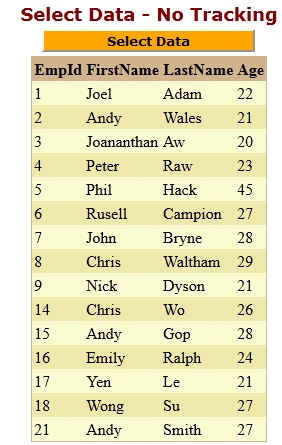
Step 5: The output of the application is as in the following:

Step 6: The selected data output of the application is as in the following:
I hope this article was useful for you.
Guest UserPosted Feb 18, 2013, 3:31 PM
This article would be way more useful if you indicated what the no tracking feature does, why it would improve performance by using it, and what side effects it can cause by using it.