

Introduction
The Power Platform enables organizations to build applications, workflows, and data-driven digital solutions. With increasing adoption, environment governance and access control become critical. One of the most important governance tools is Security Groups, which restrict who can access a Power Platform environment.
However, many admins face confusion when they discover that security groups cannot be assigned to the Default and Developer environments.
This article explains:
What security groups are
Which environments support them
Why Default/Developer environments cannot be restricted
Indirect ways to control and govern the Default environment
Best practices and governance recommendations
What Are Security Groups in Power Platform?
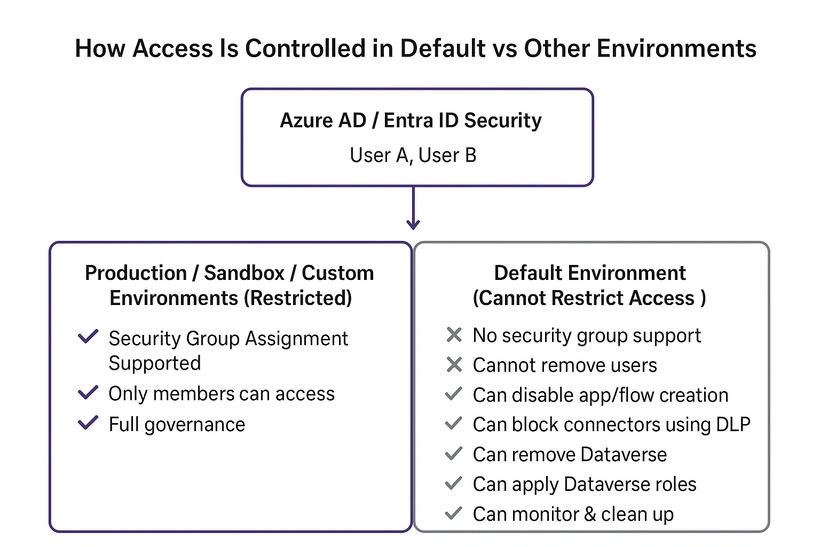
Security groups originate from Azure AD / Entra ID and are used to restrict who can access a Power Platform environment.
When a security group is assigned:
Only group members can access the environment
Only members can create apps/flows
Only members can use Dataverse in that environment
Members still require proper licensing
This provides a controlled, governed approach for managing environments.
Which Environments Support Security Group Assignment?
| Environment Type | Security Group Supported? | Notes |
|---|---|---|
| Production | Yes | Recommended for serious development |
| Sandbox | Yes | For Dev/Test/UAT |
| Trial (Production-like) | Yes | For evaluation |
| Custom Environments | Yes | Full control |
| Default | No | Cannot be restricted |
| Developer (Personal) | No | Single-user environment |
Why Default Environment Cannot Be Restricted
The Default environment is automatically created for every tenant.
Microsoft's design purpose:
For personal productivity apps
For personal cloud flows
Everyone licensed should have access
Used by Microsoft 365 features (like Teams, OneDrive, Excel integrations)
Because Microsoft relies on Default for tenant-wide scenarios, they do not allow:
Assigning security group
Removing access for any licensed user
Blocking entry to the environment
Thus, access restriction is technically impossible.
Why Developer Environments Cannot Be Restricted
Developer environments are created for users who have the Developer Plan.
Properties
Personal, single-user environment
Intended only for learning and development
Not shared with anyone
Not managed by the organization
Therefore, security groups cannot be applied.
Conclusion
While the Default environment cannot be restricted using security groups, Microsoft provides strong governance tools to limit what users can do inside it.
Organizations should:
Avoid using Default for development
Use dedicated environments with security groups
Apply DLP, maker settings, and Dataverse roles
Implement a proper ALM strategy
Use the Center of Excellence (CoE) for governance
By combining these approaches, you can achieve full environment control—even though access to the Default environment cannot be blocked.
Join the conversation! Your thoughts help the community grow.