

Introduction
As we all know, it’s very important for developers to write better and maintainable code, so checking or scanning code for vulnerabilities is a very important task as it improves code quality and reduces overall maintenance costs when implemented as part of a continuous build and deploy process.
In this article, I will explain about a tool called SonarCloud (entirely free for open source projects) using which you can highlight the issues, bugs etc. in your code and can fix leaks and therefore improve code quality systematically. Also, you will see how you can use this tool with Azure DevOps Pipeline in continuous build process.
Let’s get started!
For using SonarCloud in Azure DevOps Pipeline, you need to implement the below steps in the given order,
- Install the SonarCloud Marketplace extension.
- Create a SonarCloud service connection.
- Add variables to Azure Pipelines.
- Add scan tasks to your Azure Pipelines configuration.
- Analyze the results on SonarCloud.
Install the SonarCloud Marketplace extension
- Go to the below URL and add the freely available SonarCloud Marketplace extension in Azure DevOps, as shown in the below image,
https://marketplace.visualstudio.com/items?itemName=SonarSource.sonarcloud
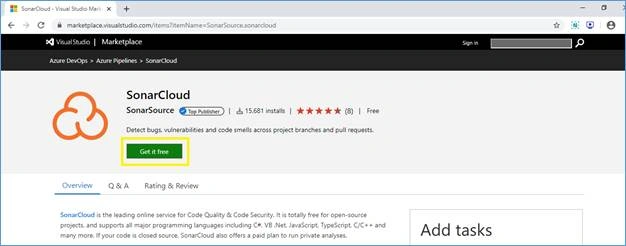
- Once you click on the “Get it free” button, you will be redirected to another page where you need to select your Azure DevOps organization from the drop-down box.
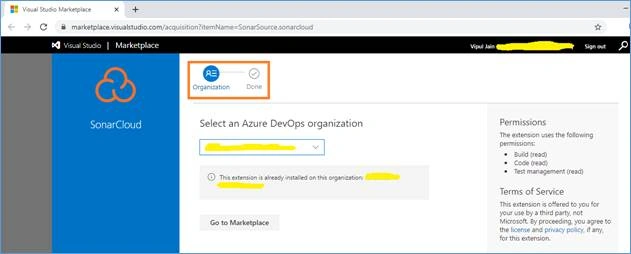
After selecting the organization, click on Install button and an email will be triggered to Azure admin for approval to add this extension. If the extension is already added in your DevOps account, then you will see the below image,
Create a SonarCloud service connection
Azure pipeline tasks require access to SonarCloud, so you need to create a service connection from the Microsoft Azure DevOps portal. A service connection provides secure access to an external service, such as SonarCloud.
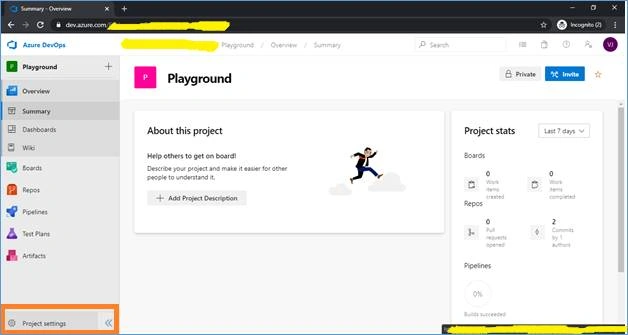
- From Azure DevOps, navigate to your project and select Project settings in the lower corner.
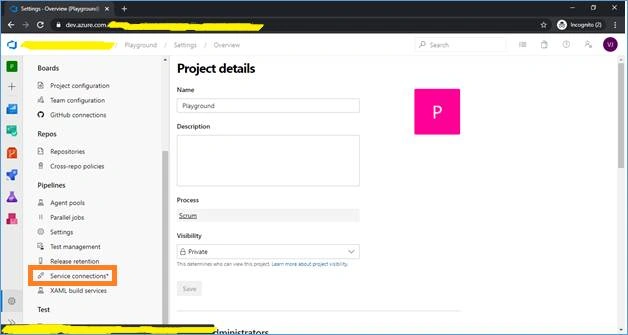
- Under Pipelines, select Service connections.
- Select New service connection, then select SonarCloud, and then select Next.
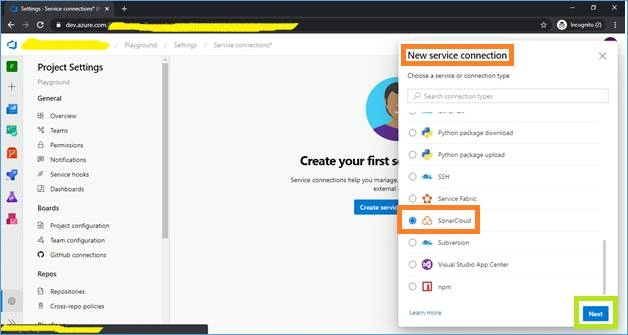
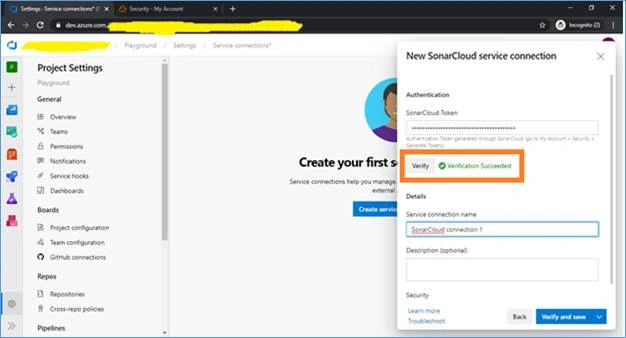
- In the dialog box that appears, enter the below details and then click on Verify and save,
- SonarCloud Token
- Connection name
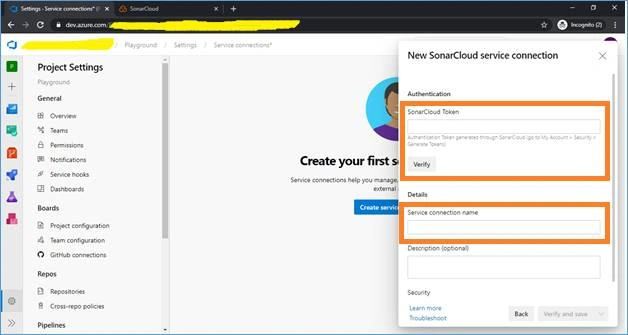
NOTE
Azure DevOps performs a test connection to verify that it can connect to Sonar Cloud.
Now the question is what is “SonarCloud Token” and how to generate it?
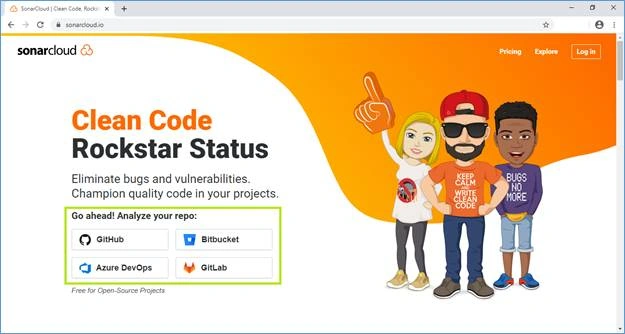
- For creating this token, navigate to the URL - https://sonarcloud.io/ . Below is the screen shot of this URL showing that you can analyze your repo from 4 sources i.e. GitHub, Bitbucket, Azure DevOps and GitLab. In this article, we will use Azure DevOps.
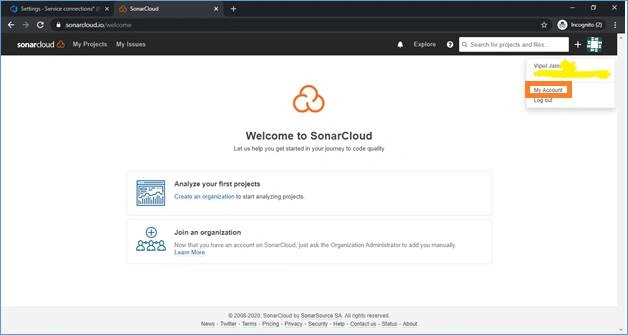
- Login to SonarCloud website using your Azure Devops account and click on “My Account” as shown in below image,
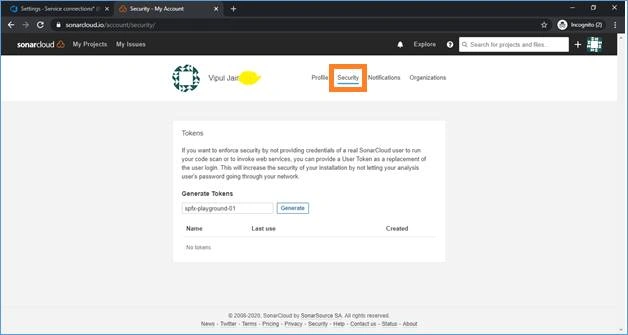
- Click on “Security” tab and generate the token as shown in below image,
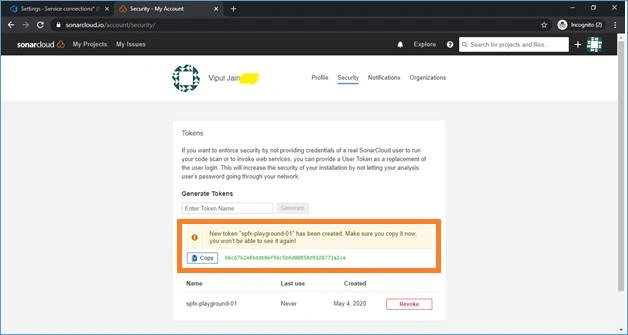
- Once the token will be generated, you can copy the token and can use it in your Azure DevOps pipeline (in continuation with Step-4 above), as shown in the below image,
- Add the token in Azure DevOps service connection and click on Verify and save.
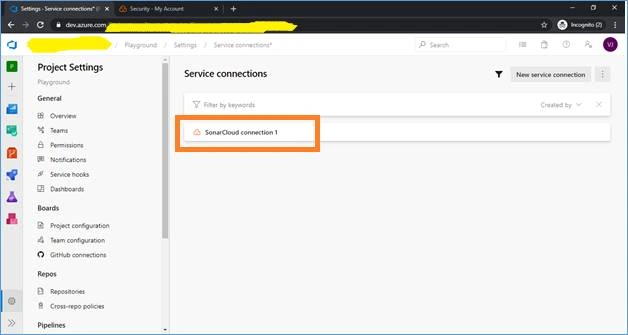
- Once the token will be verified, a new service connection will be created in Azure Devops Pipeline, as shown in the below image,
Add variables to Azure Pipelines
Let's add a few variables to the pipeline.
- From Azure DevOps, navigate to your pipeline and select Edit.
- Select Variables at the top right and click on “Add”.
- Create 3 variables – SonarProjectKey, SonarProjectName and SonarOrganization, as shown in below image,
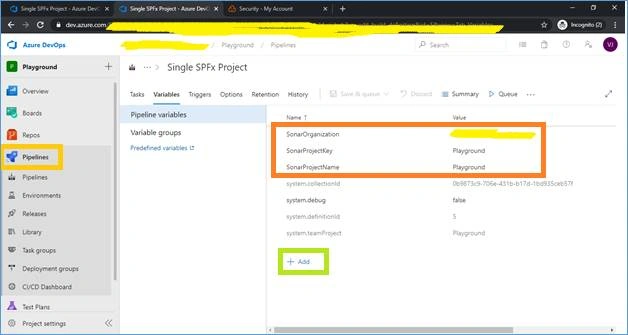
These variables will be used while configuring the settings for SonarCloud tasks in Azure DevOps Pipeline.
Add scan tasks to your Azure Pipelines configuration
SonarCloud Marketplace extension provides built-in task types that performs the scan.
You can add three different type of tasks in Azure DevOps pipeline to scan the code. These 3 tasks are,
- Prepare Analysis Configuration task – This task is required to configure all the required settings before executing the build. For this task,
- You need to create an organization in SonarCloud, as shown in the below image,
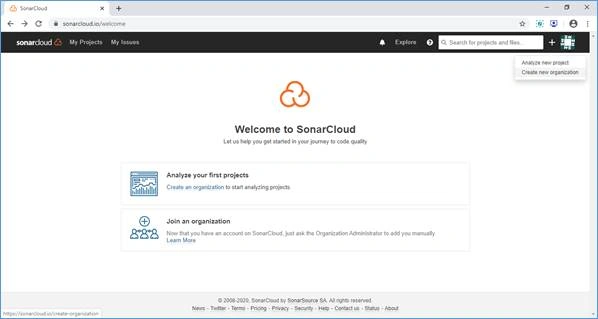
- Once you click on “Create new organization”, a Key needs to be entered, as shown in the below image,
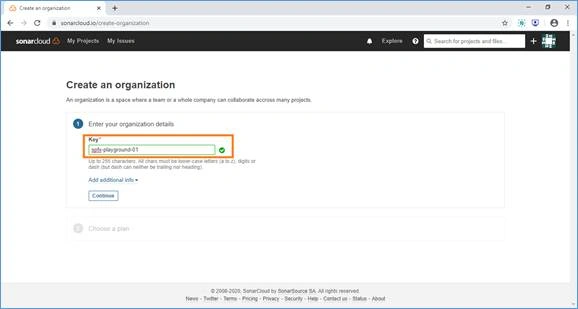
- Once key is added, you need to select a plan. You can select a Free plan for your testing purpose and then click on Create Organization, as shown in the below image,
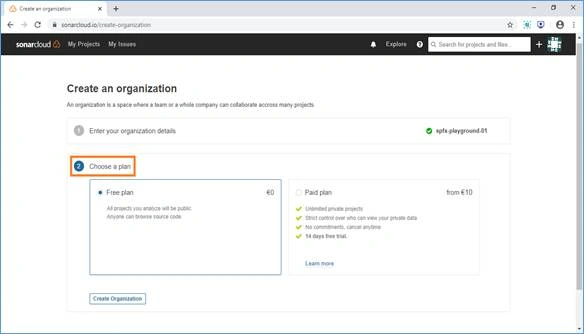
- Once organization is created in SonarCloud, you can add the task in Azure Pipeline, as shown in the below image,
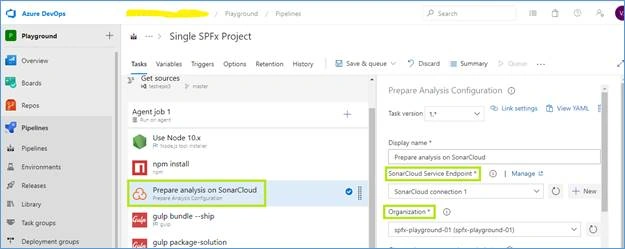
- You need to create an organization in SonarCloud, as shown in the below image,
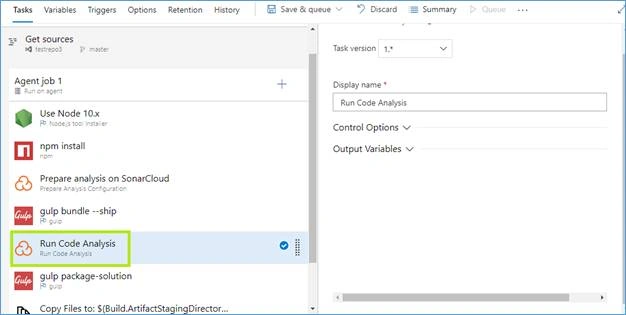
- Run Code Analysis task – This task is used to actually execute the analysis of the source code. Add this task in Azure DevOps pipeline, as shown in the below image,
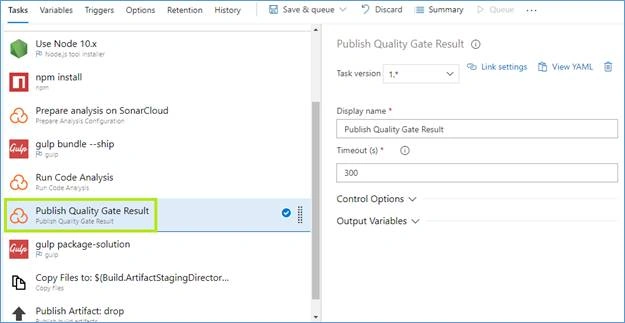
- Publish Quality Gate Result task – This task is used to display the Quality Gate status in the build summary and give you a sense of whether the application is ready for production or not. Add this task in Azure DevOps pipeline, as shown in below image,
Analyze the results on SonarCloud
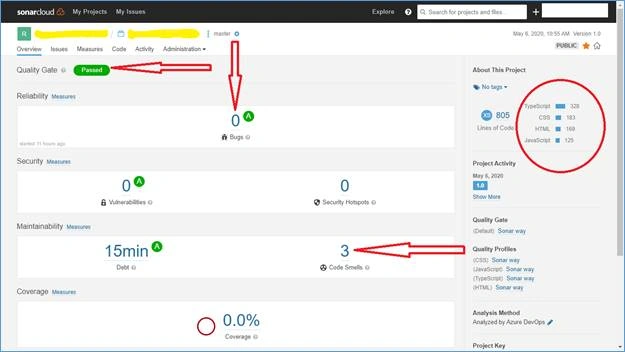
Once your pipeline runs successfully, analyze the results by navigating to the SonarCloud portal, refresh the page, and then examine the results. Below is the screen shot showing analysis of one the pipeline run using SonarCloud extension,
Important NOTE
There is one more freely available extension which you can use from Marketplace for scanning your code with Azure DevOps called – SonarQube. This extension also provides continuous inspection of your code quality and hence empowers the development teams.
Summary
In this article, I explained about the SonarCloud extension which can be used in Azure DevOps pipeline to scan issues/bugs and other vulnerabilities in your code and can give you results before the build process which could help in improving the overall quality of your code.
Venkata PrasadPosted Sep 8, 2020, 11:11 AM
Provide complete settings for Prepare Analysis Configuration task
Venkata PrasadPosted Sep 8, 2020, 11:09 AM
Where to use Project key
Venkata PrasadPosted Sep 8, 2020, 11:09 AM
Which way to run the analysis? MSBuild/Maven/Standalone?
Venkata PrasadPosted Sep 8, 2020, 11:05 AM
Not working ...incomplete article