

Introduction
Before reading further, read the following articles.
- Overview of Scalable Vector Graphics (SVG)
- Scalable Vector Graphics - Rectangle
- Scalable Vector Graphics - Circle
- Scalable Vector Graphics - Ellipse
- Scalable Vector Graphics - Line
Now let's move to learn SVG Polyline.
The <polyline> tag draws various shapes using only multiple (poly = multiple) straight lines connecting to each other. It does not need to specify the starting and ending coordinates for each line and each time like the SVG line.
In other words, it is used to draw open shapes without closing itself like polygons.
Syntax
SVG Polyline
- <svg height="200" width="500">
- <polyline points="20,20 40,25 60,40 80,120 120,140 200,180"
- style="fill:none;stroke:red;stroke-width:3" />
- </svg>
- <html>
- <body>
- <svg height="200" width="500">
- <polyline points="10,40 70,15 50,80 90,70 120,100 250,80" style="fill:none;stroke:red;stroke-width:3" />
- </svg>
- </body>
- </html>
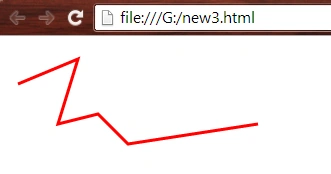
- <html>
- <body>
- <svg height="200" width="500">
- <polyline points="10,120 30,15 70,70 125,15 130,120" style="fill:none;stroke:lime;stroke-width:3" />
- <polyline points="150,15 170,120 190,90 210,120 230,15" style="fill:none;stroke:tomato;stroke-width:5" />
- <polyline points="320,15 300,120 250,15 240,120" style="fill:none;stroke:blue;stroke-width:5" />
- </svg>
- </body>
- </html>
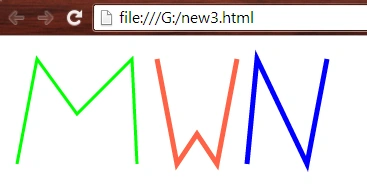
- <html>
- <body>
- <svg height="200" width="500">
- <polyline points="0,40 40,40 40,80 80,80 80,120 120,120 120,120 120,80 160,80 160,40 200,40" style="fill:none;stroke:green;stroke-width:3; stroke-dasharray:7 3" />
- <polyline points="220,10 300,10 220,100 300,100" style="fill:none;stroke:orange;stroke-width:5; stroke-dasharray:10 3" />
- </svg>
- </body>
- </html>
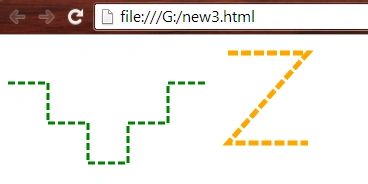
- <html>
- <body>
- <svg height="300" width="700">
- <polyline points="10,120 160,15 220,100 280,40" style="fill:orange;stroke:green;stroke-width:3" />
- <polyline points="300,10 300,80 340,100 380,80 380,10" style="fill:tomato;stroke:black;stroke-width:4" />
- <polyline points="450,10 410,100 550,100" style="fill:cyan;stroke:blue;stroke-width:4; stroke-dasharray:10 3" />
- <polyline points="570,90 610,10 650,60 690,70" style="fill:pink;stroke:red;stroke-width:3; stroke-dasharray:7 3" />
- </svg>
- </body>
- </html>
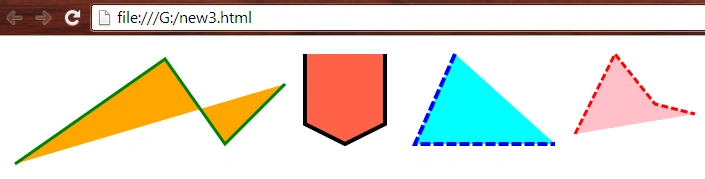
- <html>
- <body>
- <svg height="300" width="700">
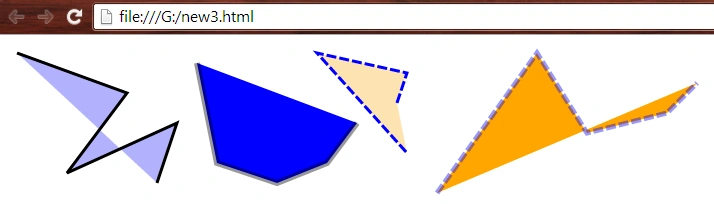
- <polyline points="10,10 120,50 60,130 170,80 150,140" style="fill:blue;stroke:black;stroke-width:3; fill-opacity:0.3" />
- <polyline points="190,20 210,120 270,140 320,120 350,80" style="fill:blue;stroke:black;stroke-width:6; stroke-opacity:0.4" />
- <polyline points="390,60 400,30 310,10 400,110" style="fill:orange;stroke:blue;stroke-width:3; stroke-dasharray:10 3; fill-opacity:0.3" />
- <polyline points="430,150 530,10 580,90 660,70 690,40" style="fill:orange;stroke:blue;stroke-width:5; stroke-dasharray:10 3; stroke-opacity:0.4" />
- </svg>
- </body>
- </html>
- <html>
- <body>
- <svg height="300" width="1000">
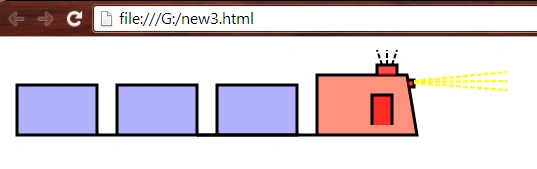
- <polyline points="90,90 10,90 10,40 90,40 90,90 110,90 110,40 190,40 190,90 110,90" style="fill:blue;stroke:black;stroke-width:3; fill-opacity:0.3" />
- <polyline points="190,90 210,90 210,40 290,40 290,90 190,90" style="fill:blue;stroke:black;stroke-width:3; fill-opacity:0.3" />
- <polyline points="290,90 310,90 310,30 400,30 410,90 190,90" style="fill:tomato;stroke:black;stroke-width:3; fill-opacity:0.7" />
- <polyline points="365,80 365,50 385,50 385,80" style="fill:red;stroke:black;stroke-width:3; fill-opacity:0.7" />
- <polyline points="390,30 390,20 370,20 370,30" style="fill:red;stroke:black;stroke-width:3; fill-opacity:0.7" />
- <polyline points="400,35 407,35 407,42 402,42" style="fill:red;stroke:black;stroke-width:3; fill-opacity:0.7" />
- <line x1="375" y1="20" x2="370" y2="5" style="stroke:black ;stroke-width:2; stroke-dasharray:5 2;" />
- <line x1="380" y1="20" x2="380" y2="5" style="stroke:black ;stroke-width:2; stroke-dasharray:5 2;" />
- <line x1="385" y1="20" x2="390" y2="5" style="stroke:black ;stroke-width:2; stroke-dasharray:5 2;" />
- <line x1="407" y1="36" x2="500" y2="27" style="stroke:yellow ;stroke-width:2; stroke-dasharray:5 2;" />
- <line x1="407" y1="37" x2="500" y2="36" style="stroke:yellow ;stroke-width:2; stroke-dasharray:5 2;" />
- <line x1="407" y1="38" x2="500" y2="45" style="stroke:yellow ;stroke-width:2; stroke-dasharray:5 2;" />
- </svg>
- </body>
- </html>
Want to read more...
Thank you, keep learning and sharing.
Gopi ChandPosted Aug 19, 2015, 6:53 AM
Thanks every one for such nice comments :)
Abhishek JaiswalPosted Jul 26, 2015, 2:58 AM
Interesting, keep more coming!! :)
Gopi ChandPosted Jul 24, 2015, 4:14 PM
Thanks a lot everyone :)
Santhakumar MunuswamyPosted Jul 24, 2015, 2:20 PM
Good one
Neeraj KumarPosted Jul 24, 2015, 1:14 PM
Good one
Shridhar SharmaPosted Jul 24, 2015, 12:23 PM
nice share.
Pankaj Kumar ChoudharyPosted Jul 24, 2015, 12:22 PM
Nice Explain Sir........
Nilesh JadavPosted Jul 24, 2015, 9:02 AM
Nice one sir