
Tools used:
.Net Framework Beta2, Editplus.
Introduction:
The following example demonstrates how to create menus on the fly. Namespaces and Classes used by this example are as follows:
- Windows
Form - Used to generate Windows Form.
MainMenu - Used to create main menu.
MenuItem - Used to create Menus such as File and Runtime Menu. To create submenus, add MenuItem objects to the MenuItems property of the parent MenuItem. The MenuItems property contains the list of submenu items associated with the MenuItem. With the reference to the collection of menu items for the menu (provided by this property), you can add and remove menu items.
Button - Used to Add buttons to the form.
MessageBox - Displays a message box that can contain text, buttons, and symbols that inform and instruct the user.
- Drawing
Graphics - Used to instantiate graphics. FromHwnd method creates a new Graphics object from the specified handle to a window. Clear method fills the entire drawing surface with the specified background color. DrawString method draws the specified text string at the specified location with the specified Brush object and font.
Font - Defines a particular format for text, including font face, size, and style attributes.
SolidBrush - Defines a brush of a single color. Brushes are used to fill graphics shapes, such as rectangles, ellipses, pies, polygons, and paths.
Source Code:
/*
Author Mokhtar B
Date 20th August, 2001
Company Adsoft Solutions Pvt. Ltd
Application Type Windows Forms
*/
using System;
using System.Windows.Forms;
using System.Drawing;
///<Summary>
///This application demonstrates how to create Menus at runtime.
///</Summary>
class RuntimeMenus:Form
{
private MainMenu myMenu;
private MenuItem mnuFile, mnuExit, mnuRtime;
private Button btnAdd, btnRemove, btnClose;
private Graphics g;
private Font DispFont;
private SolidBrush MyBrush;
static int i;
///Constructor Calls InitializeComponents method, which is used
///for initializing components that are used in the application
public RuntimeMenus()
{
InitializeComponents();
}
public void InitializeComponents()
{
DispFont = new Font("Verdana",8,FontStyle.Bold);
MyBrush = new SolidBrush(Color.Blue);
//Instantiating Main Menu
myMenu = new MainMenu();
//Instantiating Menus
mnuFile = new MenuItem("&File");
mnuRtime = new MenuItem("&Runtime Menu");
//Adding menus to Main Menu
myMenu.MenuItems.Add(mnuFile);
myMenu.MenuItems.Add(mnuRtime);
//Instantiating Exit menuitem along with a shortcut key.
mnuExit = new MenuItem("&Exit", new EventHandler(btnClose_Click), hortcut.CtrlX);
//Adding menuitem to File Menu
mnuFile.MenuItems.Add(mnuExit);
//Instantiating Add Button
btnAdd = new Button();
btnAdd.Location = new Point(275,20);
btnAdd.Text = "&Add";
btnAdd.Click += new EventHandler(btnAdd_Click);
btnAdd.Size = new Size(100,30);
//Instantiating Remove Button
btnRemove = new Button();
btnRemove.Location = new Point(275,60);
btnRemove.Text = "&Remove";
btnRemove.Click += new EventHandler(btnRemove_Click);
btnRemove.Size = new Size(100,30);
//Instantiating Close Button
btnClose = new Button();
btnClose.Location = new Point(275,100);
btnClose.Text = "&Close";
btnClose.Click += new EventHandler(btnClose_Click);
btnClose.Size = new Size(100,30);
//Adding Buttons to Form
this.Controls.Add(btnAdd);
this.Controls.Add(btnRemove);
this.Controls.Add(btnClose);
//Setting properties of the Form
this.MaximizeBox = false;
this.MinimizeBox = false;
this.Text = "Creating Menus on the Fly";
this.Menu = myMenu;
this.Size = new Size(400,250);
this.CancelButton = btnClose;
this.StartPosition = FormStartPosition.CenterScreen;
//Initializing Graphics from Windows Handle
g = Graphics.FromHwnd(this.Handle);
}
///Adds Menuitems to RuntimeMenu
protected void btnAdd_Click(object sender, EventArgs e)
{
mnuRtime.MenuItems.Add("Runtime Menu " + (i+1), new EventHandler mnuRtime_Click));
g.Clear(Color.FromArgb(214,211,206));
g.DrawString("Runtime Menu " + (i + 1) + " added Successfully",DispFont,MyBrush,50,150);
i++;
}
///Removes Menuitems from RuntimeMenu
protected void btnRemove_Click(object sender, EventArgs e)
{
if (i <= 0)
{
g.Clear(Color.FromArgb(214,211,206));
g.DrawString("Menu is Empty",DispFont, MyBrush,125,150);
}
else
{
mnuRtime.MenuItems.RemoveAt(i-1);
g.Clear(Color.FromArgb(214,211,206));
g.DrawString("Runtime Menu " + (i) + " Removed Successfully",DispFont,MyBrush,50,150);
i=i-1;
}
}
///Event for Displaying the MessageBox on Clicking
protected void mnuRtime_Click(object sender, EventArgs e)
{
String s = sender.ToString();
MessageBox.Show("You Clicked " + s.Substring(51), "RunTime Menu",MessageBoxButtons.OK, MessageBoxIcon.Information);
}
///Event for Closing Window
protected void btnClose_Click(object sender, EventArgs e)
{
Application.Exit();
}
///Instantiating the Application
public static void Main()
{
Application.Run(new RuntimeMenus());
}
}
Compilation:
csc /t:winexe /r:System.dll /r:System.Windows.Forms.dll /r:System.Drawing.dll rmenus.cs
Output:
On clicking Add button new menu item will be added as follows: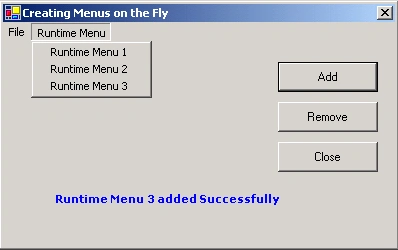
On Clicking Remove button menu item will be removed as follows: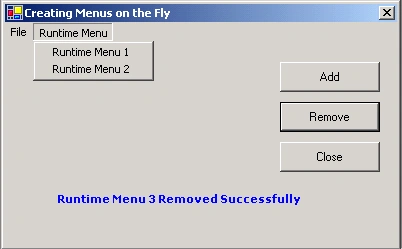
Join the conversation! Your thoughts help the community grow.