
Row_Number generates a run-time column in the result set which generates sequential number to each row according to the column used in order by clause.
Syntax
Row_Number() over (order by col1, col2, ....n partition by col1, col2, ....n)
- Order By is mandatory. Row Number is assigned in the result set based on the column provided in Order By clause.
- Partition By is optional which groups the result set based on the column provided in Partition By clause wherein each group, the sequence starts with 1.
Let's create an Employee table on which we would see how it works.
- create table tblEmployee(
- EmpId char(7)
- , FirstName varchar(50)
- , LastName varchar(50)
- , Gender char(1)
- )
- insert into tblEmployee
- select 'EMP0001', 'Sandeep', 'Mittal', 'M' union all
- select 'EMP0003', 'Abhay', 'Kumar', 'M' union all
- select 'EMP0005', 'Priya', 'Gupta', 'F' union all
- select 'EMP0002', 'Reema', 'Gupta', 'F' union all
- select 'EMP0004', 'Ritesh', 'Kumar', 'M'
- select EmpId, FirstName, LastName, Gender
- , row_number() over (order by EmpId) as RowNum
- from tblEmployee
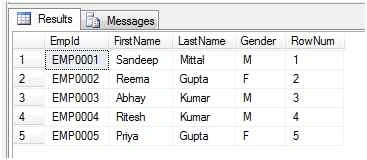
Check out the result set where RowNum is generated based on EmpId provided in Order By,
Multiple columns can be used in the Order By clause,
Let's take another example where we would use multiple columns in Order By clause,
- select EmpId, FirstName, LastName, Gender
- , row_number() over (order by FirstName, LastName) as RowNum
- from tblEmployee
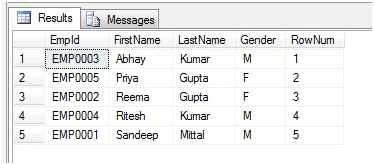
In the next example, we will see how Partition By clause works,
- select EmpId, FirstName, LastName, Gender
- , row_number() over (partition by Gender order by EmpId) as RowNum
- from tblEmployee
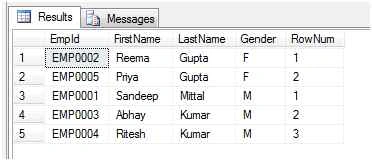
Check out the result set where RowNum is generated starting from 1 for each group i.e. Gender which is provided in Partition By clause,
In Partition By clause also, we can use multiple columns as in Order By clause.
Santhakumar MunuswamyPosted Nov 16, 2015, 4:01 AM
Good one
Gowtham KPosted Nov 16, 2015, 2:34 AM
Nice Share
Harshad PansuriyaPosted Nov 16, 2015, 1:26 AM
Nice one
Ankit BansalPosted Nov 16, 2015, 1:13 AM
Nice...thanks for sharing
Rupesh KahanePosted Nov 15, 2015, 11:01 AM
Good one
Anish AnsariPosted Nov 15, 2015, 10:52 AM
Nice
Abhay ShankerPosted Nov 15, 2015, 6:12 AM
Nice One...