

Nowadays, AngularJS is a very popular framework for the single page application and also we can get many benefits while using AngularJS. I am assuming that before reading this article, you have basic knowledge on AngularJS, so I am only focusing on routing concept in AngularJS.
Routing is a process in which we can manage our URLs for the showing contents in AngularJS. We can achieve single page application (SPA) using routing technique in AngularJS.
We don’t need to refresh the page while changing one page to another page. This is the main benefit of using routing in angularJS.
Here I am taking a sample application for describing the routing mechanism in AngularJS.
First of all, I am adding four HTML pages and one JavaScript file for that sample application as below,
- index.html
- home.html
- aboutUs.html
- contactUs.html
- app.js
- <!--Using CDN for angularjs and angular js routing-->
- <script src="https://ajax.googleapis.com/ajax/libs/angularjs/1.2.25/angular.min.js"></script>
- <script src="https://ajax.googleapis.com/ajax/libs/angularjs/1.2.25/angular-route.js"></script>
- <!--Adding javaScript file for angularJs coding-->
- <script src="app.js"></script>
- <div ng-app="myApp">
- <div id="topLinks">
- <a href="#/home">Home</a>
- <a href="#/aboutUs">About Us</a>
- <a href="#/contactUs">Contact Us</a>
- </div>
- <div ng-view></div>
- </div>
In the app.js page we are writing the following lines of code,
- var app = angular.module("myApp", ['ngRoute']);
- app.controller('myCtrl', function ($scope) {
- $scope.message = "Thank you for visiting our website";
- })
- app.config(function ($routeProvider) {
- $routeProvider
- .when('/home', {
- templateUrl: 'home.html',
- controller: 'myCtrl'
- })
- .when('/aboutUs', {
- templateUrl: 'aboutUs.html',
- controller: 'myCtrl'
- })
- .when('/contactUs', {
- templateUrl: 'contactUs.html',
- controller: 'myCtrl'
- })
- .otherwise({
- redirectTo: '/home'
- });
- });
$routeProvider is accepting when() and otherwise() method.
In the when() method, we are defining the url of the site which is coming after # as #/aboutUs. In this case it will show the aboutUs.html content inside the ng-view directive div.
We are using templateUrl for the path of targeted html page which we want to show in the ng-view directive div and giving controller to every template page.
Another one is otherwise() method. If any route is not matching then it will go to the specified route which is mentioned in the redirectTo. In this example, we are using ‘/home’ so it will show the home page.
In the home.html page we are writing the below lines of code
- <div>
- <h1>Welcome to Home page</h1>
- {{message}}
- </div>
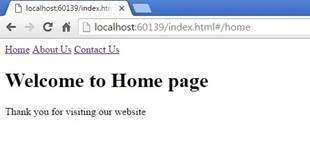
In the aboutUs.html page we are writing the below lines of code,
- <div>
- <h1>Welcome to About us page</h1>
- {{message}}
- </div>
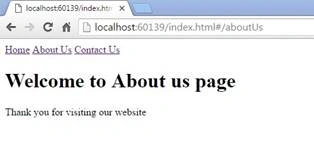
In the contactUs.html page we are writing the below lines of code,
- <div>
- <h1>Welcome to Contact us page</h1>
- {{message}}
- </div>
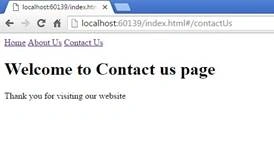
Here we are using same controller for every page but as per our requirement we can change the controller for every template as per our requirement.
venkatesh reddyPosted Aug 9, 2018, 12:26 AM
Hi vivek chiled pages in side i am using jquery but it's not working.
Amit DavePosted May 3, 2016, 10:33 AM
Keep up the Good work!
Sonu ChaudharyPosted May 2, 2016, 5:57 AM
Thanks for sharing
Vivek KumarPosted May 1, 2016, 2:36 AM
Thank you Vignesh Mani
Vignesh ManiPosted Apr 30, 2016, 12:47 PM
Nice one
Vivek KumarPosted Apr 30, 2016, 8:30 AM
Thank you Michael Griffiths
Michael GriffithsPosted Apr 30, 2016, 8:13 AM
Nice