

Introduction
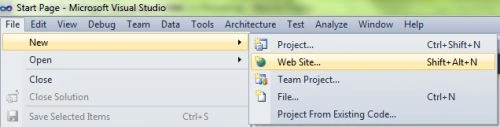
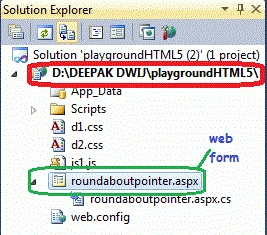
- Go to Solution Explorer
- Right-click on the Application name
- Select Add-->add new item
- Now in the window that opens, select an HTML page or news Webform
- Rename it by roundaboutpointer.aspx
Step 2: In this section, we will create the style for the media and create the .css on the media screen. Put the given script in the Head section of the HTML or in between the <head>--</head>.
Here two CSS files are used for design purposes; one is for the section div, named d1.css and the other d2.css for the whole body of the web page.
d1.css scripting
d2.css scripting
Step 3: In this part, we need to work on some JavaScript over here. For understanding the full working of JavaScript download the attached .rar file and run the playground application.
The whole JavaScript looks as follows.
Step 4: In this section, we are going to become familiar with the body part of HTML scripting. Replace this script from the body section of the roundaboutpointer.aspx page. Here we pass a #holder in the div id that is defined in the d1.css file.
Step 5: The Complete code for Playground application.
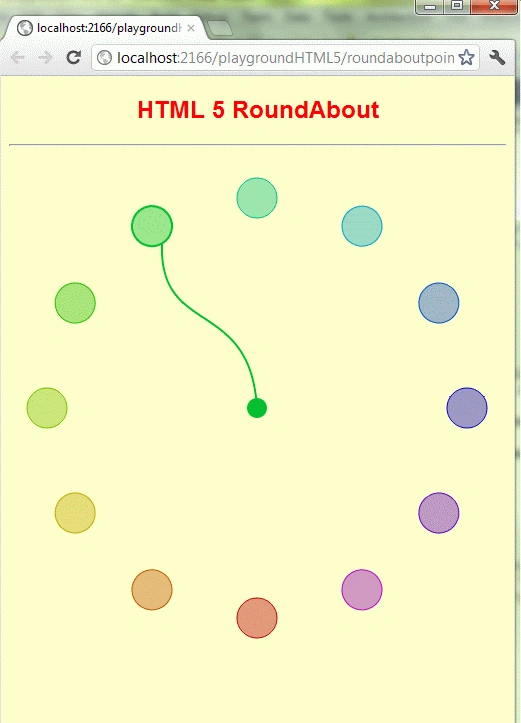
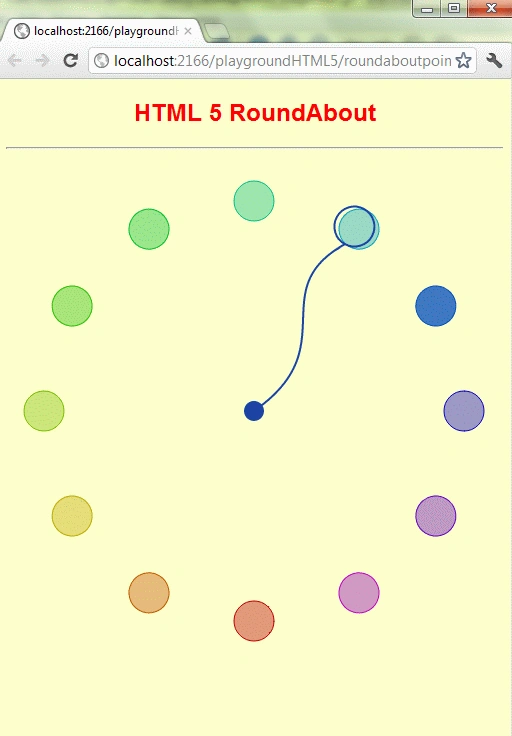
Step 6: Output Press F5
Note: For the accurate output of HTML5 applications, you must have the Google Chrome browser on your PC. You can change the position by dragging the pointer to any circle as shown in the figure.
- body
- {
- background: #FFFF99;
- color: #fff;
- font: 300 100.1% "Helvetica Neue" , Helvetica, "Arial Unicode MS" , Arial, sans-serif;
- }
- #holder
- {
- height: 442px;
- left: 42%;
- margin: -240px 0 0 -320px;
- position: absolute;
- top: 57%;
- width: 842px;
- font-size: x-large;
- background-color: #008000;
- }
- #duplicate
- {
- bottom: 0;
- font: 300 .7em "Helvetica Neue", Helvetica, ;
- position: absolute;
- right: 1em;
- text-align: right;
- }
- #duplicate d
- {
- color: #fff;
- }
- body {
- background: #fff;
- color: #000;
- font: 100.1% "Comic Sans MS", Lucida, Verdana, sans-serif;
- }
- #holder
- {
- height: 480px;
- left: 50%;
- margin: 0 0 0 -320px;
- position: absolute;
- top: 0;
- width: 640px;
- }
- #duplicate
- {
- bottom: 0;
- font-size: .7em;
- position: absolute;
- right: 1em;
- text-align: right;
- }
- window.onload = function ()
- {
- var r = Color("holder", 640, 480),
- angle = 0;
- while (angle < 360)
- {
- var color = Color.getColor();
- (function (t, c)
- {
- r.circle(320, 450, 20).attr({ stroke: c, fill: c, transform: t, "fill-opacity": .4 }).click(function () {
- s.animate({ transform: t, stroke: c }, 2000, "bounce");
- }).mouseover(function ()
- {
- this.animate({ "fill-opacity": .75 }, 500);
- }).mouseout(function ()
- {
- this.animate({ "fill-opacity": .4 }, 500);
- });
- })("r" + angle + " 320 240", color);
- angle += 30;
- }
- Color.getColor.reset();
- var s = r.set();
- s.push(r.path("M320,240c-50,100,50,110,0,190").attr({ fill: "none", "stroke-width": 2 }));
- s.push(r.circle(320, 450, 20).attr({ fill: "none", "stroke-width": 2 }));
- s.push(r.circle(320, 240, 5).attr({ fill: "none", "stroke-width": 10 }));
- s.attr({ stroke: Color.getColor() });
- };
- <body>
- <div id="holder"></div>
- </body>
- <%@ Page Language="C#" AutoEventWireup="true" CodeFile="roundaboutpointer.aspx.cs" Inherits="_Default" %>
- <!DOCTYPE html PUBLIC "-//W3C//DTD XHTML 1.0 Transitional//EN" "http://www.w3.org/TR/xhtml1/DTD/xhtml1-transitional.dtd">
- <html xmlns="http://www.w3.org/1999/xhtml">
- <head runat="server">
- <meta http-equiv="Content-Type" content="text/html; charset=utf-8">
- <title></title>
- <link rel="stylesheet" href="d1.css" type="text/css" media="screen">
- <link rel="stylesheet" href="d2.css" type="text/css" media="print">
- <script src="js1.js" type="text/javascript" charset="utf-8"></script>
- <script>
- From Step 3 JavaScript copy from there and paste it here.
- </script>
- </head>
- <body>
- <div id="holder"></div>
- </body>
- </html>
Mahesh ChandPosted Feb 10, 2012, 10:07 AM
This is interesting. Cool stuff.
Manoj Singh PanwarPosted Feb 10, 2012, 6:02 AM
Exploring Html5 ..ya..Great work dear..Keep it on