

Introduction
In this article we are going to display a rounded image in Xamarin forms PCL application. In Xamarin forms there is no default function available to make an image round. So, we need a plug-in for this.
So, start by installing a plug-in into every project of your solution.
Go to manage nuget package for solution
Search for “xam.plugins.forms.ImageCircle” and install the plug-in in every project.
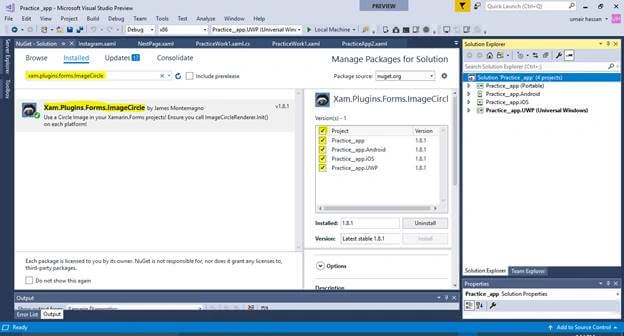
Now in each application project we have to add some code.
IOS
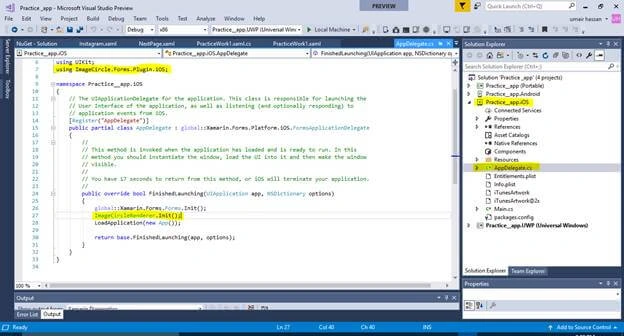
In iOS project go to AppDelegate.cs class and add the following code,
Include this library,
- using ImageCircle.Forms.Plugin.iOS;
Add Image circle renderer code after InIt method,
Code
- ImageCircleRenderer.Init();
Image
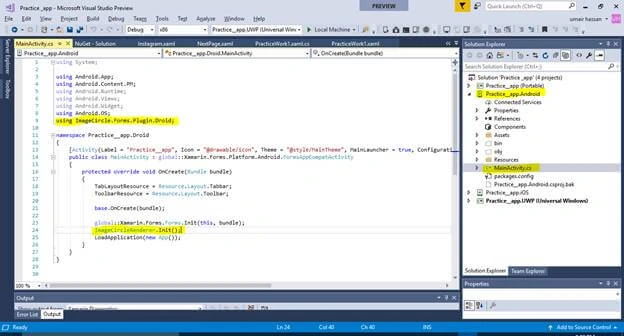
Now open Android project and search for MainActivity.cs and add the same code after InIt.
Library
- using ImageCircle.Forms.Plugin.Droid;
Code
- ImageCircleRenderer.Init();
Image
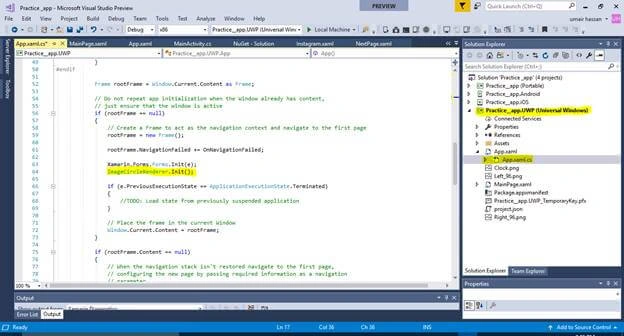
Now in Windows project open App.xaml.cs fil and paste the same code:
Library
- using ImageCircle.Forms.Plugin.UWP;
Code
- ImageCircleRenderer.Init();
Image
After initializing renderer open the xaml file where you want to use this renderer.
Now add the following Namespace in you xaml file.
- xmlns:ci="clr-namespace:ImageCircle.Forms.Plugin.Abstractions;assembly=ImageCircle.Forms.Plugin.Abstractions"
Now you can use your renderer in xaml by the following code,
- <ci:CircleImage>
- </ci:CircleImage>
There are some requirements to use the renderer. You must have to set height width request. Make sure that you use the same value for height and width to make your image rounded properly. After this you can set Aspect of your image. You can set it to,
- AspectFit
- AspectFill
- Fill
After this you can set the source for your image. You can either set the source of local image present in each of your application projects or you can use your custom markup extension to set source in xaml file. Otherwise you can use online image as your image source.
XAML
- <?xml version="1.0" encoding="utf-8" ?>
- <ContentPage xmlns="http://xamarin.com/schemas/2014/forms"
- xmlns:x="http://schemas.microsoft.com/winfx/2009/xaml"
- xmlns:ci="clr-namespace:ImageCircle.Forms.Plugin.Abstractions;assembly=ImageCircle.Forms.Plugin.Abstractions"
- x:Class="Practice__app.CsharpCorner">
- <ContentPage.Content>
- <StackLayout>
- <ci:CircleImage
- HeightRequest="100"
- WidthRequest="100"
- Source="https://www.codeproject.com/KB/GDI-plus/ImageProcessing2/flip.jpg"
- Aspect="AspectFill">
- </ci:CircleImage>
- </StackLayout>
- </ContentPage.Content>
- </ContentPage>
Original Image

Output Image
SabinaPosted Sep 24, 2018, 8:02 AM
What about if I want width and height self size?
Adrian GhisoiuPosted Jan 8, 2018, 9:40 AM
Umair, I did everything, and I have the same problem like Meenal on iOS
Meenal AgarwalPosted Nov 7, 2017, 6:45 AM
Its not working with IOS.Image rendered is still rectangle in shape.Please help.