

Microsoft Dev Box provides developers with self-service access to ready-to-code cloud workstations, meticulously pre-configured with all the tools, source code, and binaries specific to a project. This empowers development teams to hit the ground running, eliminating the tedious setup process and significantly boosting productivity.
The Core Problem Dev Box Solves
Traditionally, setting up a new development environment can take hours, even days. This involves installing IDEs, SDKs, dependencies, configuring network access, and troubleshooting compatibility issues. For new hires, this onboarding delay can be a major bottleneck. Furthermore, maintaining consistent environments across a team, especially with diverse project requirements, is a constant challenge. Microsoft Dev Box directly addresses these pain points by offering:
- Instant Onboarding: New team members can access a fully configured, ready-to-code environment within minutes, accelerating their time to contribution.
- Consistency Across Teams: Dev Boxes ensure that every developer works in an identical environment, minimizing "works on my machine" issues and fostering smoother collaboration.
- Enhanced Productivity: Developers can easily spin up multiple Dev Boxes for different projects or tasks, enabling seamless context switching without reconfiguring their local machines.
- Reduced IT Overhead: IT administrators are freed from the burden of provisioning and maintaining individual developer workstations, as Dev Box centralizes management and allows for standardized images.
How Microsoft Dev Box Works?
At its heart, Microsoft Dev Box leverages the power of Azure Virtual Machines, providing high-performance compute and storage (Azure Premium SSDs). The service is built around key concepts:
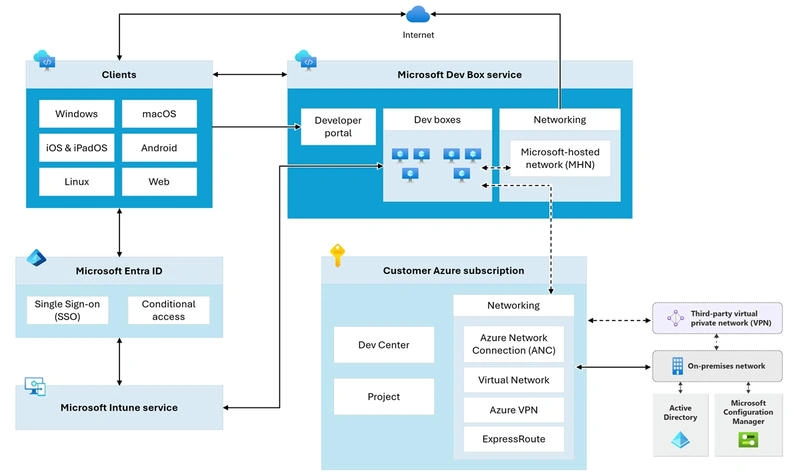
- Dev Center: A logical grouping of projects that share similar settings, allowing platform engineers to manage images, SKUs, and network connections centrally.
- Project: Represents a team or business function, containing pools of Dev Boxes tailored to specific workloads.
- Dev Box Definition: Specifies the source image (from Azure Marketplace or custom Azure Compute Gallery images) and the compute/storage size for a Dev Box.
- Dev Box Pool: A collection of Dev Boxes within a project, often configured for specific regions or workloads.
- Dev Box: The actual cloud-based workstation that developers access and manage through a self-service developer portal.
Platform engineers and IT admins configure the underlying infrastructure, including network connections and base images. Development team leads then customize these base images with project-specific tools and dependencies, often using "configuration-as-code" principles for automation. Developers, in turn, can then self-provision Dev Boxes from these predefined pools, ensuring they always have the right environment for their work.
Architecture Diagram
Key Features and Benefits
- Ready-to-Code Environments: Pre-installed tools, SDKs, and dependencies allow developers to focus on coding, not setup.
- Scalability and Flexibility: Cloud-hosted Dev Boxes can be easily scaled up or down based on project needs. Developers can create multiple Dev Boxes for different projects, each tailored to its specific requirements.
- Anywhere Access: Developers can access their Dev Boxes securely from any device (Windows, macOS, Android, iOS, web browsers), promoting remote and hybrid work models.
- Enterprise-Grade Security and Compliance: Integration with Microsoft Entra ID (formerly Azure Active Directory) allows for robust access controls, multi-factor authentication, conditional access policies, and data encryption, keeping sensitive intellectual property secure in the cloud. Dev Boxes are also automatically enrolled in Microsoft Intune for unified device management.
- Unified Management: IT teams can manage Dev Boxes like any other device on their network using familiar Microsoft Intune tools, streamlining updates, security policies, and troubleshooting.
- Customization Options: Teams can create custom images with all necessary software "baked in" or apply customizations on top of existing images using YAML files and PowerShell DSC. This includes support for tools like WSL and Docker for containerized environments.
- Cost Efficiency: Organizations are charged only for the resources consumed, with flexible pricing models including hourly compute and monthly storage, often with a predictable maximum monthly price for high utilization. This eliminates the need for expensive high-end local hardware.
- Seamless Azure Integration: Dev Box integrates effortlessly with other Azure services like Azure DevOps, GitHub, and Azure Kubernetes Service, facilitating end-to-end development workflows.
Use Cases
Microsoft Dev Box is ideal for a wide range of scenarios, including:
- New Developer Onboarding: Rapidly bring new team members up to speed.
- Project-Specific Development: Provide dedicated environments for different projects with unique toolsets and dependencies.
- Contractor and Vendor Access: Grant secure, controlled access to corporate resources for external teams without compromising internal networks.
- Context Switching: Allow developers to easily switch between multiple projects without reconfiguring their local machines.
- High-Performance Workloads: Spin up powerful machines for demanding tasks like complex builds or AI development (with serverless GPU support in preview).
- Secure Development: Keep sensitive source code and data off physical devices and within a centrally managed, secure cloud environment.
Dev Box vs. Traditional Environments
The contrast between Microsoft Dev Box and traditional development environments is stark:
| Feature | Traditional Environment | Microsoft Dev Box |
|---|---|---|
| Hours to days of manual configuration and troubleshooting | Minutes, with pre-configured, ready-to-code environments | |
| Scalability | Limited by physical hardware; often involves delays | Highly scalable; easily spin up or down resources |
| Hardware Dependency | Requires high-end local machines | No need for powerful local machines; computing in the cloud |
| Consistency | "Works on my machine" issues, inconsistent setups | Standardized environments across the team |
| Collaboration | Can be challenging to ensure shared environments | Simplified sharing and testing across teams |
| Security | Data stored locally, potential for breaches | Enterprise-grade security, central control, data in cloud |
| Cost | High upfront hardware costs, ongoing maintenance | Pay-as-you-go, optimized for actual usage |
| Access | Limited by physical location or VPN | Secure access from anywhere, any device |
Conclusion
Microsoft Dev Box represents a significant leap forward in developer experience and productivity. By centralizing, standardizing, and securing development environments in the cloud, it empowers developers to focus on what they do best – writing great code – while providing IT and platform engineering teams with the control and governance they need. For organizations looking to accelerate innovation, streamline workflows, and enhance security, Microsoft Dev Box is a compelling solution poised to transform the future of software development.
Join the conversation! Your thoughts help the community grow.