

In my previous articles, I have written about site collection, user properties, fetching access tokens, retrieving and sending emails, and lots more. I have added the links below for your reference. Please go through these before following the steps given in this article.
- How To Fetch Access Token
- Getting User Properties From Office 365 Using Microsoft Graph API
- Send Email Using Microsoft Graph API From SharePoint Online
- Upload And Set Office 365 Profile Image Using Microsoft Graph API
- Retrieve site collections and subsites using Microsoft Graph API
- Retrieve Mailbox Folders Using Microsoft Graph API
- EndPoint - https://graph.microsoft.com/v1.0/users/{{userid}}/events
- Usage - It retrieves all events of the user from office 365 calendar
Tested in the Graph Explorer, it returns the JSON data like below. In this article, we are going to retrieve events from Office 365 Calendar.
https://graph.microsoft.com/v1.0/users/[email protected]/events
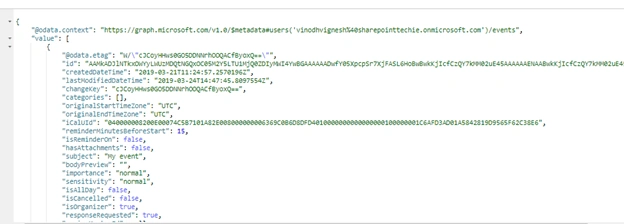
It returns all the properties from the calendar, like Startdate, EndDate, Subject, BodyContent, and Priority, etc. So, let's see how to retrieve this programmatically using JavaScript.
Please follow my previous article, How to fetch access token, to authenticate your web application to fetch the access token and authenticate.
Step 1 - Fetch Access Token
AuthUrl: https://login.microsoftonline.com/{{tenant}}/oauth2/v2.0/token
Type: POST
- var token; // Initialize Globally
- function requestToken() {
- $.ajax({
- "async": true,
- "crossDomain": true,
- "url": "https://howling-crypt-47129.herokuapp.com/https://login.microsoftonline.com/sharepointtechie.onmicrosoft.com/oauth2/v2.0/token", // Pass your tenant name instead of sharepointtechie
- "method": "POST",
- "headers": {
- "content-type": "application/x-www-form-urlencoded"
- },
- "data": {
- "grant_type": "client_credentials",
- "client_id ": "8baf0301-27df-44b1-b4fe-7911b9a918de", //Provide your app id
- "client_secret": "tZ76oVPN039WlWPoAp+1aICq66vs7oUtE4lhDQYwxGY=", //Provide your secret
- "scope ": "https://graph.microsoft.com/.default"
- },
- success: function(response) {
- log(response);
- token = response.access_token; //Store the token into global variable
- },
- error: function(error) {
- log(JSON.stringify(error));
- }
- })
- }
The successful response is shown below.

EndPoint
https://graph.microsoft.com/v1.0/users/{{userid}}/Events
Method
GET
Code
- function RetrieveCalendarEvents() {
- $.ajax({
- method: 'GET',
- url: "https://graph.microsoft.com/v1.0/users/[email protected]/events",
- headers: {
- 'Authorization': 'Bearer ' + token,
- 'Content-Type': 'application/json'
- },
- success: function(response) {
- var data = response.value;
- data.map(function(events) {
- $('#display').append('<li>StartDate: ' + events.start.dateTime + ' </br></br> EndDate: ' + events.end.dateTime + ' </br></br> Subject: ' + events.subject + '</li></br></br>');
- })
- },
- error: function(error) {},
- })
- }
HTTP "200", success -- it returns the JSON data Below,
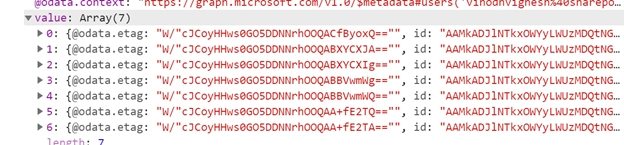
Then, apply .map to iterate over the JSON data and display it on the page.
Full Code
- <script src="https://ajax.aspnetcdn.com/ajax/jQuery/jquery-3.3.1.min.js"></script>
- <script type="text/javascript">
- var token;
- $(document).ready(function() {
- requestToken();
- });
- function requestToken() {
- $.ajax({
- "async": true,
- "crossDomain": true,
- "url": "https://howling-crypt-47129.herokuapp.com/https://login.microsoftonline.com/sharepointtechie.onmicrosoft.com/oauth2/v2.0/token", // Pass your tenant name instead of sharepointtechie
- "method": "POST",
- "headers": {
- "content-type": "application/x-www-form-urlencoded"
- },
- "data": {
- "grant_type": "client_credentials",
- "client_id ": "8baf0301-27df-44b1-b4fe-7911b9a918de", //Provide your app id
- "client_secret": "tZ76oVPN039WlWPoAp+1aICq66vs7oUtE4lhDQYwxGY=", //Provide your secret
- "scope ": "https://graph.microsoft.com/.default"
- },
- success: function(response) {
- console.log(response);
- token = response.access_token;
- // console.log(token);
- RetrieveCalendarEvents();
- },
- error: function(error) {
- console.log(JSON.stringify(error));
- }
- })
- }
- function RetrieveCalendarEvents() {
- $.ajax({
- method: 'GET',
- url: "https://graph.microsoft.com/v1.0/users/[email protected]/events",
- headers: {
- 'Authorization': 'Bearer ' + token,
- 'Content-Type': 'application/json'
- },
- success: function(response) {
- var data = response.value;
- console.log(response);
- data.map(function(events) {
- $('#display').append('<li>StartDate: ' + events.start.dateTime + ' </br></br> EndDate: ' + events.end.dateTime + ' </br></br> Subject: ' + events.subject + '</li></br></br>');
- })
- },
- error: function(error) {
- },
- })
- }
The final result is shown on the screen below. I have printed some basic infomation to HTML.
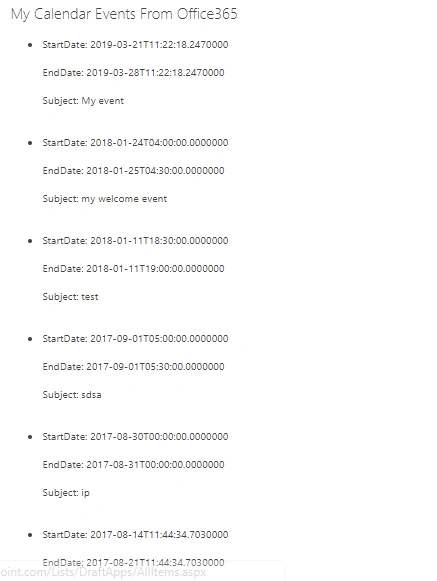
So now, we are able to retrieve the events from Office 365 Calendars using Microsoft Graph API.
Happy SharePointing!....
kamo epPosted Mar 3, 2021, 5:51 PM
Hi Vinodh thank you for sharing your code exemple, i did same way as you, declared token in global scope and assigned fetched acces_token to it inside function, when i log it out of function scope it's undefined could you help my please?
Ahmad IhsanPosted Jun 16, 2020, 9:59 AM
Hi, nice article. I have created 15 events on my outlook calendar but the API is returning only 10 events. Is this the limit? how can I get all events from the calendar?
Ryan TranPosted Oct 10, 2019, 10:57 PM
I have problem with error: NoPermissionsInAccessToken though i added permission Calendar.ReadWrite