

Introduction
This article describes an approach to restricting the user's input to letters only, numbers only, letters or numbers only, and special characters only.
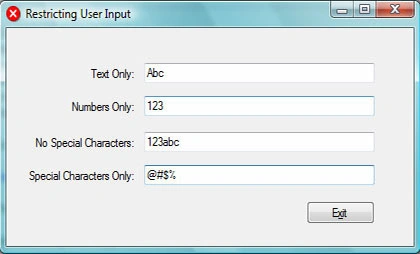
Figure 1. Restricting User Input into Text Box Controls
Getting Started.
There is a single Win Forms application included with this download. You may open the project and examine the project if you wish; however, the code is quite simple and will be described in the following sections of this document. All examples were written using Visual Studio 2005 and are in C#; the same code could also be used in earlier versions of Visual Studio.
Code Example: Restricting User Input.
The application contains a single form; the form contains four text box controls and each text box is labeled to describe the required input for the text box. There is also a single button control which is used to terminate the application.
In order to evaluate the user's entries into the text box and to prevent the entry of restricted characters, a key press event handler is added for each of the text box controls. The keyboard inputs submitted to the text box control are intercepted and evaluated prior to writing any information into the text box.
The first text box is restricted to allow only letters to be entered into the text box. In order to perform this input filtering, the key press event argument is evaluated using the character structure's "IsLetter" function to determine whether or not the value keyed in is in fact a letter. In this instance, if the character is not a letter, the key press event is disregarded by setting the handled property to true.
private void textBox1_KeyPress(object sender, KeyPressEventArgs e)
{
    // allows only letters
    if (!char.IsLetter(e.KeyChar))
    {
        e.Handled = true;
    }
}
The second box is restricted to allow only numbers to be entered into the text box. This works in a manner consistent with the first example except instead of using "IsLetter" it uses "IsNumber" to evaluate the input.
private void textBox2_KeyPress(object sender, KeyPressEventArgs e)
{
    // allows only numbers
    if (!char.IsNumber(e.KeyChar))
    {
        e.Handled = true;
    }
}
The third text box in the form restricts the user input to allow only letters or numbers to be entered; special characters are not allowed. This method uses the character structure's "IsLetterOrDigit" method to evaluate the user's input.
private void textBox4_KeyPress(object sender, KeyPressEventArgs e)
{
    // allows only letters or numbers
    if (!char.IsLetterOrDigit(e.KeyChar))
    {
        e.Handled = true;
    }
}
The last text box control restricts the user to input only special characters; this uses the same "IsLetterOrDigit" call as shown in the previous example, however, instead of looking for a negative match, it looks for a positive match.
private void textBox3_KeyPress(object sender, KeyPressEventArgs e)
{
    // allows only special characters
    if (char.IsLetterOrDigit(e.KeyChar))
    {
        e.Handled = true;
    }
}
Summary
This article demonstrates a few different ways to restrict a user's input at the level of the form. Aside from the examples shown in this document, one may also consider the use of masked text boxes as a means of restricting user input to a specific string format.
Durgesh SahuPosted Feb 24, 2012, 6:47 AM
How to restrict user input to integers only in HTML FORM text fields...????
Adolf RobatPosted Nov 18, 2010, 4:46 PM
Thanks a lot for all of your comments, they save my time a lot
LalithaPosted Sep 3, 2010, 3:16 AM
Thank you for posting this article.
vibha jhPosted Jul 30, 2009, 6:25 AM
how to enter only numbers,all other keys in the keyboard should be disabled in a c program
Becky FitchPosted Mar 28, 2009, 4:41 PM
I need to allow my customers to input either lower or upper case letters to still get an applied discount. Ideas
mamatha sadulaPosted Feb 25, 2008, 10:43 PM
Its a very good article
Jose SilvaPosted Dec 23, 2007, 4:35 PM
Hi! I'm very new at c# really, I'm still learning, and i was wondering.. When i use that code, i can't erase qhatever i have writing, if i want to use backspace, it doesn't allow me.. How do i avoid it?? thanks! Merry Christmas!
Mohamed ZakirPosted Dec 3, 2007, 6:39 AM
Thanks Zakir
Russ McAnullaPosted Mar 2, 2007, 7:54 AM
Can one specify decimal entry i.e. "123.45" ?
Terrence MaherPosted Jan 2, 2007, 5:15 PM
Scotty, Thanks for your article on restricting user input, it saved me a lot of time. I needed to make any letters a user typed into a textbox capitals and your article gave me the idea on how to do it. I changed your code as follows and it works great: private void textbox1_KeyPress(object sender, KeyPressEventArgs e) { e.KeyChar=char.ToUpper(e.KeyChar); } Regards Terry