

Introduction
Renaming a database in SQL Server is often required during maintenance tasks such as deploying backups, preparing testing environments, or aligning naming conventions with organizational standards. While renaming a database might seem straightforward, it involves key considerations to ensure the operation is safe and seamless. This article explores the process using practical examples and SQL commands.
Why Rename a Database?
Database renaming is commonly performed for the following reasons.
- Environment Differentiation: Renaming a backup or test database to include QABKP or Test in the name helps distinguish it from the production database.
- Deployment and Testing: Temporary renames allow you to restore or deploy a new database without overwriting the current one.
- Conforming to Naming Standards: Standardizing database names across environments for better management.
- Version Control: Including versioning in database names helps track updates and deployments.
Key Considerations
Before renaming a database, take the following precautions.
- Backup Your Database: Always perform a full backup to avoid data loss in case of issues during the renaming process.
- Check Dependencies: Ensure no active connections or dependent services are using the database.
- Single-User Mode: The database must be set to single-user mode to allow the rename operation.
- Permissions: The operation requires ALTER permissions on the database.
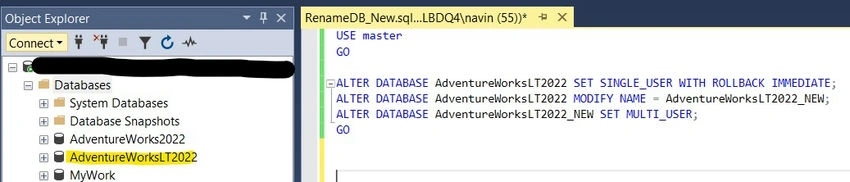
Let’s look at a practical example of renaming a database using SQL commands. Here, we’ll rename the AdventureWorksLT2022 database.
-- Step 1: Rename AdventureWorksLT2022 to AdventureWorksLT2022_NEW
USE master;
GO
ALTER DATABASE AdventureWorksLT2022
    SET SINGLE_USER WITH ROLLBACK IMMEDIATE;
ALTER DATABASE AdventureWorksLT2022
    MODIFY NAME = AdventureWorksLT2022_NEW;
ALTER DATABASE AdventureWorksLT2022_NEW
    SET MULTI_USER;
GO
Before running the script.
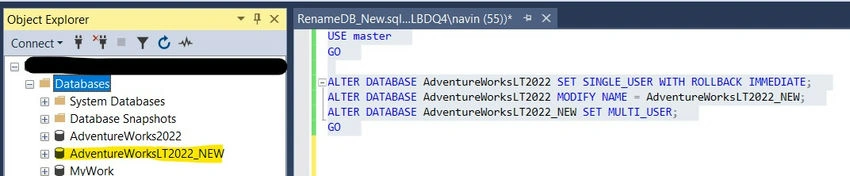
After running the script.
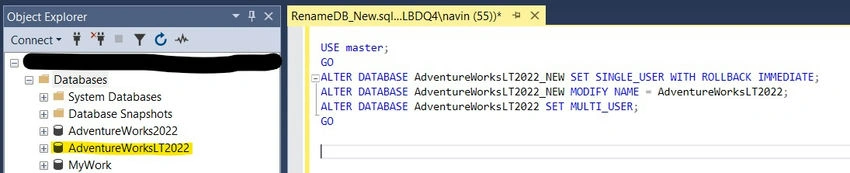
Now, let's roll back the database name to AdventureWorksLT2022.
-- Step 2: Rename AdventureWorksLT2022_NEW back to AdventureWorksLT2022
USE master;
GO
ALTER DATABASE AdventureWorksLT2022_NEW
SET SINGLE_USER WITH ROLLBACK IMMEDIATE;
ALTER DATABASE AdventureWorksLT2022_NEW
MODIFY NAME = AdventureWorksLT2022;
ALTER DATABASE AdventureWorksLT2022
SET MULTI_USER;
GO
Executing the above script will produce the following output.
Key Notes
- Deprecated Syntax: While sp_renamedb is still commonly used, Microsoft recommends using ALTER DATABASE commands for newer implementations to future-proof your scripts.
- Avoiding Downtime: If renaming in production, schedule the operation during maintenance windows to minimize the impact of temporarily setting the database to single-user mode.
- Compatibility: Always ensure the renamed database is accessible by dependent applications or scripts. Update connection strings or configuration files if necessary.
Troubleshooting
- Active Sessions Error: If an error occurs due to active connections, use the following command to list and kill active sessions.
SELECT session_id, login_name, status FROM sys.dm_exec_sessions WHERE database_id = DB_ID('AdventureWorksLT2022'); KILL <session_id>; - Permission Issues: Verify the executing user has the required permissions to perform ALTER DATABASE operations.
Conclusion
Renaming a database in SQL Server is a straightforward process but requires careful preparation and execution to avoid disruptions. By following the steps outlined in this article, you can confidently rename databases while maintaining system integrity. Always remember to back up your data and plan for dependency updates. Whether you're managing backup environments or conforming to naming conventions, these techniques ensure a smooth and efficient renaming process in SQL Server.
Join the conversation! Your thoughts help the community grow.