

Introduction
This article explains how to remove duplicate records from a DataTable in a Windows Forms application.
DataTable
A DataTable is a subset of a table that is represented in memory data. A "DataTable" object works in a disconnected environment that allows users to create a single table.
Use the following procedure to create the database and table in SQL Server:
Create Datbase Employee
use Employee
create table EmployeeInformation
(
EmpId int,
Emp_Name varchar(max),
Emp_Address nvarchar(max),
Emp_Department varchar(max)
)
Use the following procedure to insert the duplicate values in a database table in SQL Server:
insert into EmployeeInformation values(1,'Pankaj','SantNagar','Web Developer')
insert into EmployeeInformation values(1,'Pankaj','SantNagar','Web Developer')
insert into EmployeeInformation values(2,'Pravesh','Pratap Vihar','Teacher')
insert into EmployeeInformation values(2,'Pravesh','Pratap Vihar','Teacher')
insert into EmployeeInformation values(3,'Nimit','Vinod Nagar','Software Engineer')
insert into EmployeeInformation values(3,'Nimit','Vinod Nagar','Software Engineer')
insert into EmployeeInformation values(3,'Ravi','Vinod Nagar','Software Engineer')
insert into EmployeeInformation values(3,'Ravi','Vinod Nagar','Software Engineer')
Use the following procedure to execute the query in a database table in SQL Server:
select * from EmployeeInformation
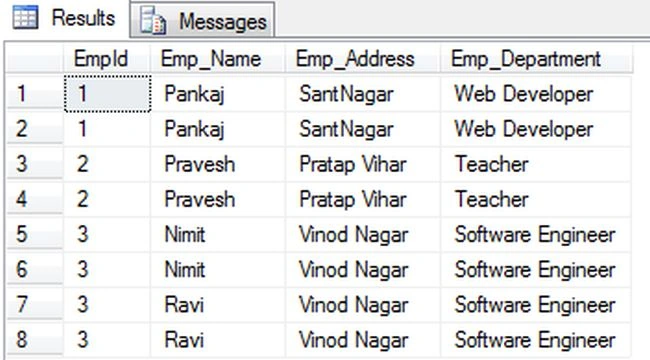
Use the following procedure to create the Stored Procedure to remove the duplicate records in a SQL Server database table:
Create proc DeleteDuplicateRecords
as
begin
DELETE
FROM EmployeeInformation
WHERE EmployeeInformation.%%physloc%%
NOT IN (SELECT MIN(b.%%physloc%%)
FROM EmployeeInformation b
GROUP BY b.EmpId, b.Emp_Name, b.Emp_Address, b.Emp_Department)
select * from EmployeeInformation;
end
Note: "%%physloc%%" is the Physical location of the row in the SQL Server and Group By clause groups the records of the database table and creates a single row for each group; this clasuu is used with an aggregate function, such as Max, Min and so on.
Now I will show you how to remove the duplicate records from the DataTable. First we need to fetch the records from the database into the DataTable after fetching the records. We will remove the duplicate records from the DataTable in a Windows Forms application; let's use the following procedure.
Step 1:
Open Visual Studio then select "Create New Project" --> "F# Console application".
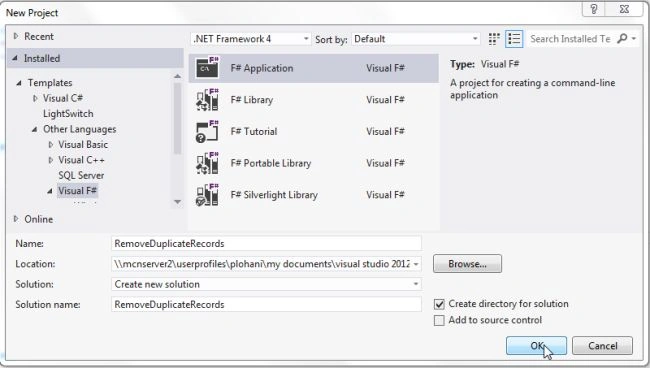
Step 2:
Now go the Solution Explorer on the right side of the application. Right-click on "References" and select "Add references".
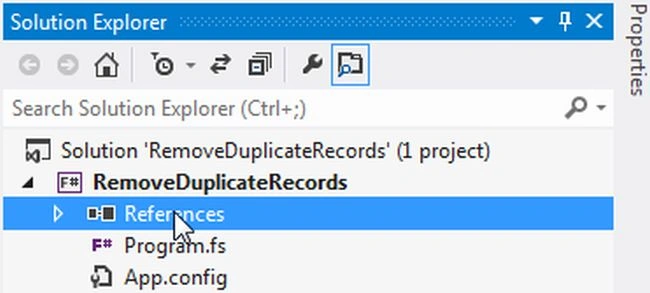
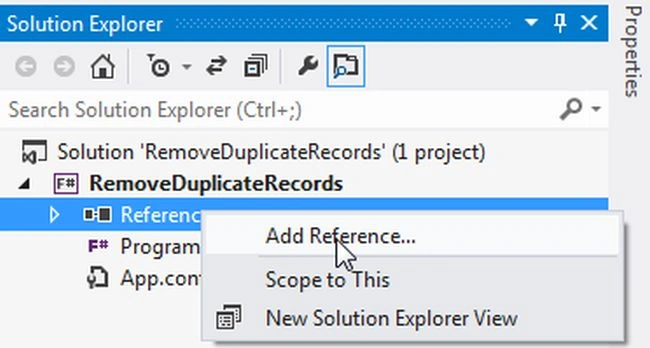
Step 3:
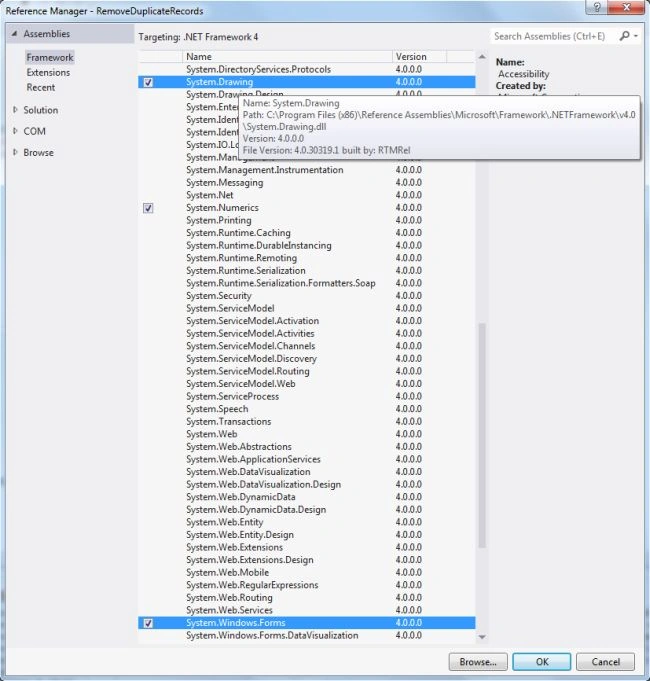
After selecting "Add References", in the framework template you need to select "System.Windows.Forms", "System.Drawing" and "System.Data" while holding down the Ctrl key and click on "Ok."
Step 4:
Write the following code to remove the duplicate records from the data table.
open System
open System.Windows.Forms
open System.Data
open System.Data.SqlClient
open System.Drawing
let duplrecform=new Form(Text="Remove Duplicate Records")
duplrecform.BackColor<-Color.Beige
let ffont=new Font("Arial", 9.75F,FontStyle.Regular, GraphicsUnit.Point)
let constring = @"Data Source=MCNDESKTOP34;Initial Catalog=Employee;User ID=; Password="
let adap=new SqlDataAdapter("select * from EmployeeInformation",constring)
let duplbl=new Label(Top=0,Left=40,Width=260)
duplbl.Text<-"Records are fetched in DataTable from Database"
let remdupllbl=new Label(Top=270,Left=40,Width=280)
remdupllbl.Text<-"After Removing Duplicate Records from DataTable"
let dt=new DataTable()
adap.Fill(dt) |>ignore
let datagrid=new DataGridView(Top=20,Left=40,Width=440,Height=200)
datagrid.DataSource<-dt
let removebtn=new Button(Top=240,Left=40,Width=260)
removebtn.Text<-"Remove Duplicate Records from DataTable"
removebtn.BackColor<-Color.Ivory
duplrecform.Controls.Add(datagrid)
duplrecform.Controls.Add(removebtn)
duplrecform.Controls.Add(duplbl)
duplrecform.Controls.Add(remdupllbl)
removebtn.Click.Add(fun _->
let con = new SqlConnection(constring)
con.Open()
let com = new SqlCommand()
com.Connection <- con
com.CommandType <- CommandType.StoredProcedure
com.CommandText <- "DeleteDuplicateRecords"
let adapter = new SqlDataAdapter("DeleteDuplicateRecords",con)
let dt = new DataTable()
adapter.Fill(dt) |>ignore
let gridview = new DataGridView(Top=300,Left=40,Width=450,Height=130)
duplrecform.Controls.Add(gridview)
gridview.DataSource <- dt
)
application.Run(duplrecform)
Step 5 :
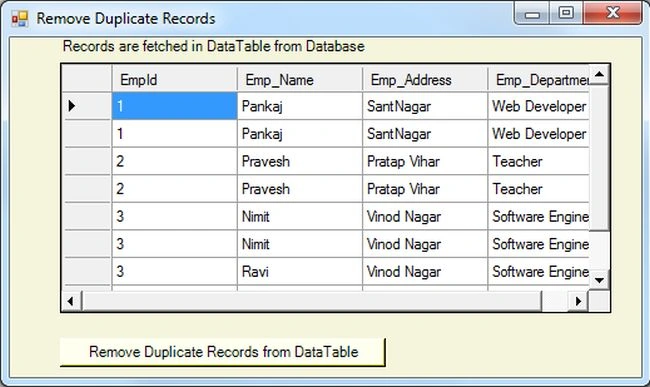
Debug the application by pressing F5 to execute the Windows Forms application. After debugging the application the output will be as in the following figure:
Step 6 :
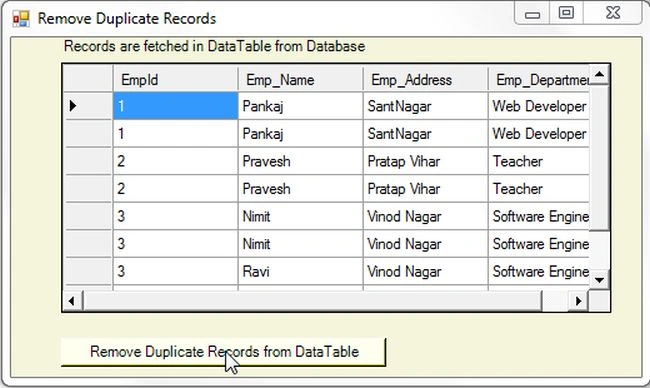
Now click on the Remove Duplicate Records From DataTable as in the following: figure:
Output

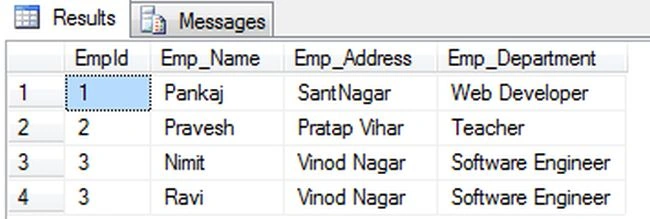
Now use the following procedure to execute the query in the database table in SQL Server:
select * from EmployeeInformation
Summary
In this article you saw how to remove the duplicate records from the DataTable in a Windows Forms application.
Join the conversation! Your thoughts help the community grow.