

Introduction
The database is the most fundamental part of the application. Without the database, there is no presence of the application. Most real-world applications contain databases such as those used by hospitals, businesses, and the public and corporate sectors. The issue that we want to address is that the database concurrently uses these kinds of applications. Let’s say we take the example of the “Train Reservation System;” if we install the database to the specific station then we are unable to pick the complete schedule of the trains on the other stations, so we need to install the database on the separate machine and access it remotely.
- My article is about how to access the database remotely.
- If we want to access the database remotely, then make sure you select the SQL Server Browser agent during installation.
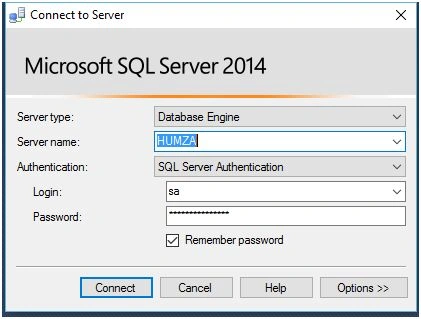
Step 1. Open the SQL Server Management Studio and login to the database, using the SQL Server/Windows authentication.
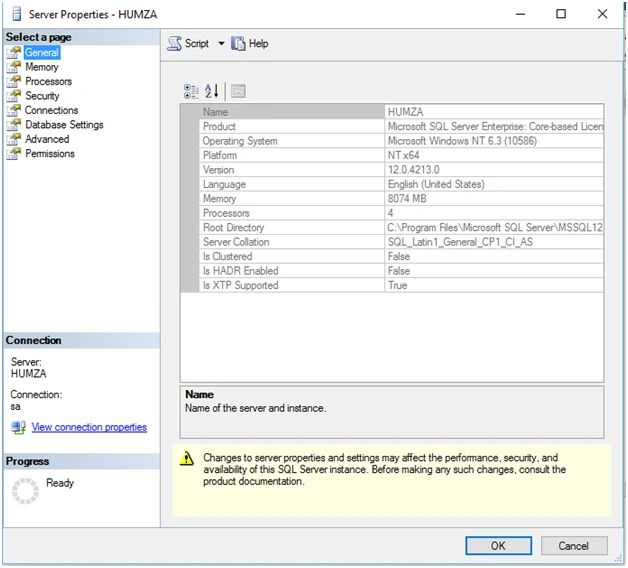
Step 2. After login, go to the Object Explorer and right-click on the root directory, in my case named HUMZA ( SQL Server and versa), and click the Properties and this window will open.
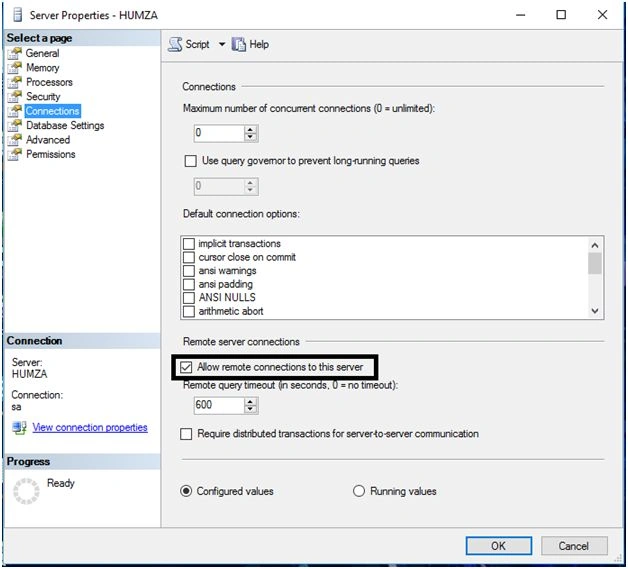
Click the connections and make sure the following check box is Checked.
Step 3
- Start->Run->SQLServerManager(version).msc like.
- Start->Run->SQLServerManager10.msc.
- For SQL 2005, you can use SQLServerManager.msc.
- Just look under C:\Windows\System32\SQLserverConfigurationManager.
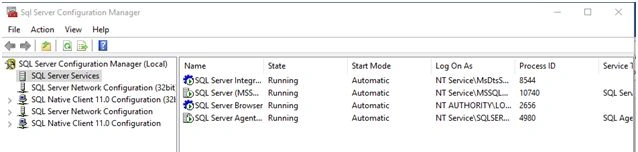
- Make sure all SQL server services are running.
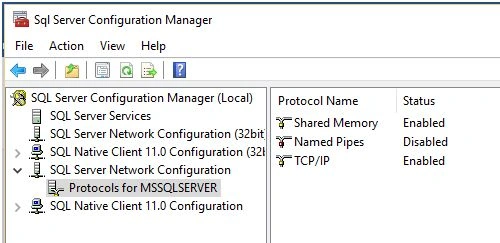
- Click SQL Server network configuration, expand it, and click “Protocols for MSSQLserver”.
- We see the three options on the right-hand pane that are listed as “Shared Memory Which is Enabled by default,” named Pipes, which is Disabled by default, and the last one which is important is “TCP/IP, which is by default, and that is enabled in the latest SQL Server versions; and if it is not enabled, then right click Properties.
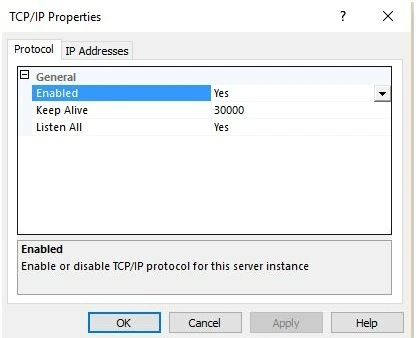
- Right-click on TCP/IP and click enabled (in case it's disabled) again and right-click properties and we see it just like this window:
- Go to the IP addresses tab.
- Scroll down and make sure that the “All-IP” and port are set to 1433, which is the default port and we can choose all the other ports not reserved by the system also.
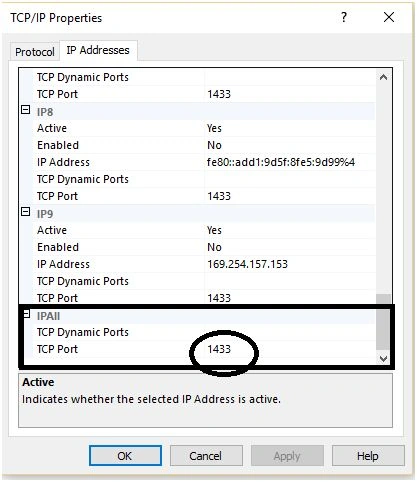
- Click OK, go back to SQL Server services, and restart all the SQL Server services.
Step 4
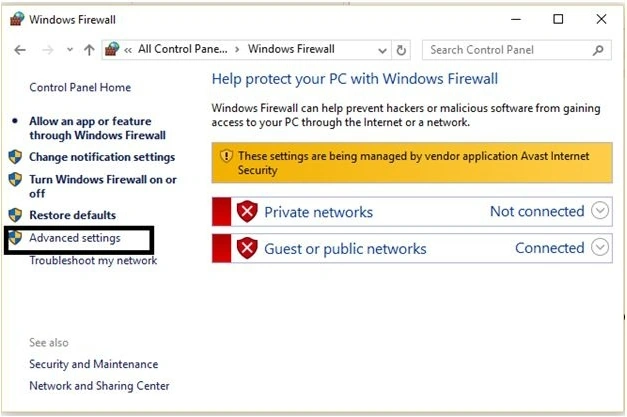
- Go to Windows firewall as I have Windows 10 in my case.
- Control Panel\All Control Panel Items\Windows Firewall.
- Click “Advanced Setting”.
- Click InBounded Rules and click New Rule
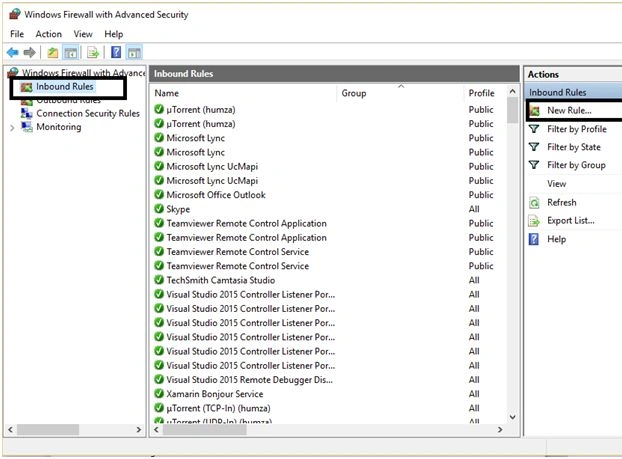
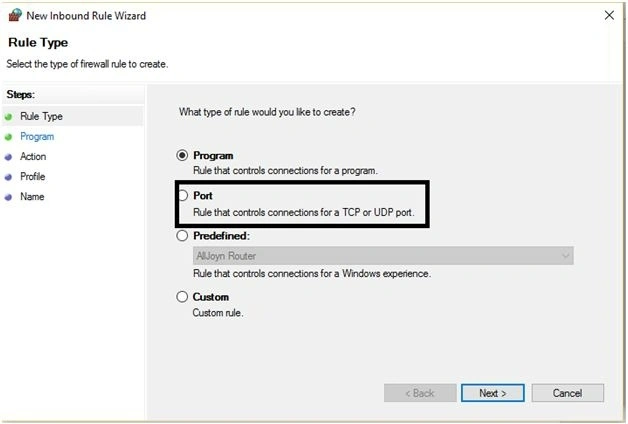
- Select the port and click next.
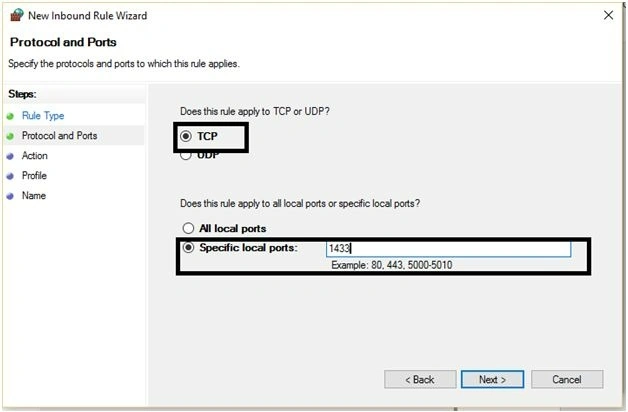
- Select TCP radio select the specified port and give the name of the port, which is “1433” in my case. You can set any port which is not reserved by the system.
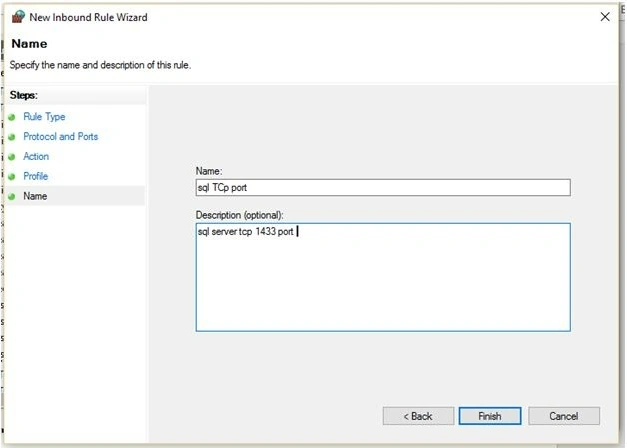
- Click the next action tab but don’t change anything. Use the default and click next in the profile. Make sure, we select all the checkboxes and then click next. Give identity to it by naming it and clicking Finish.
- Again, click on the new rule and select the “Port” radio click, next click the “UDP” radio, click the specified port, and assign 1434, which is the default port for UDP in SQL Server. Click next in the Action pane but don’t change anything. Click next in the profile tab and make sure all the checkboxes are checked and click next to give it to the “SQL Server UDP port” and click finish.
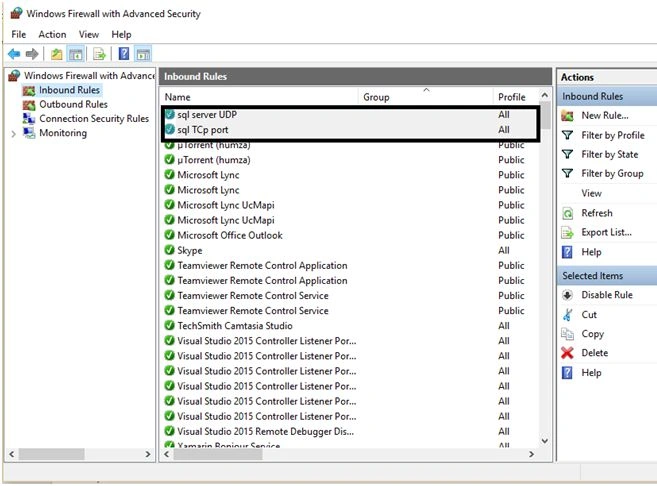
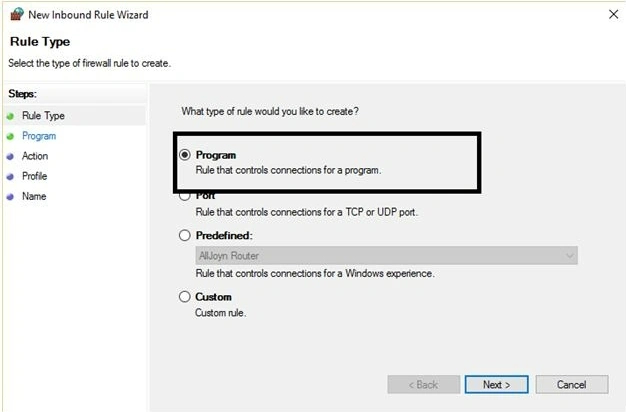
- Again, click on the new rule at that time and select the program followed by clicking next.
- Give the complete program path, where we add the “SQLbrowser.exe”, which is located at that path in my case.
- C:\Program Files (x86)\Microsoft SQL Server\90\Shared
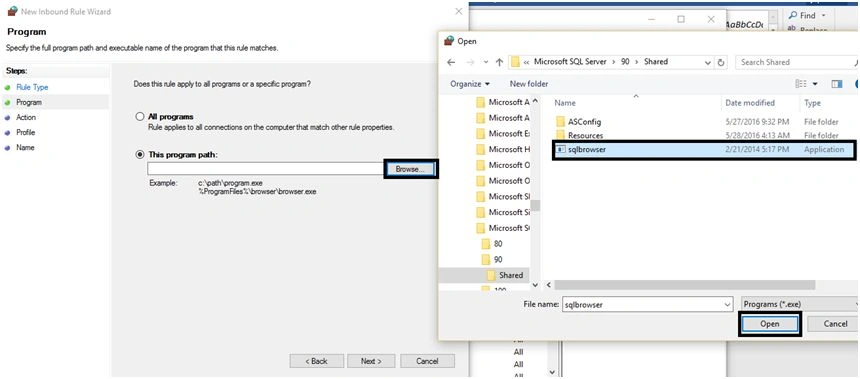
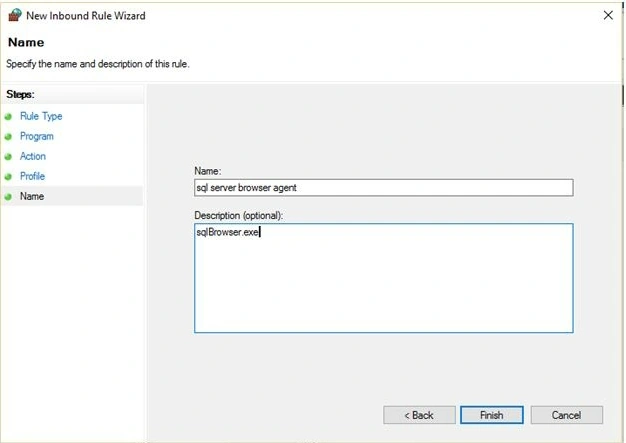
- Click next but don’t change anything. Click next to make sure all the checkboxes are checked and then click next to assign the name “SQL server browser agent” and click finish.
- Again, click the new rule and select the program. This time, we add the SQLsrvr.exe, which is located at C:\Program Files\Microsoft SQL Server\MSSQL12.MSSQLSERVER\MSSQL\Bin
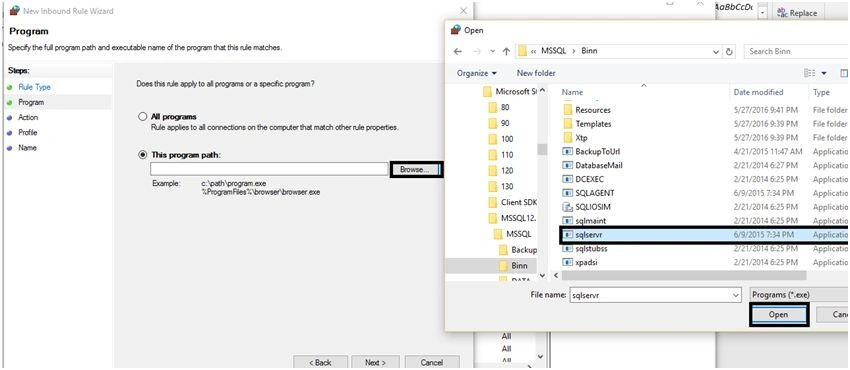
- Click next but don’t change anything, followed by clicking next to make sure you have checked all the check boxes on the Profile tab.
- Click next, name it “SQL server exe” and click finish.
- Make sure you have 4 new rules in the firewall.
- Your work is done. Set the port enabled to the TCP/IP protocols to the Server and add 2 ports 1433-TCp and 1434-UDP and 2 programs SQLbrowser.exe and SQLsrvr.exe.
Step 5
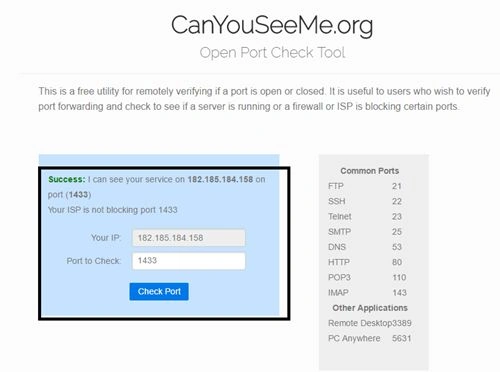
- For the port we use the canyouseeme.org.This Web detects the IP to auto enter the port 1433.
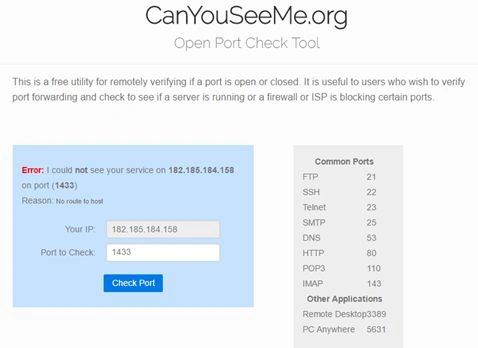
- It gives an error because it is unable to listen to port 1433 on the respective ID and we know how to resolve it.
- In Pakistan/the rest of the world, many ISPs provide internet facilities but the issue is that they don’t assign the “Static-ip” address on every restart of the router, as these ISPs provide different IP addresses, which is annoying most of the time.
- It is the PTCL (Pakistan Telecommunication Company Ltd) that provides the static-iP 500 per month.
- We can check the ISP static-IP services, according to the country which provides the cheap rates (if for production purposes) but here, I demonstrated how to access remote databases.
- Go to router settings. In my case, I have a PTCL router. Hit 192.168.1.1 and 192.168.1.X and in the case of any other brands of routers, the user needs to pass and click OK.
- Find Out the “NAT” services and in my case:
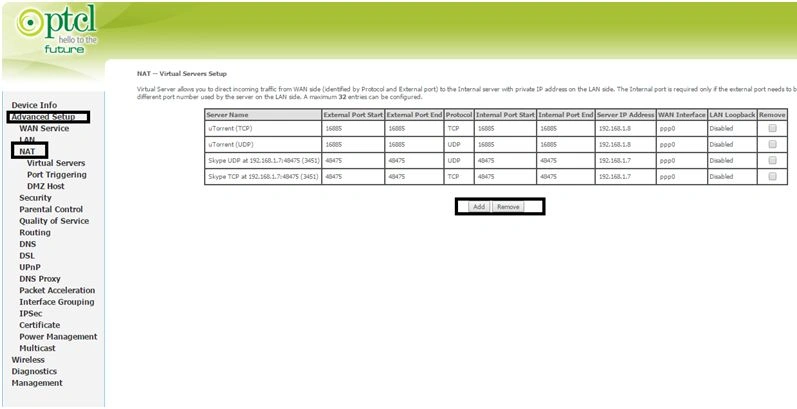
- Click add and then under custom services, it gives the name like SQL Server TCP.
- Open run type CMD and enter “ipconfig”. Note the IP address
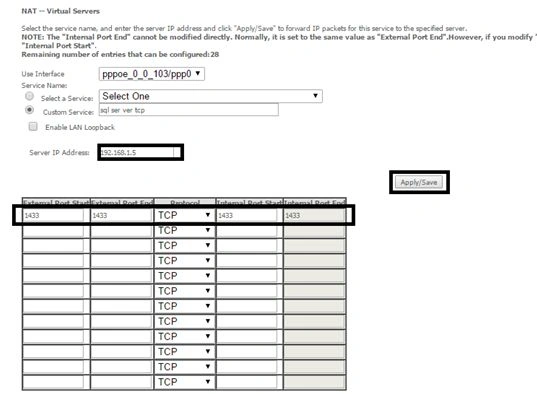
- We can add UDP, which follows the same procedure.
- After adding NAT, we again opened the canyouseeme.org and checked the port at the time we listened to port 1433.
- With all the steps shown now, we are able to log in successfully.
- The connection string format will be: IP-Address/InstanceName, PortNumber;
- In my case, it is182.185.184.158\MSSQLSERVER,1433;
- Make sure to log in with SQL Server authentication.
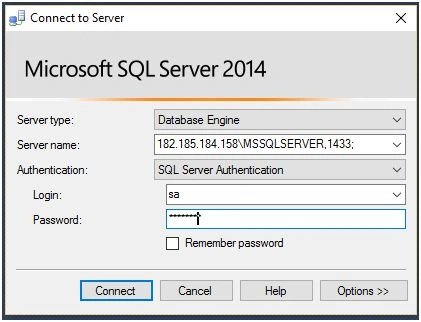
- Click Connect, to log in successfully.
Conclusion
By followings the steps listed above, we are able to access the SQL Server database remotely but for production use, we must buy the static-IP asby using the static-IP, we can host the Web on the local PC, make FTP Server, and we can host the database also.
MIIRUXPosted May 17, 2022, 12:42 AM
Than you for the effort, but i have a problem, even tho i followed all the steps, it didn't work, on https://canyouseeme.org/ , the port is working perfectly, but when i want to access my sql server from another computer it gives me error 25, if you could help me that would be cool thank you
aqeel irfanPosted Oct 4, 2018, 1:48 AM
Q#2. what is the procedure if we connected to internet with 3G or 4G?
aqeel irfanPosted Oct 4, 2018, 1:47 AM
Q#1. Have we need to get static ip service from ptcl for this procedure?
Santhakumar MunuswamyPosted Jun 25, 2016, 3:03 AM
Nice share
RakeshPosted Jun 15, 2016, 11:53 AM
Good Share
Asad AliPosted Jun 15, 2016, 9:58 AM
i keep on forgetting that good post
Yashwant VishwakarmaPosted Jun 15, 2016, 9:21 AM
awesome article bro :), keep writing such informative articles!!
Vignesh ManiPosted Jun 15, 2016, 8:46 AM
Nice one
NitinPosted Jun 15, 2016, 2:01 AM
Good one
Thiruppathi RPosted Jun 15, 2016, 1:17 AM
Nice Info...
Debasis SahaPosted Jun 15, 2016, 12:48 AM
Good share..
RajaPosted Jun 15, 2016, 12:19 AM
Nice Share...