

Ref Keyword in C#
Introduction
Today, in this article let's play around with
one of the interesting and most useful concept in C#.
Question: What
is ref keyword?
In simple
terms "The ref keyword on a method parameter
causes a method to refer to the same variable that was passed as an input
parameter for the same method. The ref
keyword is similar to Out keyword but ref requires that the variable be
initialized before being passed."
Step 1: Create a new webform project
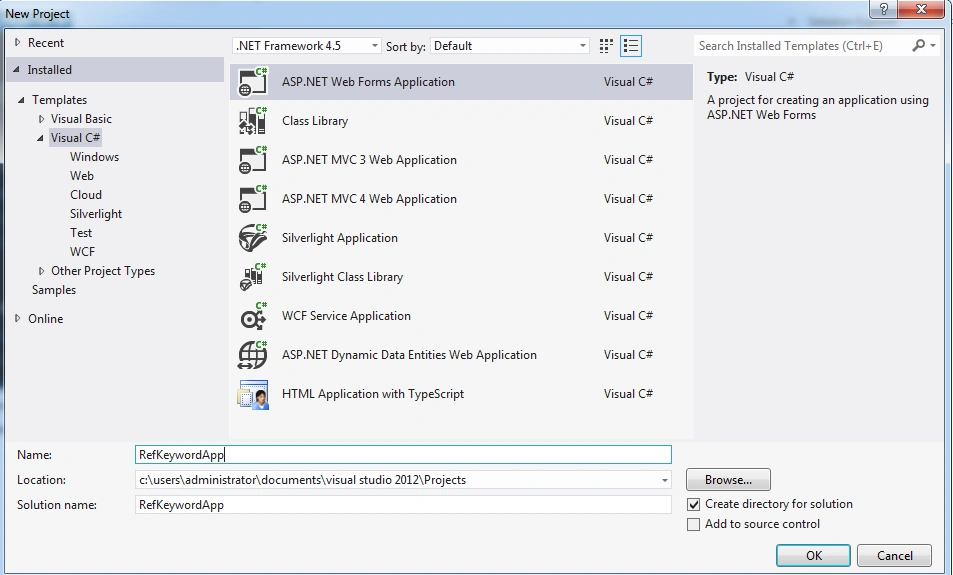
Step 2: The complete code of webform1.aspx looks like
this
<%@ Page Language="C#" AutoEventWireup="true" CodeBehind="WebForm1.aspx.cs" Inherits="RefKeywordApp.WebForm1" %>

<!DOCTYPE html>

<html xmlns="http://www.w3.org/1999/xhtml">
<head runat="server">
    <title></title>
</head>
<body>
    <form id="form1" runat="server">
      <center>
        <div>
            <table>
                <tr>
                    <td colspan="2" align="center">
                        <asp:Label ID="Label1" runat="server" Text="Ref Keyword in C#"
                            Font-Bold="true" Font-Size="Large" Font-Names="Verdana" ForeColor="Maroon"></asp:Label>
                    </td>
                </tr>
                <tr>
                    <td>
                        <asp:Label ID="Label6" runat="server" Text="Please Enter FirstNumber" Font-Size="Large" Font-Names="Verdana"
                            Font-Italic="true"></asp:Label>
                    </td>
                    <td>
                        <asp:TextBox ID="TextBox4" runat="server"></asp:TextBox>
                    </td>
                </tr>
                <tr>
                    <td>
                        <asp:Label ID="Label2" runat="server" Text="Please Enter SecondNumber" Font-Size="Large"
                            Font-Names="Verdana" Font-Italic="true"></asp:Label>
                    </td>
                    <td>
                        <asp:TextBox ID="TextBox1" runat="server"></asp:TextBox>
                    </td>
                </tr>
                <tr>
                    <td colspan="2" align="center">
                        <asp:Button ID="Button1" runat="server" Text="Addition" Font-Names="Verdana" Width="213px"
                            BackColor="Orange" Font-Bold="True" OnClick="Button1_Click" />
                    </td>
                </tr>
                <tr>
                    <td colspan="2" align="center">
                        <asp:Button ID="Button2" runat="server" Text="Substraction" Font-Names="Verdana" Width="213px"
                            BackColor="Orange" Font-Bold="True" OnClick="Button2_Click"/>
                    </td>
                </tr>
                <tr>
                    <td colspan="2" align="center">
                        <asp:Button ID="Button3" runat="server" Text="Multiplication" Font-Names="Verdana" Width="213px"
                            BackColor="Orange" Font-Bold="True" OnClick="Button3_Click" />
                    </td>
                </tr>
                <tr>
                    <td colspan="2" align="center">
                        <asp:Button ID="Button4" runat="server" Text="Division" Font-Names="Verdana" Width="213px"
                            BackColor="Orange" Font-Bold="True" OnClick="Button4_Click"/>
                    </td>
                </tr>
                <tr>
                    <td colspan="2" align="center">
                        <asp:Label ID="Label5" runat="server" Font-Bold="true" Font-Names="Verdana"></asp:Label>
                    </td>
                </tr>
            </table>
        </div>
         </center>
    </form>
</body>
</html>
Step 3: The complete code of webform1.aspx.cs looks
like this
using System;
using System.Collections.Generic;
using System.Linq;
using System.Web;
using System.Web.UI;
using System.Web.UI.WebControls;

namespace RefKeywordApp
{
    public partial class WebForm1 : System.Web.UI.Page
    {
        protected void Page_Load(object sender, EventArgs e)
        {
            TextBox4.Focus();
        }

        protected void Button1_Click(object sender, EventArgs e)
        {
            double a = 0;
            double b = 0;
            if (string.IsNullOrEmpty(TextBox4.Text) || string.IsNullOrEmpty(TextBox1.Text))
            {
                Label5.Text = "Please Enter Some Values";
                Label5.ForeColor = System.Drawing.Color.Red;

            }
            else
            {

                Label5.Text = "Addition Result is: " + Add(ref a, ref b);
                Label5.ForeColor = System.Drawing.Color.Green;
                TextBox4.Text = string.Empty;
                TextBox1.Text = string.Empty;
            }
        }

        protected void Button2_Click(object sender, EventArgs e)
        {
            double a = 0;
            double b = 0;
            if (string.IsNullOrEmpty(TextBox4.Text) || string.IsNullOrEmpty(TextBox1.Text))
            {
                Label5.Text = "Please Enter Some Values";
                Label5.ForeColor = System.Drawing.Color.Red;

            }
            else
            {

                Label5.Text = "Substraction Result is: " + Sub(ref a, ref b);
                Label5.ForeColor = System.Drawing.Color.Green;
                TextBox4.Text = string.Empty;
                TextBox1.Text = string.Empty;
            }
        }

        protected void Button3_Click(object sender, EventArgs e)
        {
            double a = 0;
            double b = 0;
            if (string.IsNullOrEmpty(TextBox4.Text) || string.IsNullOrEmpty(TextBox1.Text))
            {
                Label5.Text = "Please Enter Some Values";
                Label5.ForeColor = System.Drawing.Color.Red;

            }
            else
            {

                Label5.Text = "Multiplication Result is: " + Mul(ref a, ref b);
                Label5.ForeColor = System.Drawing.Color.Green;
                TextBox4.Text = string.Empty;
                TextBox1.Text = string.Empty;
            }
        }

        protected void Button4_Click(object sender, EventArgs e)
        {
            double a = 0;
            double b = 0;
            if (string.IsNullOrEmpty(TextBox4.Text) || string.IsNullOrEmpty(TextBox1.Text))
            {
                Label5.Text = "Please Enter Some Values";
                Label5.ForeColor = System.Drawing.Color.Red;

            }
            else
            {

                Label5.Text = "Division Result is: " + Div(ref a, ref b);
                Label5.ForeColor = System.Drawing.Color.Green;
                TextBox4.Text = string.Empty;
                TextBox1.Text = string.Empty;
            }
        }

        protected double Add(ref double a, ref double b)
        {
            a = double.Parse(TextBox4.Text);
            b = double.Parse(TextBox1.Text);
            return a + b;
        }

        protected double Sub(ref double a, ref double b)
        {
            a = double.Parse(TextBox4.Text);
            b = double.Parse(TextBox1.Text);
            return a - b;
        }

        protected double Mul(ref double a, ref double b)
        {
            a = double.Parse(TextBox4.Text);
            b = double.Parse(TextBox1.Text);
            return a * b;
        }

        protected double Div(ref double a, ref double b)
        {
            a = double.Parse(TextBox4.Text);
            b = double.Parse(TextBox1.Text);
            return a / b;
        }
    }
}
Step 4: The output of the application looks like this
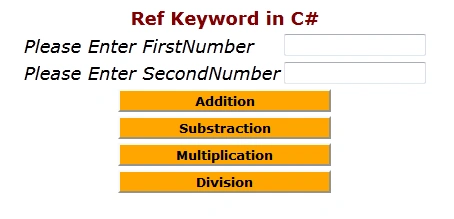
Step 5: The addition operation output of the
application looks like this
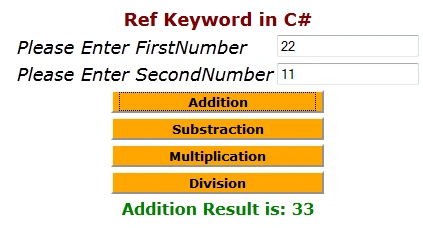
I hope this
article is useful for you ...I look forward for your comments and
feedback....Thanks Vijay Prativadi
OZGUR SARIKAMISPosted Jul 8, 2017, 10:03 AM
Thanks. the article is very helpful