

RecyclerView is the successor of Listview and Gridview in Android. The RecyclerView is available from the v7 support library. This is an improved version of Listview and GridView classes, provided by the Android framework. It has default animations, to add and remove views. It will recycle the view directly. Here, I am going to explain about how we can create a simple Recycler View, so that you can understand the methods available in this and the adapter.
First, create your layout file, as shown below:
- <RelativeLayout
- xmlns:android="http://schemas.android.com/apk/res/android"
- xmlns:tools="http://schemas.android.com/tools" android:layout_width="match_parent"
- android:layout_height="match_parent" android:paddingLeft="@dimen/activity_horizontal_margin"
- android:paddingRight="@dimen/activity_horizontal_margin"
- android:paddingTop="@dimen/activity_vertical_margin"
- android:paddingBottom="@dimen/activity_vertical_margin" tools:context=".MainActivity">
- <android.support.v7.widget.RecyclerView
- android:id="@+id/my_recycler_view"
- android:layout_width="match_parent"
- android:layout_height="match_parent"
- android:scrollbars="vertical" />
- </RelativeLayout>
Now, we need to bind these UI elements into our main activity.
- RecyclerView view = (RecyclerView) findViewById(R.id.my_recycler_view);
- LinearLayoutManager manager = new LinearLayoutManager(this);
- view.setLayoutManager(manager);
- <RelativeLayout xmlns:android="http://schemas.android.com/apk/res/android"
- android:layout_width="fill_parent"
- android:layout_height="?android:attr/listPreferredItemHeight"
- android:padding="6dip" >
- <ImageView
- android:id="@+id/icon"
- android:layout_width="wrap_content"
- android:layout_height="fill_parent"
- android:layout_alignParentBottom="true"
- android:layout_alignParentTop="true"
- android:layout_marginRight="6dip"
- android:contentDescription="TODO"
- android:src="@drawable/abc_list_focused_holo" />
- <TextView
- android:id="@+id/secondLine"
- android:layout_width="fill_parent"
- android:layout_height="26dip"
- android:layout_alignParentBottom="true"
- android:layout_alignParentRight="true"
- android:layout_toRightOf="@id/icon"
- android:ellipsize="marquee"
- android:singleLine="true"
- android:text="Description"
- android:textSize="12sp" />
- <TextView
- android:id="@+id/firstLine"
- android:layout_width="fill_parent"
- android:layout_height="wrap_content"
- android:layout_above="@id/secondLine"
- android:layout_alignParentRight="true"
- android:layout_alignParentTop="true"
- android:layout_alignWithParentIfMissing="true"
- android:layout_toRightOf="@id/icon"
- android:gravity="center_vertical"
- android:text="Example application"
- android:textSize="16sp" />
- </RelativeLayout>
Create a class named MyAdapter, that extends from RecyclerView.Adapter, shown below:
We need to implement the methods. There are three methods, which should be there in the RecyclerView Adapter. Please see them , shown below:
Here, we need to inflate the layout and this will return the view holder for us.
onBindViewHolder()
- class MyAdapter extends RecyclerView.Adapter<MyAdapter.ViewHolder>
- onCreateViewHolder()
- @Override
- public MyAdapter.ViewHolder onCreateViewHolder(ViewGroup parent, int viewType)
- {
- View view = LayoutInflater.from(parent.getContext()).inflate(R.layout.list_item, parent, false);
- ViewHolder viewHolder = new ViewHolder(view);
- return viewHolder;
- }
Here, we can set the values for each item.
getItemCount()
This will return the number of rows.
- @Override
- public void onBindViewHolder(MyAdapter.ViewHolder holder, int position)
- {
- final String text = listItem.get(position);
- holder.titleTextView.setText(text);
- holder.summaryTextView.setText("Summary " + text);
- }
This will return the number of rows.
- @Override
- public int getItemCount()
- {
- return listItem.size();
- }
- public class ViewHolder extends RecyclerView.ViewHolder
- {
- TextView titleTextView = null;
- TextView summaryTextView = null;
- public ViewHolder(View itemView)
- {
- super(itemView);
- titleTextView = (TextView) itemView.findViewById(R.id.firstLine);
- summaryTextView = (TextView) itemView.findViewById(R.id.secondLine);
- }
- }
- MyAdapter myAdapter = new MyAdapter(list);
- view.setAdapter(myAdapter);
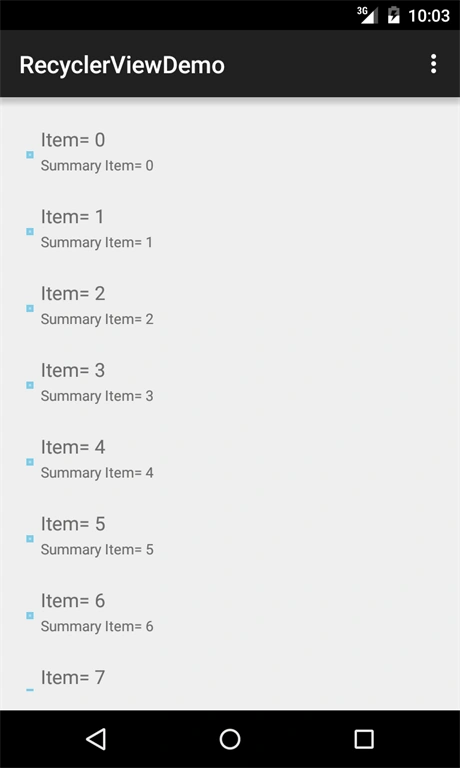
Santhakumar MunuswamyPosted Jun 25, 2016, 3:20 AM
Nice share
Kuppurasu NagarajPosted Jun 14, 2016, 1:19 PM
Nice Sharing..
Debasis SahaPosted Jun 11, 2016, 2:14 AM
Good One..
Thiruppathi RPosted Jun 10, 2016, 12:48 PM
Nice Info..