

In this article, I will show you how to create a simple Nth level recursive tree-view using Angular 2 and TypeScript. Here, I am using TypeScript, which is not mandatory. You can use your own supported scripting language, which can be either JavaScript or any other.
I will not go into much detail of each and every piece of code, as I am assuming you already know Angular 2 coding style.
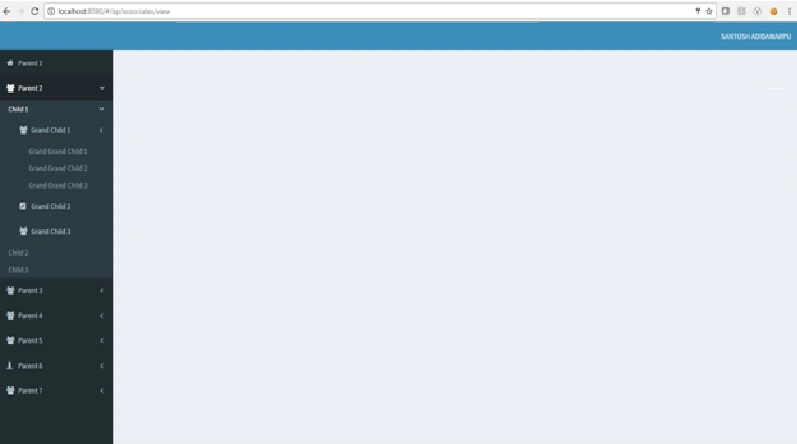
I will start by creating a wrapper component that Bootstraps the Application and includes the actual Tree-View component on the page. This sample Tree-View renders a recursive Tree-View structure with the parent nodes, child nodes, grandchild nodes, grand grand child nodes and so on in a parent child relationship fashion.
Step 1
tree-view.component.ts
- import { Component } from '@angular/core';
- import { TreeView } from './tree-view.directive';
- import { ProjectRoleService } from '../../services/project-role.service';
- import swal from 'sweetalert2';
- @Component({
- selector: 'tree-view-menu',
- template: '<tree-view [menuList]="menuList"></tree-view>',
- styleUrls: ['./tree-view.css']
- })
- export class TreeViewComponent {
- public roleName: string;
- menuList: any;
- constructor(private _projectService: ProjectRoleService) {
- }
- ngOnInit() {
- this.roleName = "Admin";
- this._projectService.getMenuDetails(this.roleName).then((res:any) => {
- this.menuList = res;
- }, (error) => {
- swal("Failed to get Treeview menu details", error._body, "error");
- });
- }
- }
In the code given above, getMenuDetails is a Service method, once the Service method executes successfully. Subsequently, it will give you the response in JSON format, as shown below. We are calling this Service method inside one of the Angular 2 lifecycle event, which is ngOnInit.
- [
- {
- title: 'Parent 1',
- routerLink: '/ap/dashboard',
- style: 'fa fa-home',
- nodeId: 'liDashboard',
- param: '',
- categories: []
- },
- {
- title: 'Parent 2',
- routerLink: '',
- style: 'fa fa-users',
- nodeId: 'liAssociates',
- param: '',
- categories: [
- {
- title: 'Child 1',
- style: 'fa fa-users',
- nodeId: 'liProspectiveAssociate',
- param: '',
- routerLink: '/ap/associates/view',
- categories: [
- {
- title: 'Grand Child 1',
- style: 'fa fa-users',
- nodeId: 'A',
- param: '',
- routerLink: '/ap/associates/view',
- categories: [
- {
- title: 'Grand Grand Child 1',
- style: 'fa fa-user-plus',
- nodeId: 'D',
- param: '',
- routerLink: '/ap/reports/resourcereport',
- categories: []
- },
- {
- title: 'Grand Grand Child 2',
- style: 'fa fa-user-plus',
- nodeId: 'E',
- param: '',
- routerLink: '/ap/reports/financereport',
- categories: []
- },
- {
- title: 'Grand Grand Child 3',
- style: 'fa fa-pencil-square',
- nodeId: 'F',
- param: '',
- routerLink: '/ap/reports/importRMGreport',
- categories: []
- }
- ]
- },
- {
- title: 'Grand Child 2',
- style: 'fa fa-pencil-square',
- nodeId: 'B',
- param: '',
- routerLink: '/ap/associates/prospective-associates',
- categories: []
- },
- {
- title: 'Grand Child 3',
- style: 'fa fa-users',
- nodeId: 'C',
- param: '',
- routerLink: '/ap/associates/list',
- categories: []
- }
- ]
- },
- {
- title: 'Child 2',
- style: 'fa fa-pencil-square',
- nodeId: 'liAssociateJoining',
- param: '',
- routerLink: '/ap/associates/prospective-associates',
- categories: []
- },
- {
- title: 'Child 3',
- style: 'fa fa-users',
- nodeId: 'liAssociatesChild',
- param: '',
- routerLink: '/ap/associates/list',
- categories: []
- }
- ]
- },
- {
- title: 'Parent 3',
- routerLink: '',
- style: 'fa fa-users',
- nodeId: 'liTalentManagement',
- param: '',
- categories: []
- },
- {
- title: 'Parent 4',
- routerLink: '',
- style: 'fa fa-users',
- nodeId: 'liTeamManagement',
- param: '',
- categories: []
- },
- {
- title: 'Parent 5',
- routerLink: '',
- style: 'fa fa-users',
- nodeId: 'liPerformanceManagement',
- param: '',
- categories: []
- },
- {
- title: 'Parent 6',
- routerLink: '',
- style: 'fa fa-street-view',
- nodeId: 'liAdmin',
- param: '',
- categories: [ ]
- },
- {
- title: 'Parent 7',
- routerLink: '',
- style: 'fa fa-users',
- nodeId: 'liReports',
- param: '',
- categories: []
- }
- ]
Step 2
This is the Service component, where we are dealing with HTTP verbs. The Services are running at http://localhost:8080/api.services. Once the getMenuDetails Service method executes, it will return response in hierarchical data structure format as a parent child relationship in JSON format. The actual logic to generate the hierarchical data is written, using C, which you will find while going forward.
project-role.service.ts
- import { Injectable, Inject } from '@angular/core';
- import { Observable } from 'rxjs/Observable';
- import { Http } from '@angular/http';
- import 'rxjs/Rx';
- @Injectable()
- export class ProjectRoleService {
- constructor(private _http: Http) {
- this._serverURL = "http://localhost:8080/api.services";
- }
- getMenuDetails(roleName: string) {
- let _url = this._serverURL + "/Menu/GetMenuDetails?roleName=" + roleName;
- return new Promise((resolve, reject) => {
- this._http.get(_url)
- .map(res =>res.json())
- .catch((error: any) => {
- console.error(error);
- reject(error);
- return Observable.throw(error.json().error || 'Server error');
- })
- .subscribe((data) => {
- resolve(data);
- });
- });
- }
- }
Step 3
The piece of code given below is required to generate the recursive Tree-View component. This component file contains the actual template URL with selector and munuList input property.
tree-view.directory.ts
- import {Component, Input} from '@angular/core';
- @Component({
- selector: 'tree-view',
- templateUrl: './tree-view.html',
- styleUrls: ['./tree-view.css']
- })
- export class TreeView {
- @Input() menuList: any;
- }
Step 4
Tree-View component is included in the main component (tree-view.component.ts) as <tree-view-menu></tree-view-menu>, but notice in this HTML for the Tree-View, as there is a self reference. This is important, since it's how I am rendering the nodes recursively.
tree-view.html
- <ul class="sidebar-menu">
- <li class="treeview" *ngFor="let parentNode of menuList">
- <a *ngIf="parentNode.Path == ''" href="" id="parentNode.NodeId">
- <i [ngClass]="parentNode.Style"></i><span> {{ parentNode.Title }}</span>
- <i *ngIf="parentNode.Categories.length > 0" class="fa fa-angle-left pull-right"></i>
- </a>
- <a *ngIf="parentNode.Path != ''" [routerLink]="[parentNode.Path]"
- id="parentNode.NodeId">
- <i [ngClass]="parentNode.Style"></i><span> {{ parentNode.Title }}</span>
- <i *ngIf="parentNode.Categories.length > 0" class="fa fa-angle-left pull-right"></i>
- </a>
- <ul class="treeview-menu">
- <li *ngFor="let childNode of parentNode.Categories">
- <a [routerLinkActive]="['active']" [routerLink]="[childNode.Path]"
- id="childNode.NodeId">
- <i [ngClass]="childNode.Style"></i><span>{{childNode.Title}}</span>
- <i *ngIf="childNode.Categories.length > 0" class="fa fa-angle-left pull-right"></i>
- </a>
- <div *ngIf="childNode.Categories.length > 0" class="treeview-menu">
- <tree-view [menuList]="childNode.Categories"></tree-view>
- </div>
- </li>
- </ul>
- </li>
- </ul>
Step 5
The actual TreeView components (TreeView and TreeViewComponent), which we are declaring in module.ts file is because usually this is the entry point for an Angular 2 Application.
app.module.ts
- import { NgModule, ErrorHandler, Injector } from '@angular/core';
- import { BrowserModule } from '@angular/platform-browser';
- import { Router, ActivatedRoute } from '@angular/router';
- import { AppComponent } from './app.component';
- import { Observable } from 'rxjs/Observable';
- import {TreeView} from './shared/tree-view-menu/tree-view.directive';
- import {TreeViewComponent} from './shared/tree-view-menu/tree-view.component';
- @NgModule({
- imports: [BrowserModule, HttpModule, AppRouteModule],
- declarations: [AppComponent, TreeViewComponent,TreeView
- ],
- bootstrap: [AppComponent],
- providers: [
- {
- provide: Http,
- useFactory: (xhrBackend: XHRBackend, requestOptions: RequestOptions, router: Router) => new HttpInterceptor(xhrBackend, requestOptions, router),
- deps: [XHRBackend, RequestOptions, Router]
- }
- ]
- })
- export class AppModule {
- }
Step 6
The actual "<tree-view-menu>" selector is the one, which we are injecting in the startup index page or in the layout page.
_layout.component.html
- <div class="wrapper">
- <header class="main-header">
- <nav class="navbarnavbar-static-top" role="navigation"> </nav>
- </header>
- <aside class="main-sidebar">
- <section class="sidebar">
- <tree-view-menu>Loading...</tree-view-menu>
- </section>
- </aside>
- <div class="content-wrapper">
- <section class="content">
- <router-outlet></router-outlet>
- </section>
- </div>
- <footer class="main-footer"> </footer>
- </div>
Step 7
Database tables script
- /****** Object: Table [dbo].[Menu] ******/
- SET ANSI_NULLS ON
- GO
- SET QUOTED_IDENTIFIER ON
- GO
- SET ANSI_PADDING ON
- GO
- CREATE TABLE [dbo].[Menu](
- [MenuId] [int] IDENTITY(1,1) NOT NULL,
- [Title] [nvarchar](50) NOT NULL,
- [IsActive] [bit] NULL,
- [Path] [nvarchar](250) NULL,
- [DisplayOrder] [int] NULL,
- [ParentId] [int] NULL,
- [CreatedUser] [varchar](100) NULL CONSTRAINT [DF_Menu_CreatedUser] DEFAULT (suser_sname()),
- [ModifiedUser] [varchar](100) NULL,
- [CreatedDate] [datetime] NULL CONSTRAINT [DF_Menu_CreatedDate] DEFAULT (getdate()),
- [ModifiedDate] [datetime] NULL,
- [SystemInfo] [varchar](50) NULL CONSTRAINT [DF_Menu_SystemInfo] DEFAULT (CONVERT([char](15),connectionproperty('client_net_address'))),
- [Parameter] [nvarchar](50) NULL,
- [NodeId] [nvarchar](50) NULL,
- [Style] [nvarchar](50) NULL,
- CONSTRAINT [PK_Menu] PRIMARY KEY CLUSTERED
- (
- [MenuId] ASC
- )WITH (PAD_INDEX = OFF, STATISTICS_NORECOMPUTE = OFF, IGNORE_DUP_KEY = OFF, ALLOW_ROW_LOCKS = ON, ALLOW_PAGE_LOCKS = ON) ON [PRIMARY]
- ) ON [PRIMARY]
- GO
- SET ANSI_PADDING ON
- GO
- /****** Object: Table [dbo].[MenuRoles] ******/
- SET ANSI_NULLS ON
- GO
- SET QUOTED_IDENTIFIER ON
- GO
- SET ANSI_PADDING ON
- GO
- CREATE TABLE [dbo].[MenuRoles](
- [MenuRoleId] [int] IDENTITY(1,1) NOT NULL,
- [MenuId] [int] NOT NULL,
- [RoleId] [int] NULL,
- [CreatedUser] [varchar](100) NULL CONSTRAINT [DF_MenuRoles_CreatedUser] DEFAULT (suser_sname()),
- [ModifiedUser] [varchar](100) NULL,
- [CreatedDate] [datetime] NULL CONSTRAINT [DF_MenuRoles_CreatedDate] DEFAULT (getdate()),
- [ModifiedDate] [datetime] NULL,
- [SystemInfo] [varchar](50) NULL CONSTRAINT [DF_MenuRoles_SystemInfo] DEFAULT (CONVERT([char](15),connectionproperty('client_net_address'))),
- CONSTRAINT [PK_MenuRoles] PRIMARY KEY CLUSTERED
- (
- [MenuRoleId] ASC
- )WITH (PAD_INDEX = OFF, STATISTICS_NORECOMPUTE = OFF, IGNORE_DUP_KEY = OFF, ALLOW_ROW_LOCKS = ON, ALLOW_PAGE_LOCKS = ON) ON [PRIMARY]
- ) ON [PRIMARY]
- GO
- SET ANSI_PADDING ON
- GO
- /****** Object: Table [dbo].[Roles] ******/
- SET ANSI_NULLS ON
- GO
- SET QUOTED_IDENTIFIER ON
- GO
- SET ANSI_PADDING ON
- GO
- CREATE TABLE [dbo].[Roles](
- [RoleId] [int] IDENTITY(1,1) NOT NULL,
- [RoleName] [nvarchar](256) NULL,
- [RoleDescription] [nvarchar](256) NULL,
- [IsActive] [bit] NULL,
- [CreatedUser] [varchar](100) NULL CONSTRAINT [DF_Roles_CreatedUser] DEFAULT (suser_sname()),
- [ModifiedUser] [varchar](100) NULL,
- [CreatedDate] [datetime] NULL CONSTRAINT [DF_Roles_CreatedDate] DEFAULT (getdate()),
- [ModifiedDate] [datetime] NULL,
- [SystemInfo] [varchar](50) NULL CONSTRAINT [DF_Roles_SystemInfo] DEFAULT (CONVERT([char](15),connectionproperty('client_net_address'))),
- [DepartmentId] [int] NULL,
- [KeyResponsibilities] [nvarchar](max) NULL,
- [EducationQualification] [nvarchar](max) NULL,
- CONSTRAINT [PK_RoleId] PRIMARY KEY CLUSTERED
- (
- [RoleId] ASC
- )WITH (PAD_INDEX = OFF, STATISTICS_NORECOMPUTE = OFF, IGNORE_DUP_KEY = OFF, ALLOW_ROW_LOCKS = ON, ALLOW_PAGE_LOCKS = ON) ON [PRIMARY]
- ) ON [PRIMARY] TEXTIMAGE_ON [PRIMARY]
- GO
- SET ANSI_PADDING ON
- GO
Step 8
Business logic
C# code starts from here. The actual logic to generate hierarchical data structure until Nth level is written using C#. Here, I have used EntityFramework database first approach to get Tree-View data source in JSON format till nth level depth, using recursive mechanism.
Menu.cs
- using System;
- using System.Linq;
- using System.Collections.Generic;
- using System.Data.Entity;
- using EntityFramework.MappingAPI;
- using Newtonsoft.Json;
- namespace AP.API
- {
- public class Menu
- {
- public IEnumerable<MenuData> GetMenuDetails(string roleName)
- {
- try
- {
- return GetMenuDetailsByRole(roleName);
- }
- catch
- {
- throw;
- }
- return null;
- }
- private IEnumerable<MenuData> GetMenuDetailsByRole(string roleName)
- {
- IEnumerable<MenuData> menuData;
- IEnumerable<MenuData> _menuParentNodesData;
- using (APEntities hrmsEntities = new APEntities())
- {
- var query = (from menu in hrmsEntities.Menus
- join menuRoles in hrmsEntities.MenuRoles on menu.MenuId equals menuRoles.MenuId
- join roles in hrmsEntities.Roles on menuRoles.RoleId equals roles.RoleId
- where menu.IsActive == true && roles.RoleName == roleName
- orderby menu.DisplayOrder ascending
- select new MenuData
- {
- MenuId = menu.MenuId,
- Title = menu.Title,
- IsActive = menu.IsActive,
- Path = menu.Path,
- DisplayOrder = menu.DisplayOrder,
- ParentId = menu.ParentId,
- Parameter = menu.Parameter,
- NodeId = menu.NodeId,
- Style = menu.Style
- });
- menuData = query.ToList();
- if (menuData != null && menuData.Count() > 1)
- {
- _menuParentNodesData = menuData.Where(menu => menu.ParentId == 0);
- foreach (var menuItem in _menuParentNodesData)
- {
- buildTreeviewMenu(menuItem, menuData);
- }
- }
- else
- _menuParentNodesData = new MenuData[] {};
- }
- return _menuParentNodesData;
- }
- private void buildTreeviewMenu(MenuData menuItem, IEnumerable<MenuData> menudata)
- {
- IEnumerable<MenuData> _menuItems;
- _menuItems = menudata.Where(menu => menu.ParentId == menuItem.MenuId);
- if (_menuItems != null && _menuItems.Count() > 0)
- {
- foreach (var item in _menuItems)
- {
- menuItem.Categories.Add(item);
- buildTreeviewMenu(item, menudata);
- }
- }
- }
- }
- }
Step 9
This is a DTO class by which the actual data communicates.
MenuData.cs
- public class MenuData:BaseEntity
- {
- public int MenuId { get; set; }
- public string Title { get; set; }
- public string Path { get; set; }
- public int? ParentId { get; set; }
- public int? DisplayOrder { get; set; }
- public string Parameter { get; set; }
- public string NodeId { get; set; }
- public string Style { get; set; }
- public List<MenuData> Categories { get; set; }
- public IEnumerable<RoleData> MenuRoles { get; set; }
- public MenuData()
- {
- Categories = new List<MenuData>();
- MenuRoles = new List<RoleData>();
- }
- }
Step 10
MenuController.cs
Here, I have used Web API controller as a Service class.
- using System;
- using AP.API;
- using AP.DomainEntities;
- using System.Collections.Generic;
- using Newtonsoft.Json;
- namespace AP.Services.Controllers
- {
- public class MenuController : ApiController
- {
- /// <summary>
- /// Get Menu Details by logged in user role
- /// </summary>
- /// <param name="email ID"></param>
- /// <returns></returns>
- [HttpGet]
- public HttpResponseMessage GetMenuDetails(string roleName)
- {
- HttpResponseMessage httpResponseMessage = null;
- try
- {
- httpResponseMessage = Request.CreateResponse(new Menu().GetMenuDetails(roleName));
- }
- catch (Exception ex)
- {
- Throw new HttpResponseException(new HttpResponseMessage(HttpStatusCode.InternalServerError)
- {
- Content = new StringContent(ex.Message),
- ReasonPhrase = "Warning"
- });
- }
- return httpResponseMessage;
- }
- }
- }
To get this output, I have used Admin LTE CSS, which was my requirement. That is not mandatory and you can go with either simple CSS classes or you can go with Bootstrap CSS or you can go with the material design, which is based on your interest and requirement.
Final output
Happy coding.
dhilip babuPosted May 16, 2019, 10:56 AM
Below is my custom jquery for sidebar expand & Collapse used in typescript:/*const _self = this; $(document).ready(function () { $('.main-sidebar ul li a').on('click', function () { const animationSpeed = '1000'; const $this = $(this); console.log($(this)); const checkElement = $this.next(); const parent = $this.parents('ul').first(); if ((checkElement.is('.treeview-menu')) && (checkElement.is(':visible'))) { checkElement.slideUp(animationSpeed, function () { checkElement.removeClass('menu-open'); }); checkElement.parent('li').removeClass('active'); } else if ((checkElement.is('.treeview-menu')) && (!checkElement.is(':visible'))) { const ul = parent.find('ul:visible').slideUp(animationSpeed); const parent_li = $this.parent('li'); ul.removeClass('menu-open'); checkElement.slideDown(animationSpeed, function () { checkElement.addClass('menu-open'); parent.find('li.active').removeClass('active'); parent_li.addClass('active'); }); _self.heightCalc.emit(); } }); });*/
dhilip babuPosted May 16, 2019, 10:23 AM
But I have used my own jquery functionality and is done. But I feel it's not a good practice, There might be some directive u are using, Can you help send that code and how to use in HTML directive.
dhilip babuPosted May 16, 2019, 10:22 AM
Above code base I understand using angular-2 structure, But I don't know how to use Admin LTE scripts for menu expand and collapse. Most of the things I have already converted using viewchild(Hamberger expand nd collapse). Only needs have to do menu submenu expand and collapse using the same structure.
dhilip babuPosted May 16, 2019, 10:18 AM
Can you please send typescript code fully for sidebar menu, Because I don't know how to use jquery into use hostlistner for menu open and slideup.
dhilip babuPosted May 16, 2019, 10:16 AM
Hi Santosh,
anubha sahuPosted Mar 20, 2019, 1:39 AM
Can u please share css also
nav aPosted May 30, 2018, 9:57 AM
Can you make your code should be acceptable to bootstrap html5 table
nav aPosted May 30, 2018, 9:56 AM
Can i get table tree in angular 5.2 without using ng-treaable or primeg?
deepak pathakPosted Feb 26, 2018, 3:43 AM
Hello Santosh, Can you give information about the Tree.js changes here for the typescript?
PR PrasadPosted Feb 16, 2018, 6:44 AM
Nice article Santosh. Can you please help me search the elements in the tree generated i.e after step 2 using Angular 4.
Vivek Kumar VishwasPosted Nov 20, 2017, 5:21 AM
Sir, can you solve this Question :http://www.c-sharpcorner.com/Forums/how-to-create-n-level-of-treeview-from-database-in-asp-net
chak chakPosted Jul 13, 2017, 12:39 PM
Santhosh toggling function is not working by default all the parent menus are being opened. I dont see any toggle function. can you provide the code related to toggle the parent and child roles
Murali KrishnanPosted Mar 31, 2017, 6:38 AM
Great article ...if u have time working on model popup window
Former memberPosted Mar 29, 2017, 5:04 AM
You should provide source code to download in zip format. nice article.