

In most C# interviews, the interviewer asks about a real-time example of extension method. So, here we will have a real time example of extension method for long data types, step by step.
This article demonstrates how to create extension method for long data types in C#. A few month ago I came across one of the requirements where I needed to display long data type numbers in a shortened format due to space constraints in the page. The number should be displayed in the page as below with a shortened fomat with suffix k, B and M (K indicates thousands, M - millions and B - Billions). Then I decided to create an extension method for long type and I am going to explain that here.
Requierment is to display numbers as below with suffix K,M,B.
- 999 then 999
- 1000 then 1k
- 12000 then 12k
- 110000 then 110K
- 1120000 then 1.12M
- 12300000 then 12.3M
- 123400000 then 123.4M
- 1234500000 then 1.235B and so on
Extension method allows you to add a new method to any existing type/class which were not part of the class. Extension method will help developer to extend the functionality of existing type without creating a new derived type, without changing existing type or without modifying existing type/orignal type.
Here I will explain how to create extension method for int type in C# step by step. A few points to remember while creating extension methods,
- Class shoud be marked as static.
- Method should be marked as static.
- First parameter of extension method must be a type which you want to extend. In parameter this keyword is used to bind with what you want to extend.
Step 1
Let's start with window console application.
Step 2
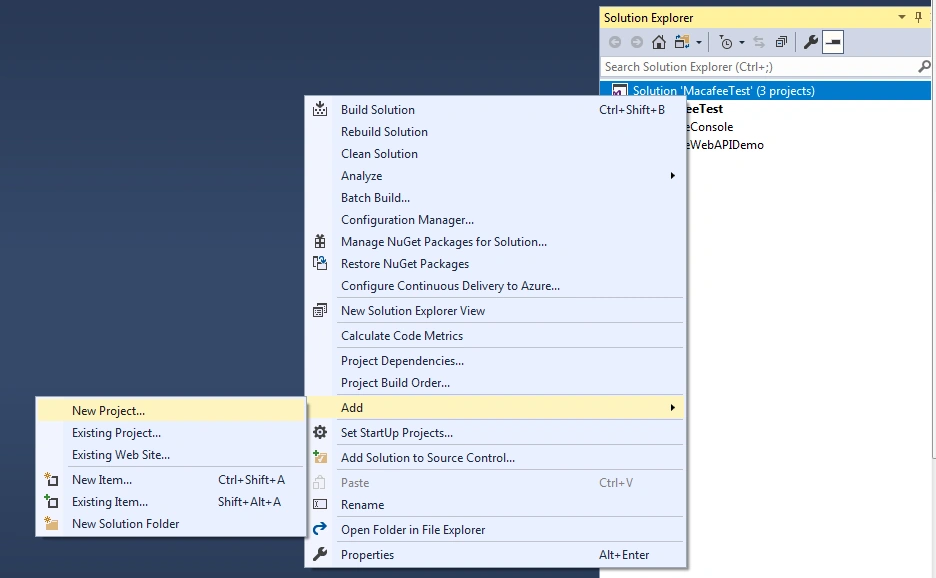
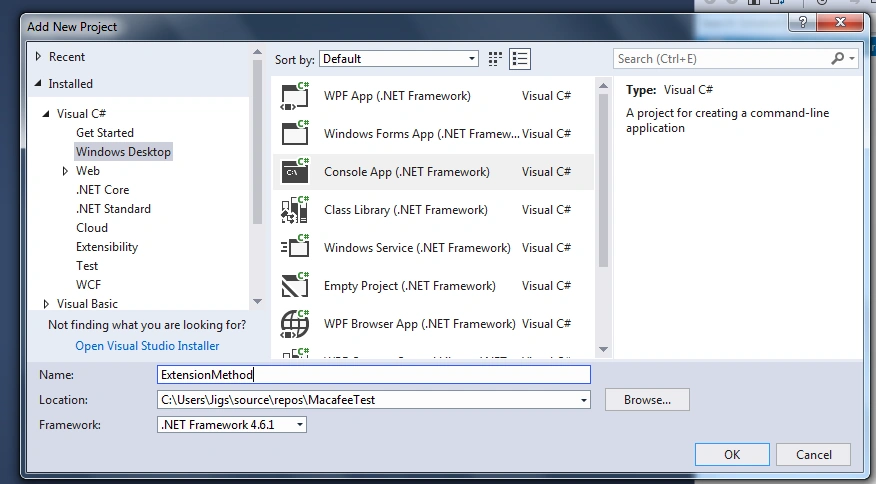
Go to Add and click on New project then give project Name as ExtensionMethod and click on ok.
Step 3
Click on add new items and add new class.
Step 4
Write Extension method for long type.
- public static class LongExtension
- {
- public static string FormatNumberKMB(this long num)
- {
- if (num >= 100000000000)
- {
- return (num / 1000000000).ToString("0.#B");
- }
- if (num >= 1000000000)
- {
- return (num / 1000000000).ToString("0.##B");
- }
- if (num >= 100000000)
- {
- return (num / 1000000).ToString("0.#M");
- }
- if (num >= 1000000)
- {
- return (num / 1000000).ToString("0.##M");
- }
- if (num >= 100000)
- {
- return (num / 1000).ToString("0.#k");
- }
- if (num >= 10000)
- {
- return (num / 1000).ToString("0.##k");
- }
- if (num >= 1000)
- {
- return (num / 1000).ToString("0.#k");
- }
- return num.ToString("#,0");
- }
- }
Step 5
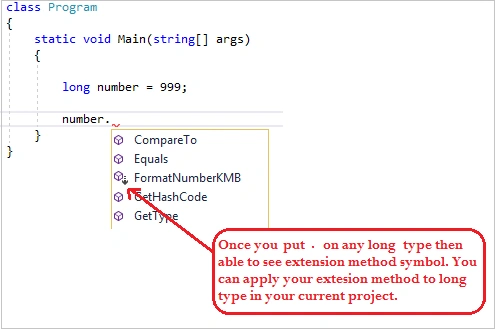
After adding extension method put logic with static method inside static class. As in the below image all long type numbers are applicable to use the above-created extension method. Once applied to any long type then this method will be able to be used on long type.
Step 6
How to use long extension method in application.
- class Program
- {
- static void Main(string[] args)
- {
- long number = 999;
- Console.WriteLine(number.ToString() + " Shorten To " + number.FormatNumberKMB());
- Console.WriteLine("-----------------------------------");
- number = 1000;
- Console.WriteLine(number.ToString() + " Shorten To " + number.FormatNumberKMB());
- Console.WriteLine("-----------------------------------");
- number = 12000;
- Console.WriteLine(number.ToString() + " Shorten To " + number.FormatNumberKMB());
- Console.WriteLine("-----------------------------------");
- number = 110000;
- Console.WriteLine(number.ToString() + " Shorten To " + number.FormatNumberKMB());
- Console.WriteLine("-----------------------------------");
- number = 1120000;
- Console.WriteLine(number.ToString() + " Shorten To " + number.FormatNumberKMB());
- Console.WriteLine("-----------------------------------");
- number = 12300000;
- Console.WriteLine(number.ToString() + " Shorten To " + number.FormatNumberKMB());
- Console.WriteLine("-----------------------------------");
- number = 123400000;
- Console.WriteLine(number.ToString() + " Shorten To " + number.FormatNumberKMB());
- Console.WriteLine("-----------------------------------");
- number = 1234560000;
- Console.WriteLine(number.ToString() + " Shorten To " + number.FormatNumberKMB());
- Console.WriteLine("-----------------------------------");
- number = 12345670000;
- Console.WriteLine(number.ToString() + " Shorten To " + number.FormatNumberKMB());
- Console.WriteLine("-----------------------------------");
- number = 123456780000;
- Console.WriteLine(number.ToString() + " Shorten To " + number.FormatNumberKMB());
- Console.WriteLine("-----------------------------------");
- Console.ReadLine();
- }
- }
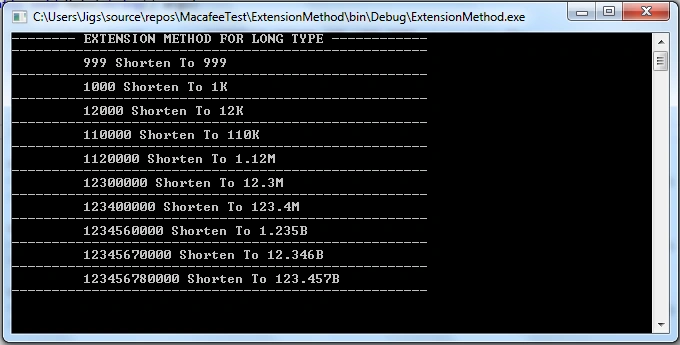
Let's have a look at the final result for the above scenarios.
Conclusion
Extension method allows you to add a new method without creating a new derived type, and without changing existing type. Here I have created long data types. In the same way you can create other types like int, decimal, string etc. I hope this article will help you to understand extension method with real time examples.
anand sharmaPosted Jun 13, 2021, 3:55 PM
Useful Article
Sean FranklinPosted Mar 27, 2020, 6:24 PM
Thank you for sharing. This gives me ideas for my own code, where I didn't think to use extension methods!
Rathrola Prem KumarPosted Jan 27, 2020, 6:24 PM
nice article
Jignesh KumarPosted Jan 25, 2020, 7:43 PM
Thank you so much
Sourav Kumar DasPosted Jan 25, 2020, 12:35 PM
Nice and informative article Sir.
Jignesh KumarPosted Jan 25, 2020, 10:21 AM
Thank you so much
Pritesh MaturkarPosted Jan 25, 2020, 9:50 AM
It is very article and Very useful. Thank you for sharing