

In modern Angular applications, seamless communication between components is essential. When dealing with loosely coupled components that aren't directly related (e.g., parent-child), RxJS Subjects offers an elegant solution for real-time data sharing. This article walks through a real-world use case: implementing a notification system where one component sends notifications and another receives them in real-time. We'll explore the best practices, optimizations, and pitfalls to avoid when working with Subjects.
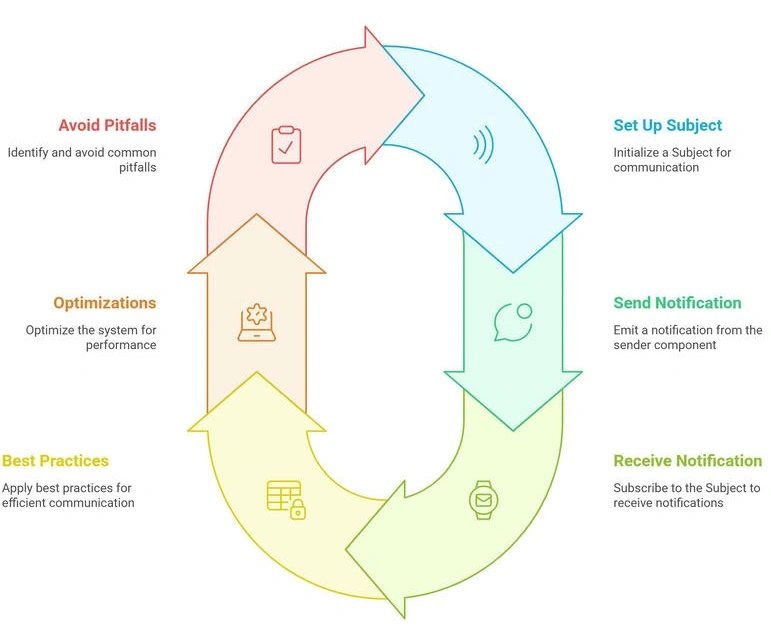
What is a Subject?
A Subject is a special kind of Observable in RxJS that acts as both a data producer and consumer. Unlike regular observables, Subjects allow multicasting, meaning multiple subscribers receive the same data stream simultaneously. This is particularly useful for,
- Real-time notifications
- Chat applications
- Live data updates (e.g., stock prices, dashboards)
- Event-driven architectures
How Does it Work?
A Subject maintains an internal state and pushes new data to all its subscribers whenever .next(value) is called. Any component subscribing to it immediately receives the latest emitted value.
Application Overview
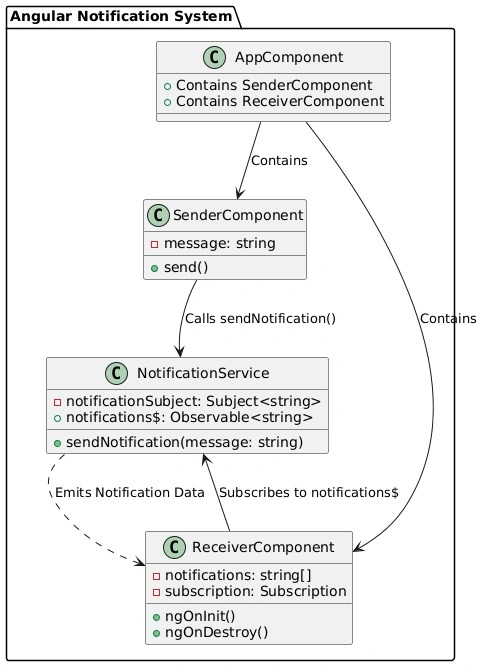
We will build a simple notification system with two components.
- SenderComponent: Allows the user to send notifications.
- ReceiverComponent: Listens and displays notifications in real-time.
Features
- Real-time notification updates using Subjects
- Decoupled architecture (Sender & Receiver have no direct dependencies)
- Memory management best practices (handling subscriptions properly)
Create the Notification Service
We start by creating a service to manage and distribute notifications using an RxJS Subject.
// notification.service.ts
import { Injectable } from '@angular/core';
import { Subject } from 'rxjs';

@Injectable({ providedIn: 'root' })
export class NotificationService {
  private notificationSubject = new Subject<string>();
  notifications$ = this.notificationSubject.asObservable();

  // Function to send a notification
  sendNotification(message: string) {
    this.notificationSubject.next(message);
  }
}
- The notificationSubject stores and emits notifications.
- The notifications$ observable allows components to subscribe and react to updates.
Build the Sender Component
This component provides an input field where users can enter messages and send notifications.
// sender.component.ts
import { Component } from '@angular/core';
import { NotificationService } from './notification.service';

@Component({
  selector: 'app-sender',
  template: `
    <input [(ngModel)]="message" placeholder="Enter notification">
    <button (click)="send()">Send</button>
  `,
})
export class SenderComponent {
  message = '';

  constructor(private notificationService: NotificationService) {}

  send() {
    if (this.message.trim()) {
      this.notificationService.sendNotification(this.message);
      this.message = '';
    }
  }
}
- Uses two-way data binding (ngModel) for the input field.
- Calls sendNotification() to emit a new notification.
Build the Receiver Component
This component listens for incoming notifications and displays them in real time.
// receiver.component.ts
import { Component, OnInit, OnDestroy } from '@angular/core';
import { Subscription } from 'rxjs';
import { NotificationService } from './notification.service';

@Component({
  selector: 'app-receiver',
  template: `
    <h3>Notifications</h3>
    <ul>
      <li *ngFor="let notification of notifications">{{ notification }}</li>
    </ul>
  `,
})
export class ReceiverComponent implements OnInit, OnDestroy {
  notifications: string[] = [];
  private subscription!: Subscription;

  constructor(private notificationService: NotificationService) {}

  ngOnInit() {
    this.subscription = this.notificationService.notifications$.subscribe(
      (message) => this.notifications.push(message)
    );
  }

  ngOnDestroy() {
    this.subscription.unsubscribe();
  }
}
- Subscribes to notifications$ and updates the UI when new messages arrive.
- Unsubscribe in ngOnDestroy to prevent memory leaks.
Configure the App Module
Import necessary modules and declare components.
// app.module.ts
import { NgModule } from '@angular/core';
import { BrowserModule } from '@angular/platform-browser';
import { FormsModule } from '@angular/forms'; // Required for ngModel
import { AppComponent } from './app.component';
import { SenderComponent } from './sender.component';
import { ReceiverComponent } from './receiver.component';

@NgModule({
  declarations: [AppComponent, SenderComponent, ReceiverComponent],
  imports: [BrowserModule, FormsModule],
  bootstrap: [AppComponent],
})
export class AppModule {}
Update the App Component
Arrange the sender and receiver components side by side.
// app.component.ts
import { Component } from '@angular/core';

@Component({
  selector: 'app-root',
  template: `
    <div style="display: flex; gap: 20px; padding: 20px;">
      <app-sender></app-sender>
      <app-receiver></app-receiver>
    </div>
  `,
})
export class AppComponent {}
Best Practices
Unsubscribe to Prevent Memory Leaks
Use ngOnDestroy to clean up subscriptions.
Use the Async Pipe (Alternative)
Avoid manual subscriptions with the async pipe.
<!-- receiver.component.html -->
<li *ngFor="let notification of notifications$ | async">{{ notification }}</li>
// receiver.component.ts (alternative)
notifications$ = this.notificationService.notifications$;
Implement Error Handling
Always handle errors in subscriptions.
By leveraging RxJS Subjects, we’ve built a real-time notification system that allows components to communicate without direct dependencies. This approach is scalable, maintainable, and extensible, making it ideal for modern Angular applications.
Join the conversation! Your thoughts help the community grow.