

Introduction
Here, we will learn about reading XML file in Angular 8. Reading XML files is very important in certain circumstances, especially when the server returns the data in XML format.
We will use a static XML file stored in the local system in the assets folder of our project.
Prerequisites
- Basic knowledge of Angular 7
- Visual Studio Code installed on the system
- Angular CLI installed on the system
- NodeJS must be installed
XML File
- <?xml version="1.0" encoding="UTF-8"?>
- <Employee>
- <emp>
- <id>1</id>
- <name>Faisal</name>
- <gender>Male</gender>
- <mobile>514545</mobile>
- </emp>
- <emp>
- <id>2</id>
- <name>Bhavdip</name>
- <gender>Male</gender>
- <mobile>5431643</mobile>
- </emp>
- <emp>
- <id>3</id>
- <name>Irshad</name>
- <gender>Male</gender>
- <mobile>43265436</mobile>
- </emp>
- <emp>
- <id>4</id>
- <name>Keyur</name>
- <gender>Male</gender>
- <mobile>5435431</mobile>
- </emp>
- <emp>
- <id>5</id>
- <name>Tabish</name>
- <gender>Male</gender>
- <mobile>432656</mobile>
- </emp>
- </Employee>
Create a new project in Angular 8 by typing the following command.
- ng new read-xml-angular8 --routing
- npm install timers
This package is necessary for reading an XML file with xml2js package.
Open the index.html present at root folder and add a reference for Bootstrap and jQuery.
- <!doctype html>
- <html lang="en">
- <head>
- <meta charset="utf-8">
- <title>ReadXmlAngular8</title>
- <base href="/">
- <meta name="viewport" content="width=device-width, initial-scale=1">
- <link rel="icon" type="image/x-icon" href="favicon.ico">
- <link rel="stylesheet" href="https://maxcdn.bootstrapcdn.com/bootstrap/4.3.1/css/bootstrap.min.css">
- <script src="https://ajax.googleapis.com/ajax/libs/jquery/3.4.1/jquery.min.js"></script> <script src="https://cdnjs.cloudflare.com/ajax/libs/popper.js/1.14.7/umd/popper.min.js"></script> <script src="https://maxcdn.bootstrapcdn.com/bootstrap/4.3.1/js/bootstrap.min.js"></script>
- </head>
- <body>
- <app-root></app-root>
- </body>
- </html>
Open the app.component.ts file and add the following code in it.
- import { Component } from '@angular/core';
- import xml2js from 'xml2js';
- import { HttpClient, HttpHeaders } from '@angular/common/http';
- @Component({
- selector: 'app-root',
- templateUrl: './app.component.html',
- styleUrls: ['./app.component.css']
- })
- export class AppComponent {
- title = 'read-xml-angular8';
- public xmlItems: any;
- constructor(private _http: HttpClient) { this.loadXML(); }
- loadXML() {
- this._http.get('/assets/users.xml',
- {
- headers: new HttpHeaders()
- .set('Content-Type', 'text/xml')
- .append('Access-Control-Allow-Methods', 'GET')
- .append('Access-Control-Allow-Origin', '*')
- .append('Access-Control-Allow-Headers', "Access-Control-Allow-Headers, Access-Control-Allow-Origin, Access-Control-Request-Method"),
- responseType: 'text'
- })
- .subscribe((data) => {
- this.parseXML(data)
- .then((data) => {
- this.xmlItems = data;
- });
- });
- }
- parseXML(data) {
- return new Promise(resolve => {
- var k: string | number,
- arr = [],
- parser = new xml2js.Parser(
- {
- trim: true,
- explicitArray: true
- });
- parser.parseString(data, function (err, result) {
- var obj = result.Employee;
- for (k in obj.emp) {
- var item = obj.emp[k];
- arr.push({
- id: item.id[0],
- name: item.name[0],
- gender: item.gender[0],
- mobile: item.mobile[0]
- });
- }
- resolve(arr);
- });
- });
- }
- }
Here is the code for app.component.html file.
- <div class="container">
- <table class="table table-bordered table-hover">
- <tr>
- <th>Id</th>
- <th>Name</th>
- <th>Gender</th>
- <th>Mobile</th>
- </tr>
- <tr *ngFor="let item of xmlItems">
- <td>{{item.id}}</td>
- <td>{{item.name}}</td>
- <td>{{item.gender}}</td>
- <td>{{item.mobile}}</td>
- </tr>
- </table>
- </div>
Finally, add the HttpClientModule reference in the app.module.ts file and that’s it.
- import { BrowserModule } from '@angular/platform-browser';
- import { NgModule } from '@angular/core';
- import { AppRoutingModule } from './app-routing.module';
- import { AppComponent } from './app.component';
- import { HttpClientModule } from '@angular/common/http';
- @NgModule({
- declarations: [
- AppComponent
- ],
- imports: [
- BrowserModule,
- AppRoutingModule,
- HttpClientModule
- ],
- providers: [],
- bootstrap: [AppComponent]
- })
- export class AppModule { }
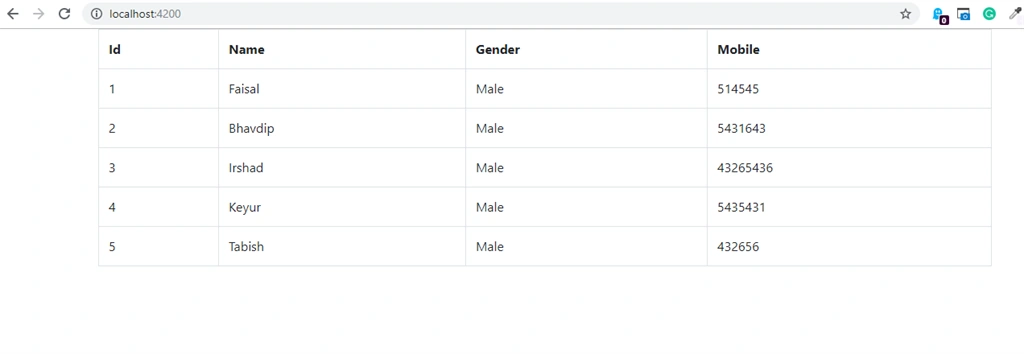
Output
Please give your valuable feedback/comments/questions about this
article. Please let me know if you liked and understood this article and
how I could improve it.
Riddhi ValechaPosted Jan 8, 2021, 6:33 PM
Hello Team, Could please anyone guide on how to do this in Visual Studio 2017 instead if Visual Studio Code ? I have a web api,, that I need to convert to .NET Object and display the results in table format.
pranjal sharmaPosted Jul 6, 2020, 12:34 PM
I need to dynamically populate dropdown menu items while fetching those menu items from xml in angular 9
Mohanraj KaliappanPosted Jul 27, 2019, 7:43 AM
Good Article
Amit MohantyPosted Jul 25, 2019, 12:06 AM
Good one..