

Introduction
In this article we will see how to read RSS feed using MVC.
Let us start step-by -:
Step 1: Firstly, we create an MVC Application. To create new MVC Application follow the below given steps.
Let us start step-by -:
Step 1: Firstly, we create an MVC Application. To create new MVC Application follow the below given steps.
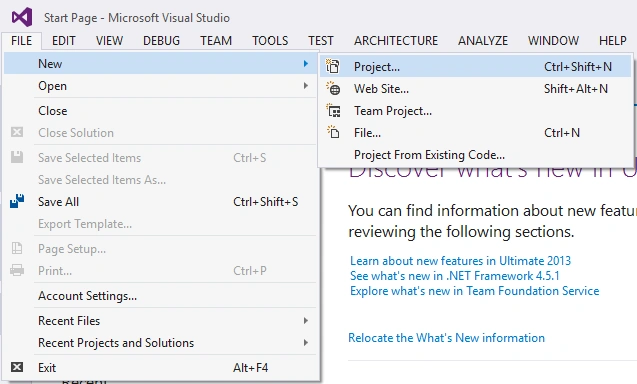
- Click FILE, New, then Project or press CTRL + SHIFT + N.
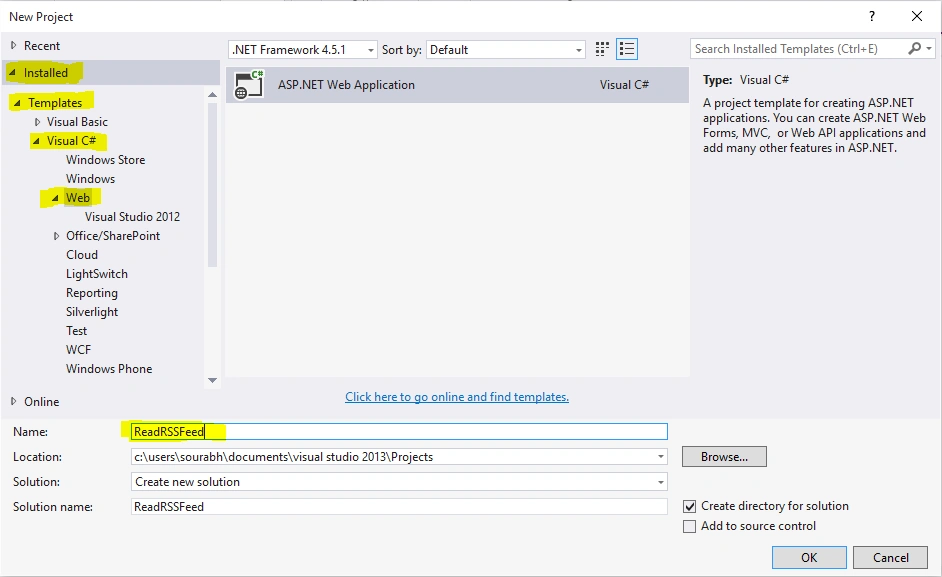
- Then one DialogBox will open for new project, go to Installed, Templates, Visual C#, then Web and select ASP .NET Web Application and give name to the project (like ReadRSSFeed) and click on OK button.
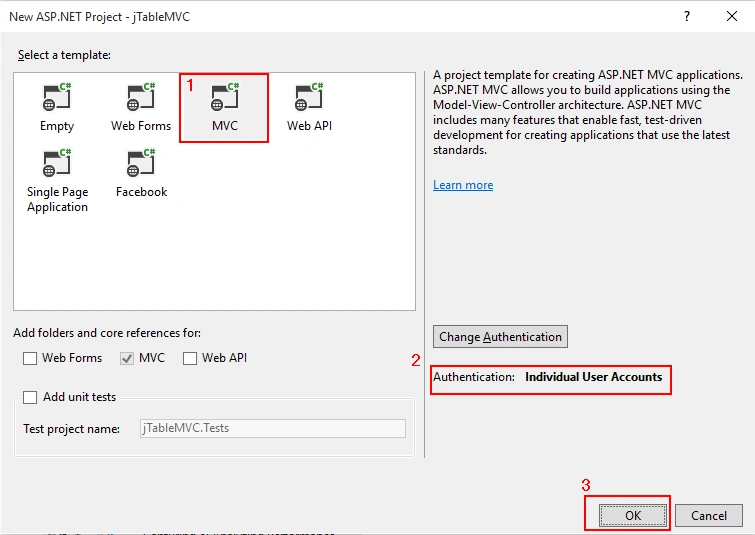
- After clicking on OK button one more dialog box will open from that dialog box. Select MVC as a project template, then Authentication to Individual User Accounts and then press OK.
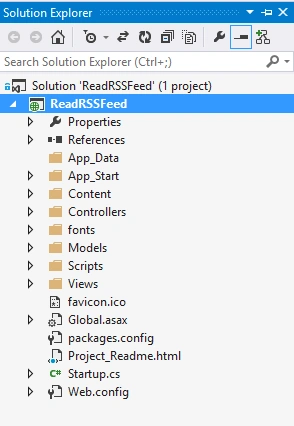
Step 2: After creating project your complete project file will be as follows in the Solution Explorer.
Step 3: Now add a model class using the following steps:
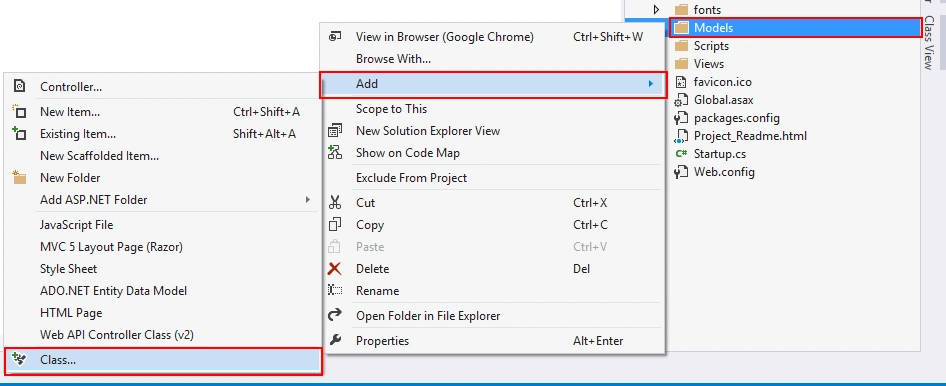
- Right click on the Models Folder.
- Click on Add, then Class.
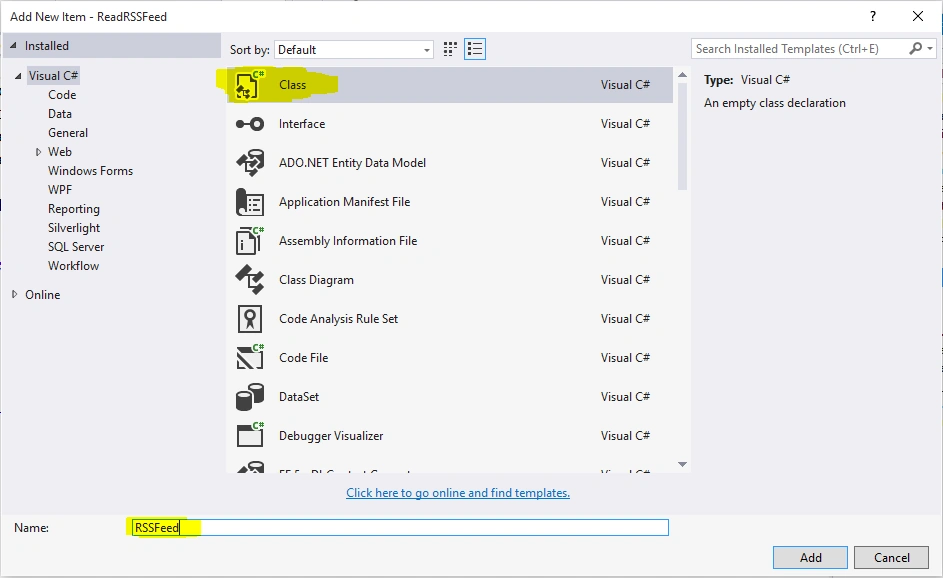
- Give the class name as RSSFeed.
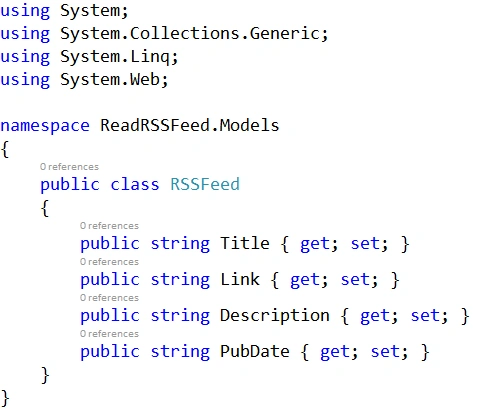
Step 4: Write the following code in RSSFeed.cs:
Step 5: Now add Empty RSSFeedController to your project. To Add RSSFeedController you can follow the below steps,
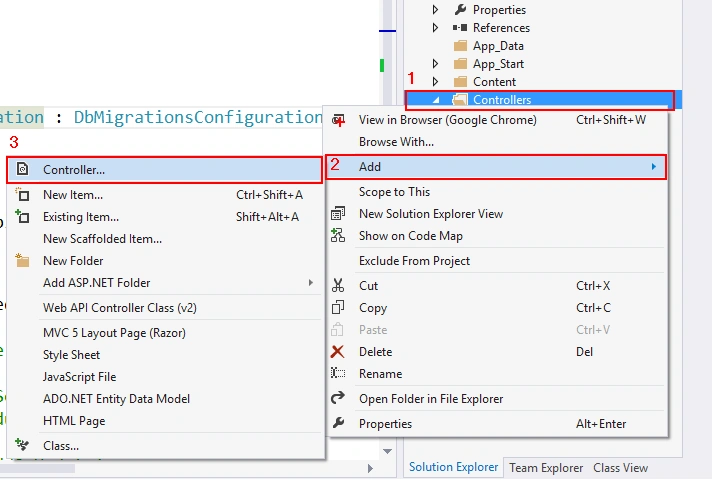
- Right Click on Controllers Folder.
- Click Add, then Controller.
- Now one dialog box will open for Add Scaffolding. Select MVC 5 Controller - Empty.
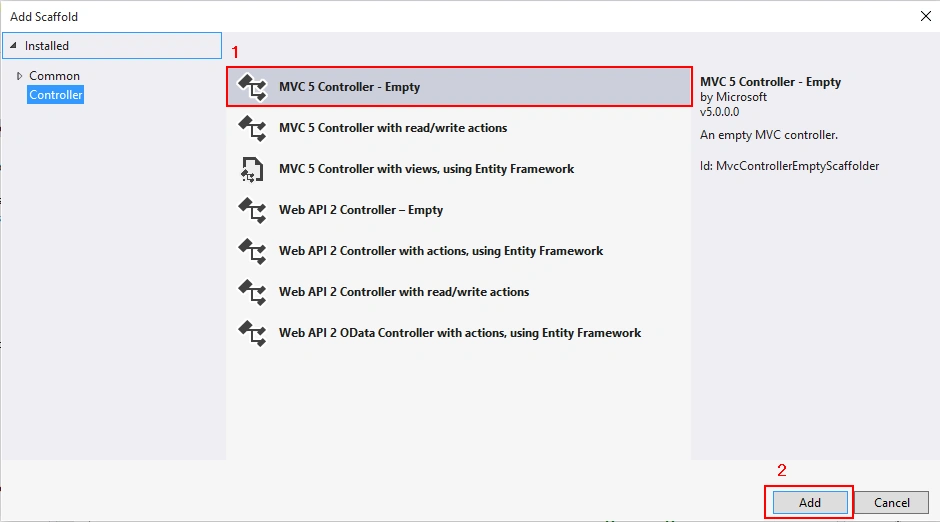
- Now give the name to the Controller as RSSFeedController.
Step 6: Write the following code in RSSFeedController.
- using ReadRSSFeed.Models;
- using System;
- using System.Collections.Generic;
- using System.Linq;
- using System.Net;
- using System.Web;
- using System.Web.Mvc;
- using System.Xml.Linq;
- namespace ReadRSSFeed.Controllers
- {
- public class RSSFeedController : Controller
- {
- public ActionResult Index()
- {
- return View();
- }
- [HttpPost]
- public ActionResult Index(string RSSURL)
- {
- WebClient wclient = new WebClient();
- string RSSData=wclient.DownloadString(RSSURL);
- XDocument xml = XDocument.Parse(RSSData);
- var RSSFeedData = (from x in xml.Descendants("item")
- select new RSSFeed
- {
- Title = ((string)x.Element("title")),
- Link = ((string)x.Element("link")),
- Description = ((string)x.Element("description")),
- PubDate = ((string)x.Element("pubDate"))
- });
- ViewBag.RSSFeed = RSSFeedData;
- ViewBag.URL = RSSURL;
- return View();
- }
- }
- }
- Extend View folder open you will get RSSFeed Folder.
- Right click on RSSFeed Folder.
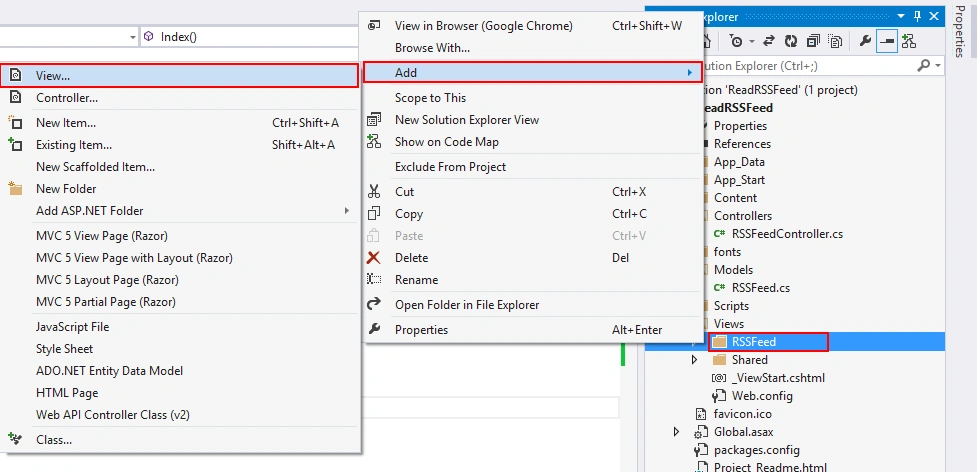
- Now give the name of the view as "Index" and Select Empty Template. Then click on Add Button.
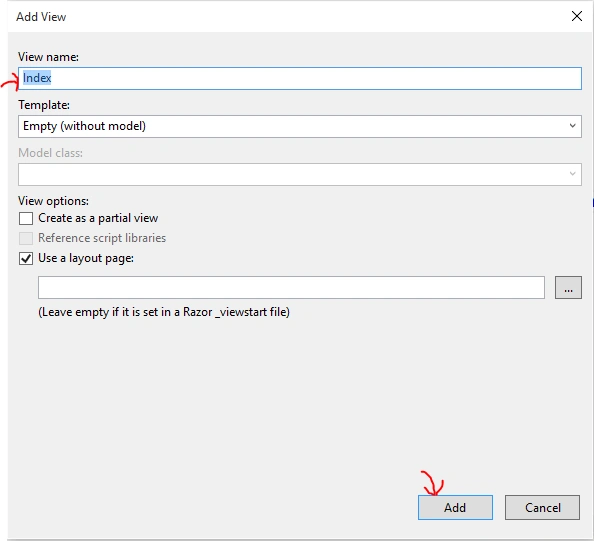
Step 8: Write the following code to this created view:
- @{
- ViewBag.Title = "Index";
- }
- <br />
- <h2>RSS Feed Reader</h2>
- <hr />
- <br />
- @using (Html.BeginForm())
- {
- <input type="URL" name="RSSURL" placeholder="Enter RSS Feed URL Here..." class="form-control" value="@ViewBag.URL" style="min-width:100%" />
- <br />
- <input type="submit" class="btn btn-danger" />
- }
- <table class="table table-hover">
- <thead>
- <tr>
- <th>Title</th>
- <th>Link</th>
- <th>Description</th>
- <th>Publish Date</th>
- </tr>
- </thead>
- <tbody>
- @if (ViewBag.RSSFeed != null)
- {
- foreach (var item in ViewBag.RSSFeed)
- {
- <tr>
- <td>@item.Title</td>
- <td><a href="@item.Link">@item.Link</a></td>
- <td>@item.Description</td>
- <td>@item.PubDate</td>
- </tr>
- }
- }
- </tbody>
- </table>
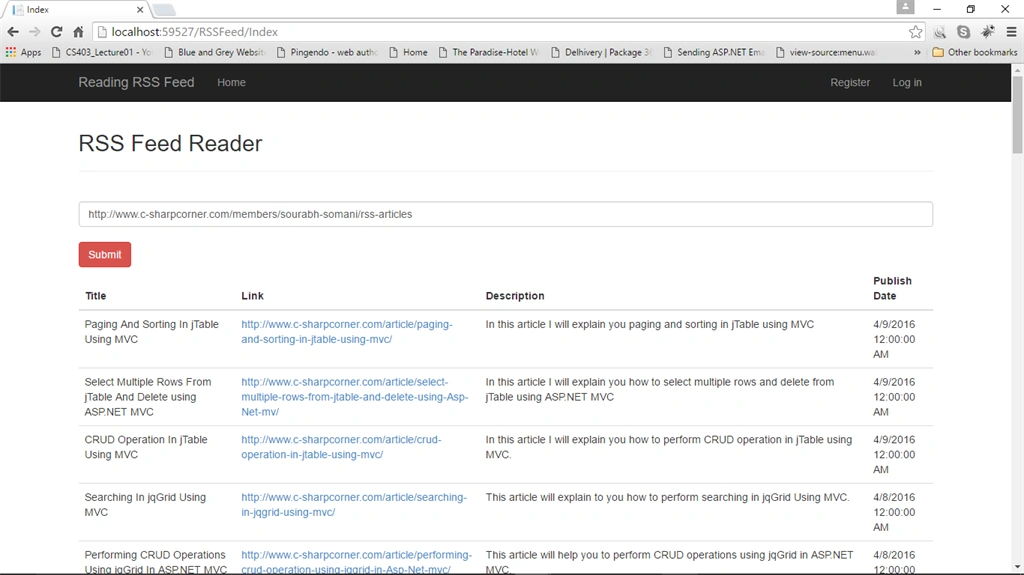
Step 9: Now run the project
Output :
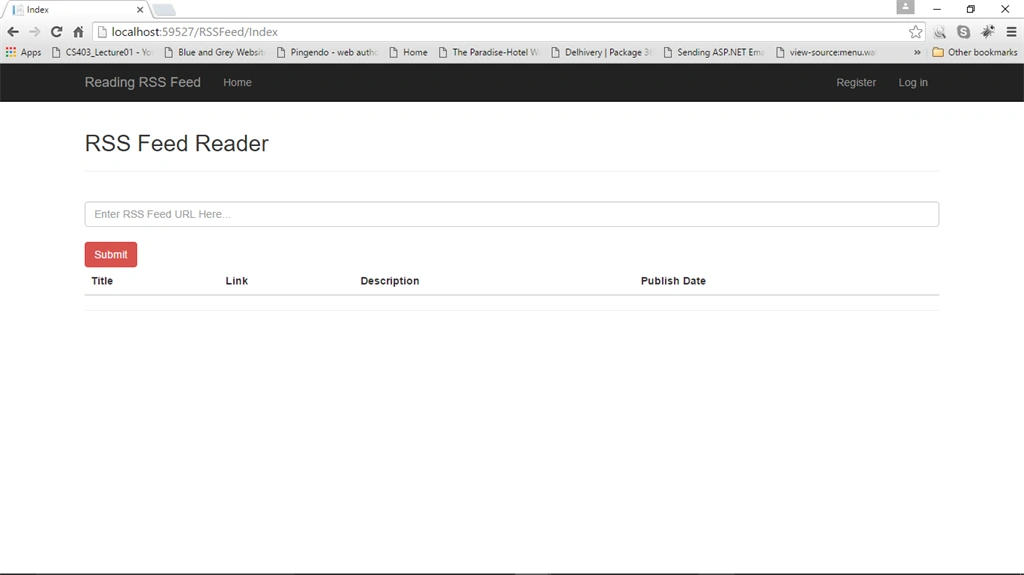
Read more articles on MVC:
Kurian ThomasPosted Nov 5, 2019, 2:26 AM
Do u know about linkedin rss feed to asp.net webpage connection ..feed coming daily then not login daily
Tony TrappPosted Jul 28, 2019, 10:56 PM
One more thing this is a ATOM feed not rss feed
Tony TrappPosted Jul 28, 2019, 10:53 PM
Public ActionResult NewReleases() { //WebClient wclient = new WebClient(); //string RSSData = wclient.DownloadString("https://theater.aebn.net/feed/topNewReleases?categoryId=687&theaterId=50898&genreId=102"); XDocument xml = XDocument.Load("https://theater.aebn.net/feed/topNewReleases?categoryId=687&theaterId=50898&genreId=102"); var RSSFeedData = (from x in xml.Descendants("entry") select new newreleaes { title = ((string)x.Element("title")), id = ((string)x.Element("id")), summary = ((string)x.Element("summary")), updated = ((string)x.Element("updated")) }); ViewBag.newreleaes = RSSFeedData; //ViewBag.URL = RSSURL; return View(); }
Tony TrappPosted Jul 28, 2019, 10:50 PM
Hi Sourabh, got a question, instead of posting to a form , how about just load the xml document only ?
Karen HyunJaePosted Jan 9, 2019, 10:32 AM
I followed the instructions and runned the same link bt i got this error: System.Xml.XmlException: 'Reference to undeclared entity 'nbsp'. Line 17, position 1635.'
Bill SpangPosted May 17, 2018, 6:23 PM
Getting this error in browser: The 'p' start tag on line 97 position 142 does not match the end tag of 'div'. Line 97, position 336.
Caleb MillerPosted May 16, 2018, 11:06 AM
Thanks for the tutorial. It was the first I could find on doing this in the latest version of MVC! To any other readers, if your description comes back as HTML, you must wrap the Razor HTMLString function around the @item.description in the view. Here is what my code looked like after I did that: <tr> @*<td>@item.Image</td>*@ <td>@(new HtmlString(@item.Title))</td> <td><a href="@item.Link" target="_blank">@item.Link</a></td> <td>@(new HtmlString(@item.Description))</td> <td>@item.PubDate</td> </tr>
Bellezze AppsPosted Jan 29, 2017, 8:56 PM
Hi there, great job! What if you wanted to display an RSS link (i.e. https://www.somesite.com/rss) automatically in the table, rather than having users submit an RSS link? What exactly would change in the above code?
VinayakPosted Jun 16, 2016, 11:33 PM
string RSSDATA = webclient.DownloadString(RSSURL); at this line im getting the error. the browser sends request but not getting output .is there any other configuration to be done?
VinayakPosted Jun 16, 2016, 2:58 AM
tried but get error Unable to connect to the remote server.
Mohammed IbrahimPosted Apr 11, 2016, 1:56 PM
nice
Kuppurasu NagarajPosted Apr 11, 2016, 1:23 PM
Nice Sharing
Gowtham KPosted Apr 11, 2016, 11:28 AM
Nice Share:)
NitinPosted Apr 11, 2016, 11:23 AM
Good one. Thanks for sharing.
Muhammad Aqib ShehzadPosted Apr 11, 2016, 11:07 AM
nice one dear