

In my previous articles, I have written about retrieving emails from folders and fetching access tokens and users/groups, etc. I have added the links below for your reference. Please go through these before following the steps given in this write-up.
- How To Fetch Access Token
- Getting User Properties From Office 365 Using Microsoft Graph API
- Send Email Using Microsoft Graph API From SharePoint Online
- Upload And Set Office 365 Profile Image Using Microsoft Graph API
- Retrieve site collections and subsites using Microsoft Graph API
- Retrieve Mailbox Folders Using Microsoft Graph API
Retrieve Emails From Mail Folders
- EndPoint - https://graph.microsoft.com/v1.0/users/{{userid}}/mailFolders/{{Foldername}}/Messages
- Usage - It retrieves all your emails from a selected folder from your mailbox
Tested in the Graph Explorer, it returns the JSON data like below. In this article, we are going to retrieve emails from the Inbox folder.
https://graph.microsoft.com/v1.0/users/{{userid}}/mailFolders/Inbox/messages
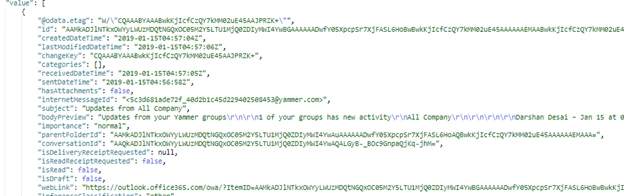
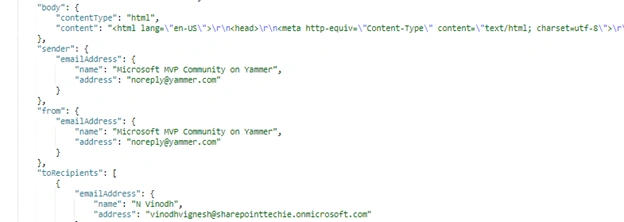
It returns all the properties of the mail like From, To, CC, Subject, Body, Conversation Id, Weblink, and a lot more.
So let's see how to retrieve this programmatically using JavaScript.
Please follow my previous article, How to fetch access token, to authenticate your web application to fetch the access token and authenticate.
Step 1 - Fetch Access Token
AuthUrl: https://login.microsoftonline.com/{{tenant}}/oauth2/v2.0/token
Type: POST
var token; // Initialize Globally
function requestToken() {
    $.ajax({
        "async": true,
        "crossDomain": true,
        "url": "https://howling-crypt-47129.herokuapp.com/https://login.microsoftonline.com/sharepointtechie.onmicrosoft.com/oauth2/v2.0/token", // Pass your tenant name instead of sharepointtechie
        "method": "POST",
        "headers": {
            "content-type": "application/x-www-form-urlencoded"
        },
        "data": {
            "grant_type": "client_credentials",
            "client_id ": "8baf0301-27df-44b1-b4fe-7911b9a918de", //Provide your app id
            "client_secret": "tZ76oVPN039WlWPoAp+1aICq66vs7oUtE4lhDQYwxGY=", //Provide your secret
            "scope ": "https://graph.microsoft.com/.default"
        },
        success: function(response) {
            log(response);
            token = response.access_token; //Store the token into global variable
        },
        error: function(error) {
            log(JSON.stringify(error));
        }
    })
}
The successful response is below,

So now create a function "RetrieveMessagesFromFolder", then pass the access token into the header.
EndPoint
https://graph.microsoft.com/v1.0/users/{{userid}}/mailFolders/{{Folderid}}/Messages
Method
GET
Code
function RetrieveMessagesFromFolder() {
    $.ajax({
        method: 'GET',
        url: "https://graph.microsoft.com/v1.0/users/[email protected]/mailFolders/Inbox/Messages",
        headers: {
            'Authorization': 'Bearer ' + token,
            'Content-Type': 'application/json'
        },
    }).success(function(response) {

        var data = response.value;
         console.log(data);
        //  data.map(function(folderinfo){
        //      $('#display').append('<li>'+ folderinfo.displayName+ '</li>');
        //  })

          }).error(function(error) {});
}
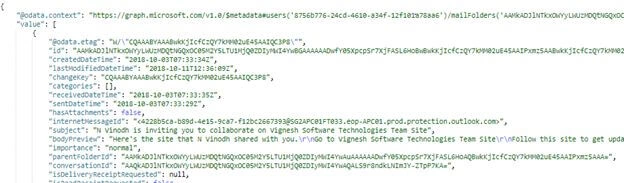
HTTP "200", success -- it returns the JSON data Below,

Then apply .map to iterate over the response and display it on the page
Full Code
<script src = "https://ajax.aspnetcdn.com/ajax/jQuery/jquery-3.3.1.min.js" > < /script>   < script type = "text/javascript" >
    var token;
$(document).ready(function() {
    requestToken();
});

function requestToken() {
    $.ajax({
        "async": true,
        "crossDomain": true,
        "url": "https://howling-crypt-47129.herokuapp.com/https://login.microsoftonline.com/sharepointtechie.onmicrosoft.com/oauth2/v2.0/token", // Pass your tenant name instead of sharepointtechie
        "method": "POST",
        "headers": {
            "content-type": "application/x-www-form-urlencoded"
        },
        "data": {
            "grant_type": "client_credentials",
            "client_id ": "8baf0301-27df-44b1-b4fe-7911b9a918de", //Provide your app id
            "client_secret": "tZ76oVPN039WlWPoAp+1aICq66vs7oUtE4lhDQYwxGY=", //Provide your secret
            "scope ": "https://graph.microsoft.com/.default"
        },
        success: function(response) {
            console.log(response);
            token = response.access_token;
            //     console.log(token);
            RetrieveMessagesFromFolder();
        },
        error: function(error) {
            console.log(JSON.stringify(error));
        }
    })
}

function RetrieveMessagesFromFolder() {
    $.ajax({
        method: 'GET',
        url: "https://graph.microsoft.com/v1.0/users/[email protected]/mailFolders/Inbox/Messages",
        headers: {
            'Authorization': 'Bearer ' + token,
            'Content-Type': 'application/json'
        },
    }).success(function(response) {
        var data = response.value;
        console.log(data);
        data.map(function(mailmessages) {
            $('#display').append('<li>From: ' + mailmessages.from.emailAddress.address + ', </br></br> Subject: ' + mailmessages.subject + ', </br></br> Body: ' + mailmessages.body.content + '</li>');
        })
    }).error(function(error) {});
}
</script>
<ul id = "display" >
</ul>
The final result is on the screen below, I have bound the body content as HTML from the response
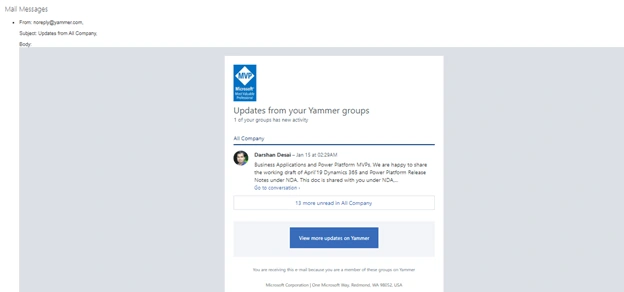
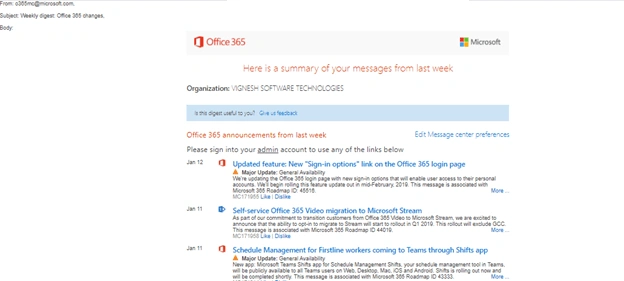
So now, we are able to retrieve the mail from the folders using Microsoft Graph API.
Here is the change that works well for system generated folders. If you need to retrieve the custom created folder messages from your mailbox, you need to pass the "mail folder id" instead of passing the generic folder name.
For an example, see below.
EndPoint: https://graph.microsoft.com/v1.0/users/{{userid}}/mailFolders/
Response

EndPoint: https://graph.microsoft.com/v1.0/users/{{userid}}/mailFolders/{{Folderid}}/messages
Response
Now, you are able to understand how to retrieve emails from the mail folders using Microsoft Graph API.
Happy SharePointing!
Athena RicePosted Jul 12, 2021, 4:20 AM
Hey mate, I wanted to DM this to you, but I need 100 points and it's too hard to collect points. You need to remove the API keys from all your articles / code mate. The API keys you provided are valid and let me connect to your Azure instance. If that's too much work, please revoke / cycle the API keys. Good luck :)
Saurav KumarPosted May 28, 2020, 3:11 PM
I Access token also users api call but my mail api unauthorized 401 error