

About TypeScript
Those very new to TypeScript, here are some basics of TypeScript. TypeScript is a strongly typed, object-oriented, compiled language. It is an open-source programming language developed and maintained by Microsoft. It is said to be a strict syntactical superset of JavaScript and adds optional static typing to the language. TypeScript is designed for development of large applications and transcompiles to JavaScript.
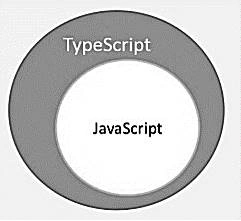
In simple words, if we are writing code in TypeScript and the extension for saving code is .ts. Then, using transpiler (TypeScript Compiler) we are converting this to JavaScript and then only the execution is done.
Basic Types- Boolean
- g let isValid:boolean
- Number
- g let age:number
- String
- g let name:string
- Array
- g let days:string[]
- Tuple
- let x: [string, number];
- Any
- let customer: any;
- addNumbers(num1:number, num2:number):number{
- return num1+num2;
- }
- class Employee {
- private firstName: string;
- private lastName: string;
- private email: string;
- private address: string;
- Constructor(firstName:string, lastName:string, email:string, address:string){
- This.firstName = firstName;
- This.lastName = lastName;
- This.address = address;
- }
- }
- interface Vehicle {
- color: string;
- make: string;
- }
- class Car implements Vehicle {
- color: string;
- make: string;
- constructor(color: string, make:string) {
- this.color = color;
- this.make = make;
- }
- }
Generic class
- class GenericNumber<T> {
- zeroValue: T;
- add: (x: T, y: T) => T;
- }
- let myGenericNumber = new GenericNumber<number>();
- myGenericNumber.zeroValue = 0;
- myGenericNumber.add = function(x, y) { return x + y; };
- Generic function
- getData<T>(arg: T): T {
- return arg;
- }
- let countryName = getData<string>("india");
- let countryCode = getData<number>(91);
For more information, please visit here.
About ReactJS
React.js is a component-based UI development framework. React is useful not only for developing the web application but with it, we can develop native mobile apps as well. To understand more about web applications, please visit here and for the mobile native apps, go here.
React with TypeScript
First, we can set up the environment. The following two npm commands can easily build a sample application.
npm install -g create-react-app
npx create-react-app react-ts-app --scripts-version=react-scripts-ts A
Now, just go to the folder react-ts-app using the following command.
After the installation is done, use any IDE to open the application. I am using Visual Studio Code as this is free and light-weight.
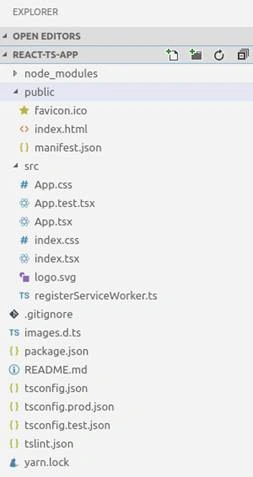
Open app.tsx and modify.
- import * as React from 'react';
- import './App.css';
- class App extends React.Component {
- public render() {
- return (
- <div className="App">
- <header className="App-header">
- <h1 className="App-title">React with typescript</h1>
- </header>
- <p className="App-intro">
- This React application developed using typescript
- </p>
- </div>
- );
- }
- }
- export default App;
Use the below command to run the application.
npm start or yarn start
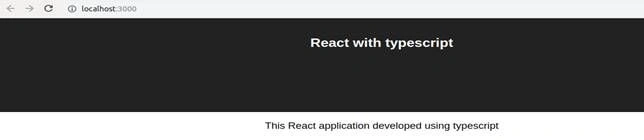
After successfully executing the basic application, now we can start exploring the folder structure and the way of execution.
- JSON
- contains script for application execution
- dependencies
- {
- "name": "react-ts-app",
- "version": "0.1.0",
- "private": true,
- "dependencies": {
- "react": "^16.6.3",
- "react-dom": "^16.6.3",
- "react-scripts-ts": "3.1.0"
- },
- "scripts": {
- "start": "react-scripts-ts start",
- "build": "react-scripts-ts build",
- "test": "react-scripts-ts test --env=jsdom",
- "eject": "react-scripts-ts eject"
- },
- "devDependencies": {
- "@types/jest": "^23.3.10",
- "@types/node": "^10.12.15",
- "@types/react": "^16.7.17",
- "@types/react-dom": "^16.0.11",
- "typescript": "^3.2.2"
- }
- }
- Public/index.html
- It is the main html page. <div id="root"></div> is a div where whole React application gets integrated.
- It is the main html page. <div id="root"></div> is a div where whole React application gets integrated.
- src/index.tsx
- This file contains the code which is actually used to read the HTML div element and integrate with the React code.
- import * as React from 'react';
- import * as ReactDOM from 'react-dom';
- import App from './App';
- import './index.css';
- import registerServiceWorker from './registerServiceWorker';
- ReactDOM.render(
- <App />,
- document.getElementById('root') as HTMLElement
- );
- registerServiceWorker();
- This file contains the code which is actually used to read the HTML div element and integrate with the React code.
- src/app.tsx
- The actual code of the first component written. So, if you want to start changing the application, this is the right place.
- import * as React from 'react';
- import './App.css';
- class App extends React.Component {
- public handleClick = () => {
- this.setState({ clicked: true });
- }
- public render() {
- return <div>
- <h1>welcome to react with typescript</h1>
- </div>;
- }
- }
- export default App;
- The actual code of the first component written. So, if you want to start changing the application, this is the right place.
- src/index.css
- We can add stylesheet for our application here only. There is only one difference between the HTML with CSS integration and TSX with CSS integration, that is, in HTML/CSS, we can write <div class=”sample”></div> and in CSS .sample{margin=12px;} this way. But in tsx/css, we can write <div className=”sample”></div> and in CSS .sample{margin=12px;}. Then only, our CSS reflects the changes.This is a React-specific change.
- src/app.test.tsx
- In this file, we can write unit tests related to the app components. Similarly, we can add a component and also, test a class for unit testing.
- import * as React from 'react';
- import * as ReactDOM from 'react-dom';
- import App from './App';
- it('renders without crashing', () => {
- const div = document.createElement('div');
- ReactDOM.render(<App />, div);
- ReactDOM.unmountComponentAtNode(div);
- });
- In this file, we can write unit tests related to the app components. Similarly, we can add a component and also, test a class for unit testing.
- JSON
- This file is used to compile TypeScript into JavaScript.
- {
- "compilerOptions": {
- "baseUrl": ".",
- "outDir": "build/dist",
- "module": "esnext",
- "target": "es5",
- "lib": ["es6", "dom"],
- "sourceMap": true,
- "allowJs": true,
- "jsx": "react",
- "moduleResolution": "node",
- "rootDir": "src",
- "forceConsistentCasingInFileNames": true,
- "noImplicitReturns": true,
- "noImplicitThis": true,
- "noImplicitAny": true,
- "importHelpers": true,
- "strictNullChecks": true,
- "suppressImplicitAnyIndexErrors": true,
- "noUnusedLocals": true
- },
- "exclude": [
- "node_modules",
- "build",
- "scripts",
- "acceptance-tests",
- "webpack",
- "jest",
- "src/setupTests.ts"
- ]
- }
- This file is used to compile TypeScript into JavaScript.
Summary
This was all about creating React application using TypeScript. To get more hands on this, please visit here.
Amit Kumar SinghPosted Jan 24, 2019, 12:23 AM
Hi Amit,Here g stands for --> g let isValid:boolean