

Introduction
React Table is a lightweight, fast and extendable data grid built for React.
Features of React table
- Lightweight at 11kb (and just 2kb more for styles)
- Fully customizable (JSX, templates, state, styles, callbacks)
- Client-side & Server-side pagination
- Multi-sort
- Filters
- Pivoting & Aggregation
- Minimal design & easily theme able
- Fully controllable via optional props and callbacks
Installation
$npm install react-table
import ReactTable from 'react-table'
import 'react-table/react-table.css'
- import ReactTable from 'react-table'
- import 'react-table/react-table.css'
- render() {
- const data = [{
- name: 'Tanner Linsley',
- age: 26,
- friend: {
- name: 'Jason Maurer',
- age: 23,
- }
- }, {
- ...
- }]
- const columns = [{
- Header: 'Name',
- accessor: 'name'
- }, {
- Header: 'Age',
- accessor: 'age',
- Cell: props => < span className = 'number' > {
- props.value
- } < /span>
- }, {
- id: 'friendName',
- Header: 'Friend Name',
- accessor: d => d.friend.name
- }, {
- Header: props => < span > Friend Age < /span>,
- accessor: 'friend.age'
- }]
- return <ReactTable
- data = {
- data
- }
- columns = {
- columns
- }
- />}
Simply pass the Data prop to anything that resembles an array or object. Client-side sorting and pagination are built in, and your table will update gracefully as you change any props. Server-side data is also supported!
- <ReactTable
- data={[...]}
- />
- const columns = [{
- Header: 'Information',
- accessor: 'information',
- Cell: e =><a href=”” </a>
- },
- {
- Header: 'RelevanceRegion',
- accessor: 'relevance'
- },
- {
- Header: 'Function',
- accessor: 'function'
- },
- {
- Header: 'SubFunction',
- accessor: 'sbfunction'
- },
- {
- Header: 'Type',
- accessor: 'infotype'
- },
- {
- Header:"Language",
- accessor:'language'
- },
- {
- Header:"Summary",
- accessor:'summary',
- show:false
- }
- ]
- <div >
- <span className={styles.resultspan}>Results</span>
- <div style={{display: this.state.resultItems.length==0 ? 'none':'block' }}>
- <ReactTable
- data={this.state.resultItems}
- columns={columns}
- minRows={1}
- sortable
- defaultSorted={[
- {
- id: "information",
- desc: true
- }
- ]}
- className="-highlight"
- SubComponent={row => {
- return (
- <div style={{'border':'1px solid rgba(0, 0, 0, 0.05)'}}>
- {row.row.summary}
- </div>
- )
- }}
- defaultExpanded={defaultExpandedRows}
- />
- </div>
- </div>
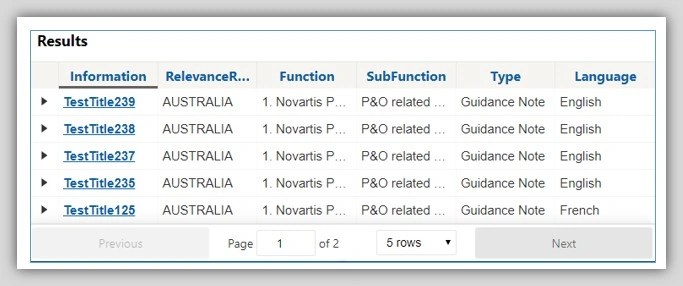
- React-table ships with a minimal and clean stylesheet to get you on your feet quickly.
- The stylesheet is located at react-table/react-table.css.
- There are countless ways to import a stylesheet. If you have questions on how to do so, consult the documentation of your build system.
- Adding a -striped className to ReactTable will slightly color odd numbered rows for legibility
- Adding a -highlight className to ReactTable will highlight any row as you hover over it
Sub Tables and Sub Components
By adding a Sub Component props, you can easily add an expansion level to all root-level rows:
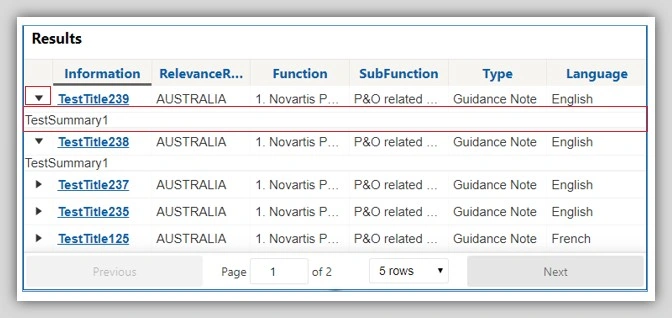
- <ReactTable
- data={data}
- columns={columns}
- defaultPageSize={10}
- SubComponent={row => {
- return (
- <div>
- You can put any component you want here, even another React Table! You even have access to the row-level data if you need! Spark-charts,
- drill-throughs, infographics... the possibilities are endless!
- </div>
- )
- }}
- />
Join the conversation! Your thoughts help the community grow.