

Introduction
This series will allow you to learn ReactJS and Redux thoroughly in a steady manner.
Also, to understand from the beginning, please go through with Part-One.
It will cover the following things.
- Implementation – Pass argument from one component to other
- Implementation – Pass data from state into render method
- Implementation – Extend the props (properties) in the app with the default values
- Implementation - Passing state between constructor and normal method in class and setting the state
Implementation – Pass argument from one component to other
- Here, we will create a couple of components – ‘App’ and ‘Message’.
- And, we will show you how to pass an argument from one component to another and how the other component accesses it
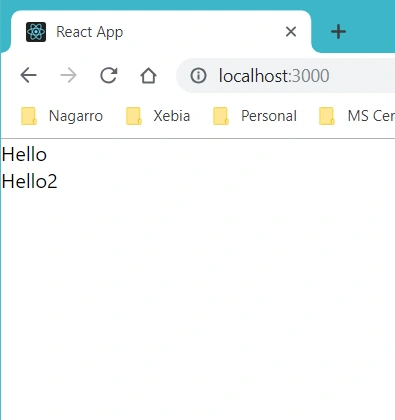
- Here, we added two properties, ‘message1’with value ‘Hello’, and ‘message2’ with value ‘Hello2’ and passed it to the calling of another component
- On the other side, component-2 accesses the props value through ‘this.props.property-name’ and shows it in the output
Example
Here, we have message component which will render the arguments passed from App component.
- import React, { Component } from "react";
- import logo from "./logo.svg";
- import "./App.css";
- class App extends React.Component {
- constructor() {
- super();
- }
- render() {
- return (
- <div>
- <MessageComponent message1="Hello" message2="Hello2" />
- </div>
- );
- }
- }
- class MessageComponent extends React.Component {
- render() {
- return (
- <div>
- <tr>
- <td>{this.props.message1}</td>
- </tr>
- <tr>
- <td>{this.props.message2}</td>
- </tr>
- </div>
- );
- }
- }
- export default App;
Output
Implementation – Pass data from the state into render method
- Here, we have created a state in the component with the basic object consisting of string and data value.
- Then, we are trying to access the data from the state into the render method using ‘this.state.property-name’ and then use it there.
Example
Here, we have only one component and pass the state data into the render method.
- import React, {Component } from "react";
- import logo from "./logo.svg";
- import "./App.css";
- class App extends React.Component {
- constructor(props) {
- super(props);
- this.state = {
- name: 'Gourav',
- date: new Date()
- }
- }
- render() {
- return (<div>
- <h1>{this.state.name}</h1>
- <h1>{this.state.date.toLocaleDateString()}</h1>
- </div>)
- }
- }
- export default App;
Output
Name and Date property will be printed.

Implementation – Extend the props (properties) in the app with the default values
- Here, we will show you how to apply types and provide default values to the properties of the component.
- So far, we have assigned the string prop and then used it in another component.
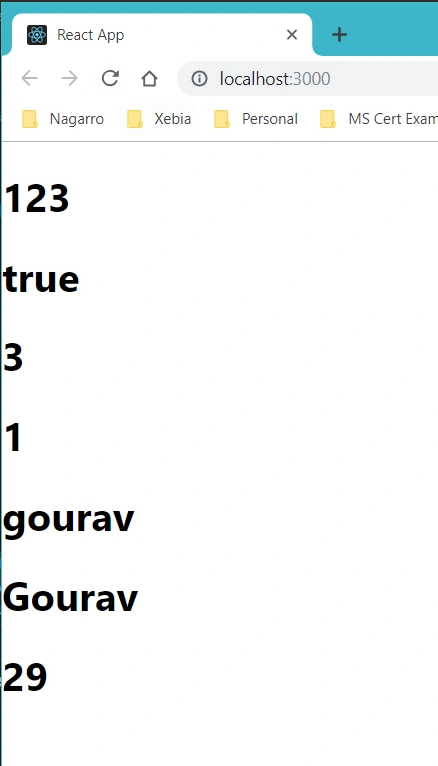
- But here, we have applied types on the properties by extending it after the component creation and here we have used all types of props be it Boolean, string, number, object, function, array etc.
- Then, after setting the types of properties, we have set the default values of the properties based on the type of property.
- Here, you can try one more thing, to set the property, not from its type, then it will give an error.
Example
- import React, { Component } from "react";
- import logo from "./logo.svg";
- import "./App.css";
- import PropTypes from 'prop-types';
- class App extends React.Component {
- render() {
- return (<div>
- <h1>{this.props.prop1}</h1>
- <h1>{this.props.prop2 ? "true" : "false"}</h1>
- <h1>{this.props.prop3(3)}</h1>
- <h1>{this.props.prop4}</h1>
- <h1>{this.props.prop5}</h1>
- <h1>{this.props.prop6.name}</h1>
- <h1>{this.props.prop6.age}</h1>
- </div>)
- }
- }
- App.propTypes = {
- prop1: PropTypes.array.isRequired,
- prop2: PropTypes.bool.isRequired,
- prop3: PropTypes.func,
- prop4: PropTypes.number,
- prop5: PropTypes.string,
- prop6: PropTypes.object
- }
- App.defaultProps = {
- prop1: [1, 2, 3],
- prop2: true,
- prop3: function (e) { return e },
- prop4: 1,
- prop5: "gourav",
- prop6: { name: "Gourav", age: 29 }
- }
- export default App;
Output
All the properties values will be printed,
Implementation – Passing state between constructor and normal method in a class and setting the state
- Here, we are trying to cover two things
- First - how to pass the state between constructor and normal method
- Second – how to set the state using setState() method
- When we call the setState() method, it automatically calls the render’s method and changes in the state gets reflected automatically on the UI
- If we would like to pass the state the into the method from constructor, then we would have to call the bind() of that method and then pass this object in it.
- Here, we have an array of countries in the method and as soon as we call the method, we add the country into the list and it updates the state.
- This method is called on button click.
Example
- import React, { Component } from "react";
- import logo from "./logo.svg";
- import "./App.css";
- import PropTypes from 'prop-types';
- class App extends React.Component {
- constructor() {
- super();
- this.state = {
- data: [],
- index: 0
- };
- this.setStatehandler = this.setStatehandler.bind(this);
- }
- setStatehandler() {
- var country = [India, US, UK];
- var data1 = this.state.data.slice();
- var i = this.state.index;
- data1.push(country[this.state.index]);
- this.setState({ data: data1, index: ++i });
- }
- render() {
- return (
- <div>
- <button onClick={this.setStatehandler}>Add Country</button>
- <h1>{this.state.data}</h1>
- </div>
- );
- }
- }
- export default App;
Output
After clicking the button three times,

Stay tuned for the next article which will have more concepts of ReactJS.
Happy learning!
Join the conversation! Your thoughts help the community grow.