

Introduction

Step 1: First we take three Images (Star1, Star2, Star3) of the stars in the Image Folder.

- <img id="img1" alt="" src="Image/Star1.png" width="20" />
- <img id="img2" alt="" src="Image/Star1.png" width="20" />
- <img id="img3" alt="" src="Image/Star1.png" width="20" />
- <img id="img4" alt="" src="Image/Star1.png" width="20" />
- <img id="img5 alt="" src="Image/Star1.png" width="20" />
- <asp:Label ID="lblrate" runat="server"></asp:Label>
Step 3: Now we write the JavaScript functions Show() and Hide().
Show(): With this function, we set the Image and Label like this:
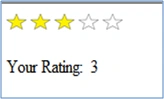
- <img id="img1" onmouseover="Show1()" onmouseout="Hide1()" alt="" src="Image/Star1.png" width="20" />
- <img id="img2" onmouseover="Show2()" onmouseout="Hide2()" alt="" src="Image/Star1.png" width="20" />
- <img id="img3" onmouseover="Show3()" onmouseout="Hide3()" alt="" src="Image/Star1.png" width="20" />
- <img id="img4" onmouseover="Show4()" onmouseout="Hide4()" alt="" src="Image/Star1.png" width="20" />
- <img id="img5" onmouseover="Show5()" alt="" src="Image/Star1.png" width="20" />
- <script language="javascript" type="text/javascript">
- function Show1() {
- document.getElementById('img1').src = "Image/Star2.png";
- document.getElementById('lblrate').innerHTML = "1";
- }
- function Show2() {
- document.getElementById('img1').src = "Image/Star2.png";
- document.getElementById('img2').src = "Image/Star2.png";
- document.getElementById('lblrate').innerHTML = "2";
- }
- function Show3() {
- document.getElementById('img1').src = "Image/Star2.png";
- document.getElementById('img2').src = "Image/Star2.png";
- document.getElementById('img3').src = "Image/Star2.png";
- document.getElementById('lblrate').innerHTML = "3";
- }
- function Show4() {
- document.getElementById('img1').src = "Image/Star2.png";
- document.getElementById('img2').src = "Image/Star2.png";
- document.getElementById('img3').src = "Image/Star2.png";
- document.getElementById('img4').src = "Image/Star2.png";
- document.getElementById('lblrate').innerHTML = "4";
- }
- function Show5() {
- document.getElementById('img1').src = "Image/Star2.png";
- document.getElementById('img2').src = "Image/Star2.png";
- document.getElementById('img3').src = "Image/Star2.png";
- document.getElementById('img4').src = "Image/Star2.png";
- document.getElementById('img5').src = "Image/Star2.png";
- document.getElementById('lblrate').innerHTML = "5";
- }
- function Hide1() {
- if (document.getElementById('img1').src != "Image/Star3.png") {
- document.getElementById('lblrate').innerHTML = "";
- }
- if (document.getElementById('img2').src != "Image/Star1.png") {
- document.getElementById('img2').src = "Image/Star1.png";
- document.getElementById('img1').src = "Image/Star1.png";
- }
- }
- function Hide2() {
- if (document.getElementById('img2').src != "Image/Star3.png") {
- document.getElementById('lblrate').innerHTML = "2";
- }
- if (document.getElementById('img3').src != "Image/Star1.png") {
- document.getElementById('img3').src = "Image/Star1.png";
- }
- }
- function Hide3() {
- if (document.getElementById('img3').src != "Image/Star3.png") {
- document.getElementById('lblrate').innerHTML = "3";
- }
- if (document.getElementById('img4').src != "Image/Star1.png") {
- document.getElementById('img4').src = "Image/Star1.png";
- }
- }
- function Hide4() {
- if (document.getElementById('img4').src != "Image/Star3.png") {
- document.getElementById('lblrate').innerHTML = "4";
- }
- if (document.getElementById('img5').src != "Image/Star1.png") {
- document.getElementById('img5').src = "Image/Star1.png";
- }
- }
- </script>
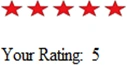
- <img id="img1" onmouseover="Show1()" onclick="ShowRate1()" onmouseout="Hide1()" alt="" src="Image/Star1.png" width="20" />
- <img id="img2" onmouseover="Show2()" onclick="ShowRate2()" onmouseout="Hide2()" alt="" src="Image/Star1.png" width="20" />
- <img id="img3" onmouseover="Show3()" onclick="ShowRate3()" onmouseout="Hide3()" alt="" src="Image/Star1.png" width="20" />
- <img id="img4" onmouseover="Show4()" onclick="ShowRate4()" onmouseout="Hide4()" alt="" src="Image/Star1.png" width="20" />
- <img id="img5" onmouseover="Show5()" onclick="ShowRate5()" alt="" src="Image/Star1.png" width="20" />
- function ShowRate1() {
- document.getElementById('img1').src = "Image/Star3.png";
- document.getElementById('img2').src = "Image/Star1.png";
- document.getElementById('img3').src = "Image/Star1.png";
- document.getElementById('img4').src = "Image/Star1.png";
- document.getElementById('img5').src = "Image/Star1.png";
- document.getElementById('lblrate').innerHTML = "1";
- }
- function ShowRate2() {
- document.getElementById('img2').src = "Image/Star3.png";
- document.getElementById('img1').src = "Image/Star3.png";
- document.getElementById('img3').src = "Image/Star1.png";
- document.getElementById('img4').src = "Image/Star1.png";
- document.getElementById('img5').src = "Image/Star1.png";
- document.getElementById('lblrate').innerHTML = "2";
- }
- function ShowRate3() {
- document.getElementById('img3').src = "Image/Star3.png";
- document.getElementById('img1').src = "Image/Star3.png";
- document.getElementById('img2').src = "Image/Star3.png";
- document.getElementById('img4').src = "Image/Star1.png";
- document.getElementById('img5').src = "Image/Star1.png";
- document.getElementById('lblrate').innerHTML = "3";
- }
- function ShowRate4() {
- Show4();
- document.getElementById('img4').src = "Image/Star3.png";
- document.getElementById('img2').src = "Image/Star3.png";
- document.getElementById('img3').src = "Image/Star3.png";
- document.getElementById('img1').src = "Image/Star3.png";
- document.getElementById('img5').src = "Image/Star1.png";
- document.getElementById('lblrate').innerHTML = "4";
- }
- function ShowRate5() {
- Show5();
- document.getElementById('img5').src = "Image/Star3.png";
- document.getElementById('img2').src = "Image/Star3.png";
- document.getElementById('img3').src = "Image/Star3.png";
- document.getElementById('img4').src = "Image/Star3.png";
- document.getElementById('img1').src = "Image/Star3.png";
- document.getElementById('lblrate').innerHTML = "5";
- }
Dinesh BeniwalPosted Jun 29, 2011, 6:44 AM
Thanks for sharing...
Mahesh BabuPosted Jun 28, 2011, 7:30 AM
When I am clicking or onmouseover on imag1,it displays the color as well as label but when onmouseout it didn't display color or label.
Dorababu MekaPosted Jun 28, 2011, 5:00 AM
Nice and cool one