

Random Number
The Random number class in the .Net Framework generates random numbers. The Random number class allows creating random number instances by using one of two constructors.
- Random(): It uses the system clock as the seed value and creates an instance.
Random uses the System clock as input when creating two instances as in the following:
It uses the same system clock input so the output of the preceding from the following code:- Random rand = new Random();
- Random rand1 = new Random();
Generates the same random number. Both lines of code in the example writes 10 on the console.- Console.WriteLine(rand.Next());
- Console.WriteLine(rand1.Next());
- Random(int32 seed): It uses an input integer value and creates an instance.
Random uses the integer value as input when creating two instance with different input.
So the output of the preceding when writing the following code.- Random rand = new Random(30);
- Random rand1 = new Random(40);
Is different random numbers.- Console.WriteLine(rand.Next());
- Console.WriteLine(rand1.Next());
The preceding two ways to create a random instance shows that the seed value plays an important role in creating random number instances.
Random in Multi-Threading
The following code can be used as a simulator, in other words the following code can be used to generate something used by another application.
- static void Main(string[] args)
- {
- Program program = new Program();
- char[] publish = new char[] { 'r', 'v'};
- List<Task> tasks = new List<Task>();
- while (true)
- {
- Console.WriteLine("Press any key to publish new data and 'n' to exit");
- char rchar = Convert.ToChar(Console.Read());
- Console.ReadLine();
- if (rchar == 'n')
- break;
- foreach (char c in publish)
- {
- if (c == 'r')
- tasks.Add(Task.Run(() =>program.PublishRateOrVolume(c)));
- else if (c == 'v')
- tasks.Add(Task.Run(() =>program.PublishRateOrVolume(c)));
- }
- try
- {
- Task.WaitAll(tasks.ToArray());
- foreach (Task<string> t in tasks)
- Console.WriteLine(t.Result);
- }
- catch (AggregateException ae)
- {
- Console.WriteLine(ae.ToString());
- }
- tasks.Clear();
- }
- tasks = null;
- }
- private string PublishRateOrVolume(char publishChar)
- {
- StringBuilder sb = new StringBuilder();
- char[] inputchar = new char[] { '1', '2'};
- string clientName = string.Empty;
- var random = new Random();
- try
- {
- foreach (char c in inputchar)
- {
- if (c == '1')
- clientName = "Test 1";
- if (c == '2')
- clientName = "Test 2";
- var data = random.NextDouble() * random.Next(0, 500);
- if (publishChar == 'v')
- sb.AppendLine("VOLUME Data Publish by Client :" + clientName + " Volume :" + data);
- else if (publishChar == 'r')
- sb.AppendLine("RATE Data Publish by Client :" + clientName + " Rate :" + data);
- }
- return sb.ToString();
- }
- finally
- {
- random = null;
- inputchar = null;
- sb = null;
- }
- }
The preceding code generates the following output:
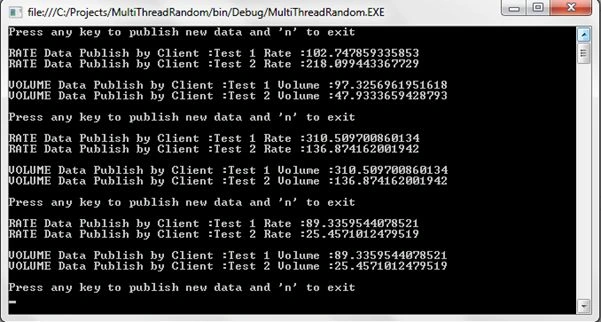
The problem with the output is that Program generates the same data for volume and rate for each client that is not expected, the expected result is for it to generate multiple random values for rate and value for each client.
The issue
The issue with the preceding code is that a random number instance is created by two different tasks almost with the same seed value, since the seed value for both random instances is the same, it generates the same values. It's already discussed in the preceding in the random class constructor example.
The following is the solution to the problem of random numbers in a multithreading environment.
- Add Delay between creating two task
Since Random instances use the system clock value, adding a delay between the creation of two tasks provides a different seed value to the default random class instance. So the code for this is:
With the Thread.Sleep a small delay occurs between the creation of the task and since there is a delay the two instance of random numbers receive a different seed.- foreach (char c in publish)
- {
- if (c == 'r')
- tasks.Add(Task.Run(() =>program.PublishRateOrVolume(c)));
- else if (c == 'v')
- tasks.Add(Task.Run(() =>program.PublishRateOrVolume(c)));
- Thread.Sleep(50);
- }
But the problem with this solution is it requires the addition of a delay, so if there are more than two tasks then it will create a problem, so it also causes a problem in mission-critical applications where time is important.
- Use only one instance of the Random class
With this solution only one instance of the random number class is created and shared among multiple threads. So the code is:
As in this code one random instance is created in the main method and the same instance is used by both tasks to generate random numbers.- static void Main(string[] args)
- {
- Random random = new Random();
- // code as it is
- foreach (char c in publish)
- {
- if (c == 'r')
- tasks.Add(Task.Run(() => program.PublishRateOrVolume(c, random)));
- else if (c == 'v')
- tasks.Add(Task.Run(() => program.PublishRateOrVolume(c, random)));
- }
- //code as it is
- }
- private string PublishRateOrVolume(char publishChar, Random random)
- {
- //code as it is
- }
But the problem with this solution is that one random number instance is shared between two tasks and the random number class is not thread safe.
Since the random number instance is not thread-safe when two threads call the next() method at the same time it will generate 0 as output and then the random number generates 0 and is not useful. To check try the following example:
To avoid that problem use a lock when accessing a random instance via it methods like next(), netxtDouble().- Random rand = new Random();
- Parallel.For(0, 1000000, (i, loop) =>
- {
- if (rand.Next() == 0) loop.Stop();
- });
It resolves issues but the problem is a lock statement slows down the application when there are more threads.- object lockobj = new object();
- lock (lockobj)
- {
- data= rand.NextDouble() * rand.Next(0, 500);
- }
- Make use of ThreadLocal<T> with the different seed value
This solution uses the ThreadLocal<T> class, it allows creating local variables for each thread/task. Read more about ThreadLocal class.
So the code with ThreadLocal<T> is as in the following:
In that code the random instance is created using the ThreaLocal<T> class, in other words each task receives its own local instance of the Random class.- private string PublishRateOrVolume(char publishChar)
- {
- var random = new ThreadLocal<Random>(() => new Random(Guid.NewGuid().GetHashCode()));
- //code as it is
- var data = random.Value.NextDouble() * random.Value.Next(0, 500);
- //code as it is
- }
Another thing to note in the code is the seed value passed when creating the Random instance. The Seed value is the HashCode value of the Guid instance, in other words each time a new instance receives a new seed value.
Conclusion
The Random class is not thread-safe and the preceding shows three solutions to make it thread-safe but out of the three the third solution is perfect and is the best fit as a thread-safe solution.
Please find the attached code with all three solutions.
Santhakumar MunuswamyPosted Jul 8, 2015, 3:52 PM
Nice article. Thanks for sharing
Michal HabalcikPosted Feb 26, 2015, 1:18 AM
interesting article, went 2 times through it.
jack the bestPosted Feb 12, 2015, 9:53 PM
hi can you help me?how add you category for the products and on product frm show you a combox with all category?