

Event-Driven architecture services communicate by messages using Message brokers like RabbitMQ. The entire transaction will be completed if the message will get processed successfully. While processing messages from Queue there will be a chance of failure due to invalid data or resources unavailable.
If data is invalid, then the message will get failed while processing. In this case, we can reject the message from the Queue and needs to send a notification to the corresponding services about the invalid data. Resource unavailability will be based on completing the entire transaction in the distributed system. The availability time will vary from milliseconds to seconds in distributed systems.
Once Resource is available, we need to process the message again. We need to retry the message in case of failure that will increase our system reliability and accuracy.
Retry Mechanism
We can retry the message from RabbitMQ using two approaches.
- Rollback
- Retry with Dead Letter Exchange
Rollback
While using Rollback the message will get requeued again. The time taken to process the requeued message will be based on the existing message count in the queue. We can also requeue the message after a period X. In this case, we need to keep the thread open until the X period. In case there a lot of messages are getting failed then there will be a lot of threads that will wait to complete the X period for each message. It's not recommended to requeue the message after the X period. If your resource will be available after requeuing the message without any waiting period, then we can requeue the message otherwise we need to add it to Dead Letter Exchange.
But due to fault tolerance, service will not be available for certain periods of time or other reasons. In this case, we need to keep the message in the queue certain period. We can achieve this using Dead Letter Exchange.
Dead Letter Exchange
Each queue can configure a Dead Letter exchange. If Queue is configured with Dead Letter exchange, then rejected or expired message will be moved into the Dead Letter Exchange otherwise it will be get removed from the Queue. Dead Letter Exchange will push those messages into the corresponding bounded Queues.
Queue Configuration
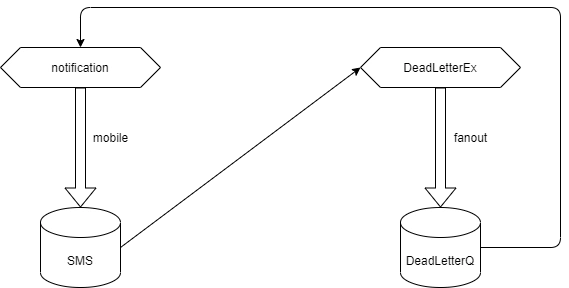
- I have created an exchange name notification and Created Queue called SMS.
- I have bound the SMS Queue with notification exchange with direct binding key "mobile"
- Whenever I will publish the message into notification exchange with direct binding key "mobile", then the message will get pushed into the SMS Queue.
- Once a message is getting processed successfully or failed, then it will be removed from the SMS Queue.
- Suppose if want to retry the message, whenever processing getting failed, then we need to add the retry mechanism to the SMS Queue by Dead Letter Exchange support.
Dead Letter Configuration
- I have created a new Exchange DeadLetterEx.
- I have created a new Queue DeadLetterQ.
- I have bound the DeadLetterEx exchange with DeadLetterQ Queue using fanout type.
Bind Dead Letter Exchange
- Each Queue has arguments to support the Dead Letter Exchange.
- I have added DeadLetterEx exchange as a dead letter exchange for SMS Queue so whenever we can reject the message from the SMS queue, immediately the message gets moved into the DeadLetterEx exchange.
- From the DeadLetterEx exchange, the message will get pushed into the DeadLetterQ Queue.
- If we want to keep the message into a certain period of time in the DeadLetterQ then we need to configure the TTL for the DeadLetterQ.
- So the message will be there in the DeadLetterQ for a certain period of time.
- Once the period is over then a message will be removed from the DeadLetterQ.
Retry Messages
Here we need to retry the message from DeadLetterQ, In this case, we need to bind the DeadLetterQ with notification Exchange.
I have bound notification exchange as a Dead Letter exchange for DeadLetterQ, so the message will be there in DeadLetterQ for the period. Once it's expired it will be pushed into notification exchange. From notification exchange, it will flow into the SMS queue. The flow is getting repeated. We can set the threshold for message retry. Once it reached the threshold, we can complete the message.
If you want to add some processing on failure messages, then we can connect to DeadletterQ and we can process the message from the Queue. It will be based on the system architecture and business needs.
Bohdan StupakPosted Oct 15, 2021, 8:58 AM
Great article. Dead letter exchange reminded me of "Enterprise integration patterns" book. Useful stuff!