
In JavaScript, document.querySelector() and document.getElementById() are both the methods used to select and manipulate elements in the DOM (Document Object Model). However, they serve different purposes and have distinct characteristics. Understanding these differences is crucial for effective DOM manipulation.
What is document.querySelector()?
The document.querySelector() is a method that allows selecting a single element in the DOM using a CSS selector. It returns the first element that matches the specified CSS selector within the document.
Syntax:
document.querySelector(selector)Characteristics
Versatility: Can select elements using the any valid CSS selector.
Returns First Match: Only the first element that matches the selector is returned.
Broad Usage: Useful for selecting complex and specific elements within the DOM.
Applications
Complex Selections: Selecting elements using the complex and specific CSS selectors.
Single Element Manipulation: When we need to manipulate the first instance of the element that matches a selector.
Dynamic Content: Handling the dynamic content that may not have unique IDs but can be identified by the classes or other attributes.
When to use querySelector()?
Use querySelector() when we need to select an element using the any CSS selector including the class names, IDs and attribute selectors.
It provides flexibility in selecting elements based on the various criteria.
Example: This illustrates document.querySelector('.text') selects the first element with the class "text" and logs its text content.
HTML
<!DOCTYPE html>
<html lang="en">
<head>
<meta charset="UTF-8">
<meta name="viewport" content="width=device-width, initial-scale=1.0">
<title>querySelector Example</title>
<style>
  .example {
    background-color: lightblue;
    padding: 10px;
    border: 1px solid blue;
    margin: 10px;
    cursor: pointer;
  }
  .selected {
    background-color: lightcoral;
    color: white;
  }
</style>
</head>
<body>
  <div class="example">Example 1</div>
  <div class="example">Example 2</div>
  <div class="example">Example 3</div>
  <button onclick="selectAndHighlight()">Select and Highlight</button>

  <script>
    function selectAndHighlight() {
      const elements = document.querySelectorAll('.example');
      elements.forEach(element => {
        element.classList.add('selected');
      });
    }
  </script>
</body>
</html>
Output:
What is document.getElementById()?
The document.getElementById() is a method that allows to the select a single element in the DOM using its unique ID attribute. It returns the element with the specified ID.
Syntax:
document.getElementById(id)Characteristics
Specificity: The Selects elements only by their ID.
Returns Single Element: The Returns the single element with the specified ID.
Fast and Efficient: The Generally faster and more efficient due to the direct nature of the ID selection.
Applications
Unique Element Selection: Ideal for selecting elements with the unique IDs ensuring only one element is selected.
Simple and Direct: Useful for the simple and straightforward DOM manipulation when IDs are used.
Common Usage: Frequently used in the forms where elements have unique IDs.
When to use getElementById()?
Use getElementById() when we specifically need to the select an element by its unique ID.
It is faster than querySelector() when targeting elements by the ID because IDs are unique in a document.
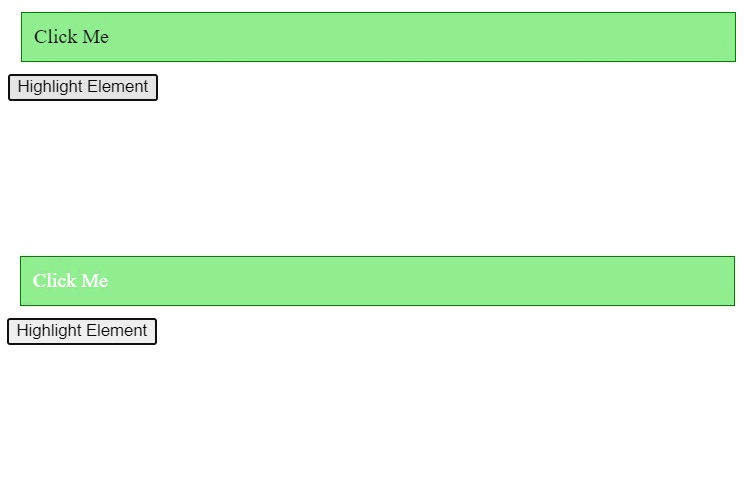
Example: This illustrates document.getElementById('message') selects the element with the ID "message" and logs its text content.
HTML
<!DOCTYPE html>
<html lang="en">
<head>
<meta charset="UTF-8">
<meta name="viewport" content="width=device-width, initial-scale=1.0">
<title>getElementById Example</title>
<style>
  #example {
    background-color: lightgreen;
    padding: 10px;
    border: 1px solid green;
    margin: 10px;
    cursor: pointer;
  }
  .highlighted {
    background-color: lightcoral;
    color: white;
  }
</style>
</head>
<body>
  <div id="example">Click Me</div>
  <button onclick="highlightElement()">Highlight Element</button>
  <script>
    function highlightElement() {
      const element = document.getElementById('example');
      element.classList.toggle('highlighted');
    }
  </script>
</body>
</html>
Output:
Difference Between JavaScript document.querySelector() vs. document.getElementById():
| Characteristics | document.querySelector() | document.getElementById() |
|---|---|---|
| Selector Type | Any valid CSS selector | Unique ID attribute |
| Returns | The First element matching the selector | The Element with the specified ID |
| Usage | The Complex and specific selections | The Simple and direct selections |
| Performance | The Generally slower due to the flexibility | The Generally faster due to direct selection |
| Scope | Can select by class, attribute, tag name, etc. | Only selects by ID |
| Use Case | The Dynamic and complex content | The Unique and simple element selection |
| Example | document.querySelector('.example') | document.getElementById('example') |
Conclusion
Both document.querySelector() and document.getElementById() are essential methods for the DOM manipulation in JavaScript. document.querySelector() offers greater flexibility and can handle complex selections using any valid CSS selector making it suitable for the dynamic and intricate content. On the other hand, document.getElementById() is faster and more efficient for selecting elements with the unique IDs making it ideal for the simple and straightforward DOM manipulation. Understanding when and how to the use these methods can greatly enhance the ability to the manipulate and interact with the DOM effectively.
Join the conversation! Your thoughts help the community grow.