

Introduction
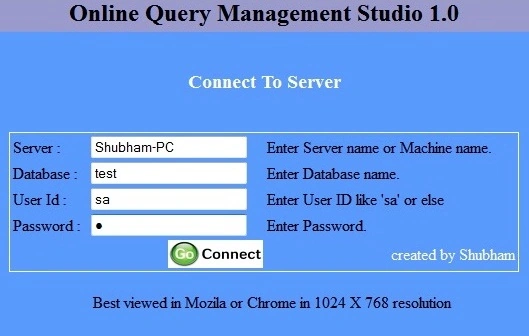
Query Management Studio can be run in a browser and it allows the user to manage the database like insert, select, update and delete operations. QMS is a simple application to understand. You can use this application as GUI for your database. In making this application, I use SQL Server 2005, .NET Framework 3.5 and C#. This article is meant for all kinds of beginner users who want to get started with SQL Server. I have included a small feather of SQL Server like insert, update and delete in QMS.
Background
The basic idea behind making OQMS is that some time ago, I used a hosting panel where I created a table on a server but the server response was very slow and sometimes, the server was getting stuck and not responding. Then I made this web application and using this application, you need to use your SQL Server that is intalled on your machine and it does DDL and DML operations.
Using the Code
- using System;
- using System.Data;
- using System.Configuration;
- using System.Collections;
- using System.Web;
- using System.Web.Security;
- using System.Web.UI;
- using System.Web.UI.WebControls;
- using System.Web.UI.HtmlControls;
- using System.Data.Sql;
- using System.Data.SqlClient;
- using System.IO;
- using System.Drawing;
- public partial class Entrance : System.Web.UI.Page
- {
- SqlConnection con = new SqlConnection();
- protected void Page_Load(object sender, EventArgs e)
- {
- }
- protected void btncon_Click(object sender, ImageClickEventArgs e)
- {
- if (txtdbase.Text == "" || txtserv.Text == "" || txtuid.Text == "" || txtpass.Text == "")
- {
- Page.RegisterStartupScript("UserMsg",
- "alert('All field should be filled');if(alert){ window.location='Entrance.aspx';}");
- }
- else
- {
- Session["dbase"] = txtdbase.Text;
- Session["sname"] = txtserv.Text;
- Session["uid"] = txtuid.Text;
- Session["pass"] = txtpass.Text;
- Response.Redirect("~/Default.aspx", false);
- }
- }
- }
- public partial class _Default : System.Web.UI.Page
- {
- SqlConnection con = new SqlConnection();
- protected void Page_Load(object sender, EventArgs e)
- {
- string server = Session["sname"].ToString();
- string dname = Session["dbase"].ToString();
- string uid = Session["uid"].ToString();
- string pass = Session["pass"].ToString();
- con.ConnectionString = "Data Source="+server +";
- Initial Catalog="+ dname +"; User ID=" + uid +"; Password=" + pass ;
- if(!IsPostBack)
- getdbase();
- }
- protected void btnreset_Click(object sender, EventArgs e)
- {
- querybox.Text = "";
- ListBox2.Items.Clear();
- GridView1.Dispose();
- }
- protected void btnexcu_Click(object sender, EventArgs e)
- {
- functions();
- }
- void functions()
- {
- try
- {
- if (querybox.Text != "")
- {
- if (hidSelectedText.Value == "")
- {
- hidSelectedText.Value = querybox.Text;
- }
- if (hidSelectedText.Value != "")
- {
- con.Open();
- SqlCommand cmd = new SqlCommand("use " +
- ddl.SelectedItem.ToString() + " " + hidSelectedText.Value, con);
- // SqlCommand cmd = new SqlCommand(hidSelectedText.Value, con);
- SqlDataAdapter da = new SqlDataAdapter(cmd);
- DataTable dt = new DataTable();
- da.Fill(dt);
- GridView1.DataSource = dt;
- GridView1.DataBind();
- con.Close();
- lblmes.Visible = true;
- war.Visible = false;
- ok.Visible = true;
- lblmes.ForeColor = Color.Green;
- lblmes.Text = "Query executed successfully";
- }
- else
- {
- lblmes.Visible = true;
- ok.Visible = false;
- war.Visible = true;
- lblmes.ForeColor = Color.DarkGoldenrod;
- lblmes.Text = "Query completed with error";
- }
- }
- else
- {
- querybox.Text = "Write some query or select some text...";
- }
- }
- catch (Exception ex)
- {
- querybox.Text = ex.Message;
- lblmes.Visible = true;
- ok.Visible = false;
- war.Visible = true;
- lblmes.ForeColor = Color.Red;
- lblmes.Text = "Query completed with error";
- GridView1.Dispose();
- }
- }
- protected void ddl_SelectedIndexChanged(object sender, EventArgs e)
- {
- try
- {
- ListBox2.Items.Clear();
- con.Open();
- string qry = ddl.SelectedItem.ToString();
- SqlCommand cmd = new SqlCommand("USE "+qry +
- " select name from sysobjects where type='U' ", con);
- SqlDataReader dr = cmd.ExecuteReader();
- ListBox1.Items.Clear();
- while (dr.Read())
- {
- ListBox1.Items.Add(dr["name"].ToString());
- }
- con.Close();
- }
- catch(Exception ex)
- {
- querybox.Text = ex.Message;
- }
- }
- protected void ListBox1_SelectedIndexChanged(object sender, EventArgs e)
- {
- try
- {
- con.Open();
- string qry = ListBox1 .SelectedItem.ToString();
- SqlCommand cmd = new SqlCommand("use " + ddl.SelectedItem.ToString() + "
- select Column_Name from INFORMATION_SCHEMA.COLUMNS _
- where TABLE_NAME = '" + qry + "'", con);
- SqlDataReader dr = cmd.ExecuteReader();
- ListBox2.Items.Clear();
- while (dr.Read())
- {
- ListBox2.Items.Add(dr["Column_Name"].ToString());
- }
- con.Close();
- }
- catch (Exception ex)
- {
- querybox.Text = ex.Message;
- }
- }
- void getdbase()
- {
- try
- {
- con.Open();
- SqlCommand cmd = new SqlCommand("SELECT name FROM master.dbo.sysdatabases", con);
- SqlDataReader dr = cmd.ExecuteReader();
- ddl.Items.Clear();
- while (dr.Read())
- {
- ddl.Items.Add(dr["name"].ToString());
- }
- con.Close();
- lblststus.ForeColor = Color.Green;
- lblststus.Text = "Connected";
- }
- catch (Exception ex)
- {
- querybox.Text = ex.Message;
- }
- }
- }
SriramPosted Jul 6, 2015, 3:11 AM
Good job.............
Shubham KumarPosted Apr 14, 2015, 12:31 PM
thnx to all
Karthik Muthu KaruppanPosted Apr 13, 2015, 1:32 PM
Good start.... Thanks for sharing
Abhishek JaiswalPosted Apr 13, 2015, 5:01 AM
Good Start.. Make it large! :)
Sibeesh VenuPosted Apr 13, 2015, 1:57 AM
Good one :)
Khargesh RajputPosted Apr 13, 2015, 12:35 AM
nice
Santhakumar MunuswamyPosted Apr 12, 2015, 11:08 PM
good work