

Introduction
This article demonstrates how to make a QR CodeScanner Application using C# and XAML in Xamarin.Forms.
QR codes are plastered on advertisements, billboards, business windows, and products. They appear to be very popular among marketers, although it’s rare to see anyone actually scanning one.
These barcodes can be captured with a smartphone camera — for example, a typical QR code may contain an URL. Scan the QR code with a mobile phone and you’ll be taken to the website the QR code specifies.
Let’s Start,
Step 1
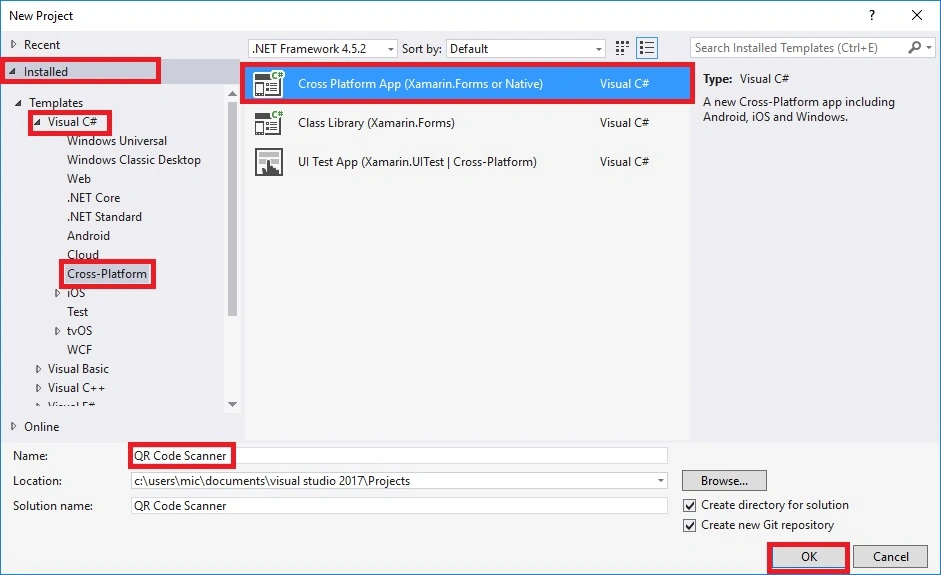
Open Visual Studio and Go To New Project >> installed >> Visual C# >> Cross-Platform.
Select the Cross-Platform App, then give Your Project a Name and Location.
Step 2
After Project Creation, add the Following Nuget Packages to Your Project.
• ZXing.Net.Mobile
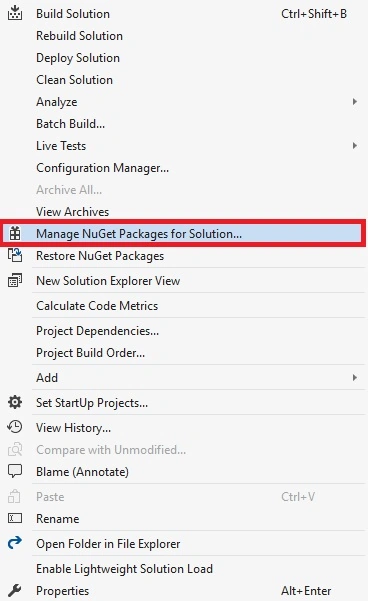
Go to Solution Explorer and Select Your Solution. Right-click and select "Manage Nuget Packages for Solution".
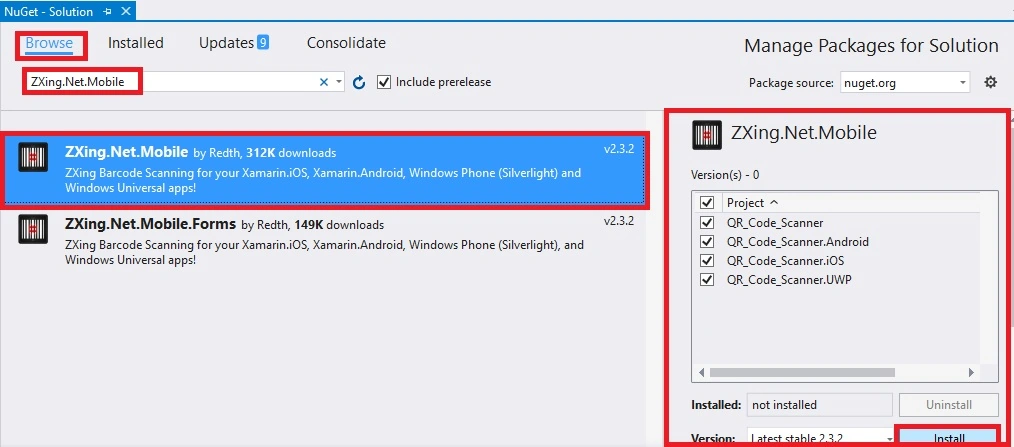
Now, Select the Following Nuget Package and Select your project to Install it.
Step 3
Open Solution Explorer >> Project Name >> Mainpage.xaml. Open the Design View of this page.
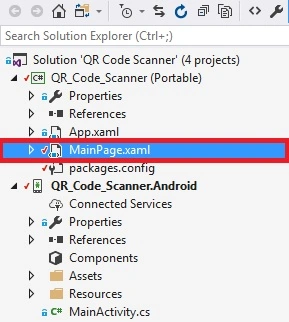
The Code Is Given Below.
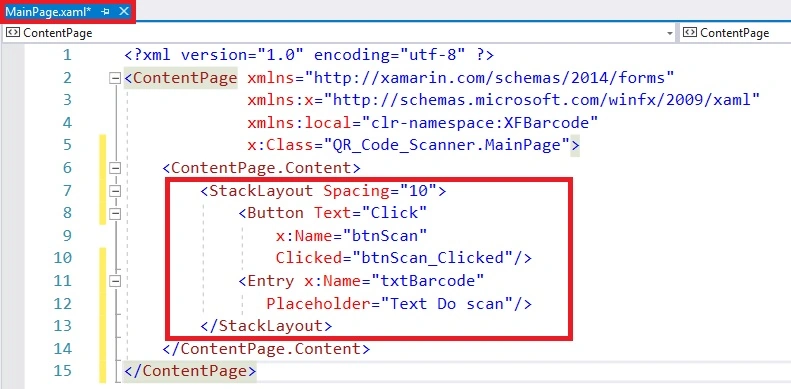
Xaml Code
- <StackLayout Spacing="10">
- <Button Text="Click"
- x:Name="btnScan"
- Clicked="btnScan_Clicked"/>
- <Entry x:Name="txtBarcode"
- Placeholder="Text Do scan"/>
- </StackLayout>
Step 4
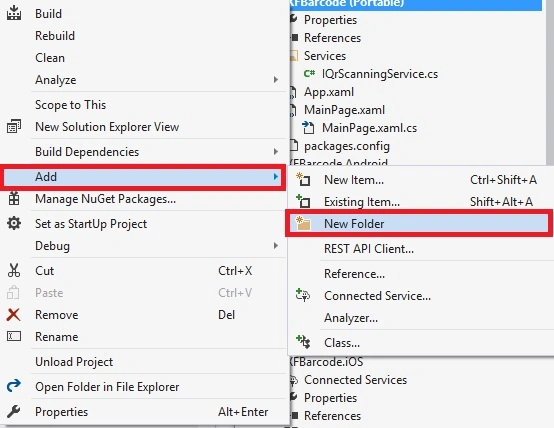
Next, go to Project Name >> Add >> NewFolder. Select the NewFolder, the Dialogue Box Will Open, Just Give the Folder Name.
Now add a New Interface on Service Folder.
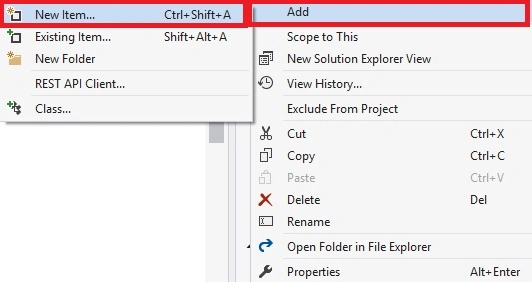
Add-In The Service Folder
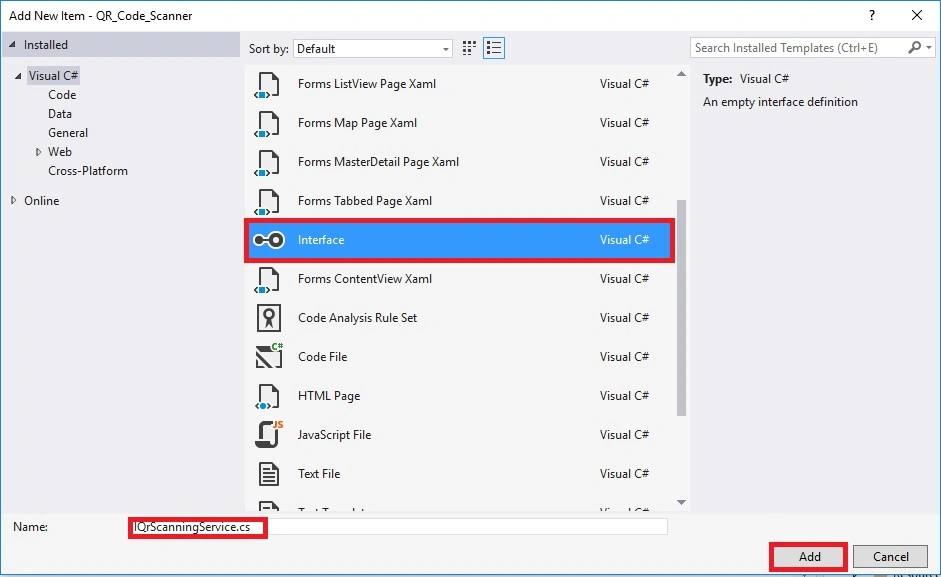
Step 5
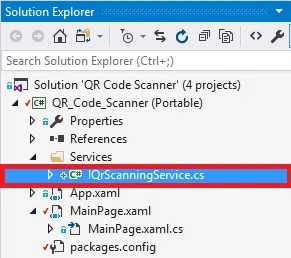
Next, go to Project Name (Portable) >> Services >> IQrScanningService.cs. Open the Design View Of this Page.
The Code is given below
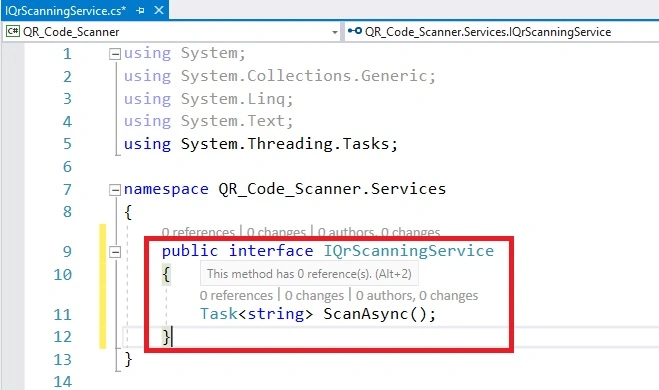
C# Code
- public interface IQrScanningService
- {
- Task<string> ScanAsync();
- }
Step 6
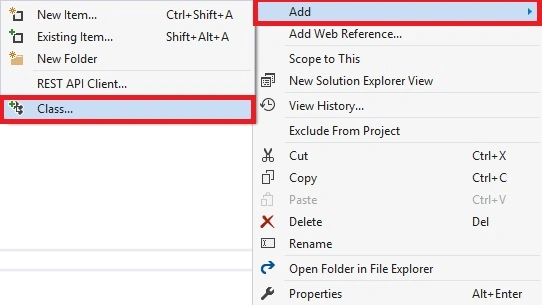
Next, go to Project Name (Android) >> Add >> NewFolder. Select the NewFolder, the dialogue box will open, just give the folder name.
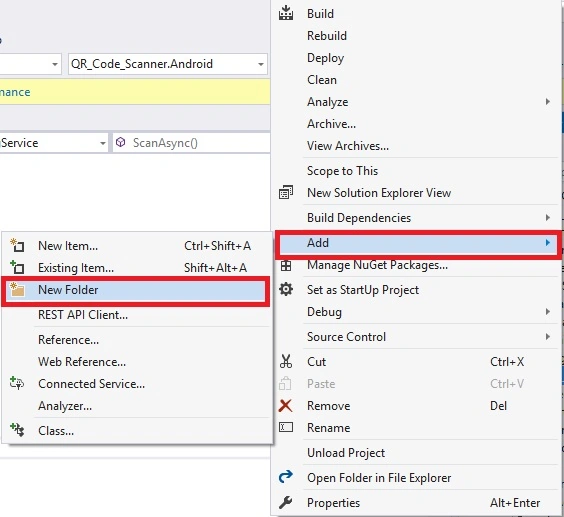
Now add a New Class on Service Folder.
Step 7
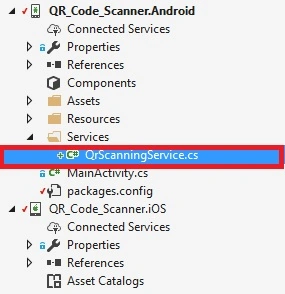
Next, go to Project Name (Android) >> Services >> IQrScanningService.cs. Open the design view of this page.
The Code Is given below
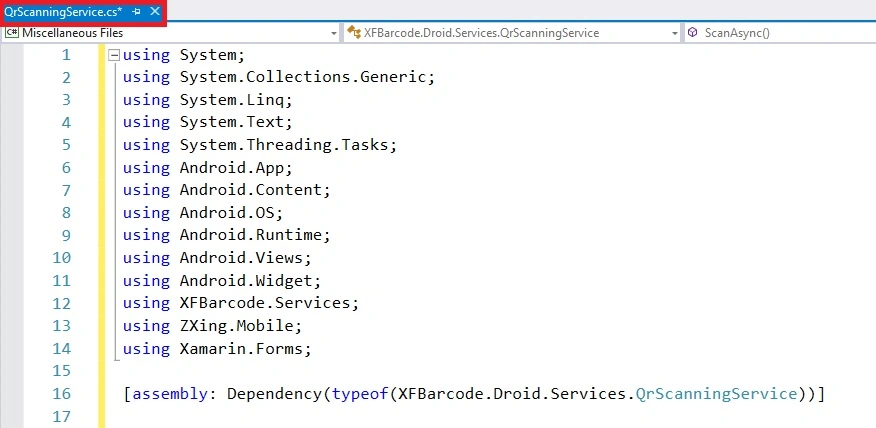
C# Code
- using System;
- using System.Collections.Generic;
- using System.Linq;
- using System.Text;
- using System.Threading.Tasks;
- using Android.App;
- using Android.Content;
- using Android.OS;
- using Android.Runtime;
- using Android.Views;
- using Android.Widget;
- using XFBarcode.Services;
- using ZXing.Mobile;
- using Xamarin.Forms;
- [assembly: Dependency(typeof(XFBarcode.Droid.Services.QrScanningService))]
- namespace QR_Code_Scanner.Droid.Services
- {
- public class QrScanningService : IQrScanningService
- {
- public async Task<string> ScanAsync()
- {
- var optionsDefault = new MobileBarcodeScanningOptions();
- var optionsCustom = new MobileBarcodeScanningOptions();
- var scanner = new MobileBarcodeScanner()
- {
- TopText = "Scan the QR Code",
- BottomText = "Please Wait",
- };
- var scanResult = await scanner.Scan(optionsCustom);
- return scanResult.Text;
- }
- }
- }
Step 8
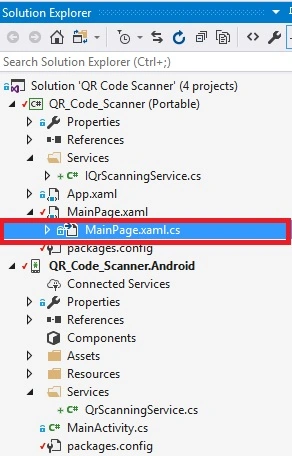
Next, Open Solution Exlorer >> Project Name >> MainPage.xaml.cs. Then, click to replace the C# code.
the code Is given below,
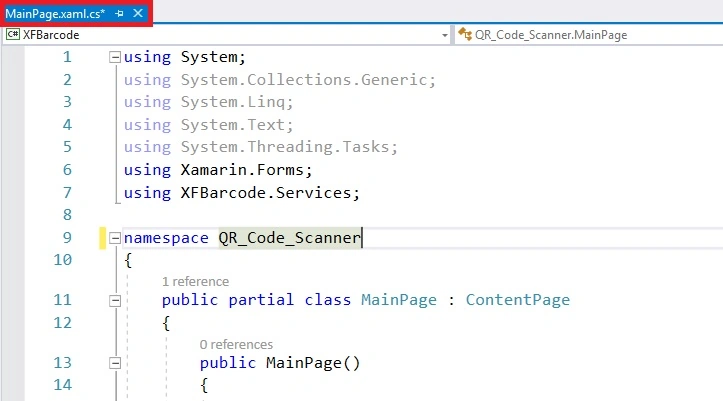
C# Code
- using System;
- using System.Collections.Generic;
- using System.Linq;
- using System.Text;
- using System.Threading.Tasks;
- using Xamarin.Forms;
- using XFBarcode.Services;
- namespace QR_Code_Scanner
- {
- public partial class MainPage : ContentPage
- {
- public MainPage()
- {
- InitializeComponent();
- }
- private async void btnScan_Clicked(object sender, EventArgs e)
- {
- try
- {
- var scanner = DependencyService.Get<IQrScanningService>();
- var result = await scanner.ScanAsync();
- if (result != null)
- {
- txtBarcode.Text = result;
- }
- }
- catch (Exception ex)
- {
- throw;
- }
- }
- }
- }
Step 9
Press F5 or build and run the application
OutPut 1
Run the application and click the button
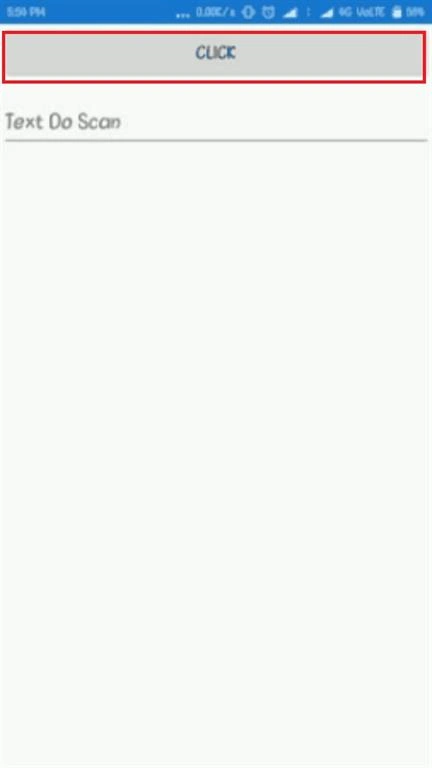
Output 2
Scan the QR Scanner

The result will be displayed.
Finally, we have successfully created a Xamarin.Forms QR code scanner app.
nick birdPosted Jul 21, 2021, 5:07 PM
Hi - this is an excellent article. Could you please contact me directly - I have an Android project I would like you to provide a quotation for if you are accepting commissions for work. I like your articles and would like to work with you.
Muhammad MalikPosted Feb 26, 2021, 7:09 AM
Why you write platform specific code and used DependencyService?
Vinay KPosted Feb 11, 2021, 9:21 AM
Will it scan Kanji QR codes? double byte QR?
SilongPosted Sep 19, 2020, 8:41 PM
Code seems not completed. Need to be tested. Waste viewer time to debug...
Pappu KumarPosted Aug 22, 2020, 10:37 AM
Var scanner = new MobileBarcodeScanner() { TopText = "Scan the Bar Code", BottomText = "Click mobile cancel button to cancel scanning.", CancelButtonText="Cancel" };
Pappu KumarPosted Aug 22, 2020, 10:37 AM
How to add a cancel button when scanner opens.
Adrian FernandezPosted Jun 12, 2020, 1:08 PM
As a summary on how to make this work, checking some comments and code from github https://github.com/juanraa/XFBarcode This is how I made it work:First, substitute all the XFBarcode by your project name. This means both in the "using" statements and any inside bits of the code. Second, if you use the same name for the classes inside the services folders, remember that you'll have to use this line instead of the one presented above when defining the class in android: "public class IQrScanningService : QR_Code_Non_tab.Service.IQrScanningService" where "QR_Code_Non_tab" is how I named my project, so change it accordingly to your own project. Third, they forgot to initialise the Barcode scanner process, so in the MainActivity.cs of Android remember to add "MobileBarcodeScanner.Initialize(this.Application);" just before the "LoadApplication(new App());". For this statement to work, you'll also have to add "using ZXing.Mobile;" at the beginning of the same file. Hope this makes it work on all of you! In mine at least was enough. Not sure if juanraa was the original creator of the file since this tutorial and his files in github seems to have some differences, but thanks to both!
Eruthia RajPosted Jun 12, 2020, 12:28 PM
Hi, kindly let me know where exactly need to add this MobileBarcodeScanner.Initialize(Application); in MainActivity.cs?
elizabeth castiPosted Feb 26, 2020, 5:41 PM
HELLO I HAVE THE SAME PROBLEM WHIT XFBARCODE, SOMEONE KNOW HOW TO SOLVE IT? THANKS
Vinay KPosted Dec 13, 2019, 12:21 AM
This method works fine for scanning QR with help of camera, If I want to use integrated scanner which available with device(device name: Zebra TC56) then what are the necessary changes I have to do?
Charles HainesPosted Jun 17, 2019, 1:58 PM
This doesn't work. I you are looking for a simple solution and working examples just save yourself time and go here. https://github.com/acaliaro/TestZXing
Sam MettenmeyerPosted Feb 22, 2019, 6:34 AM
When I click the button, Application stops and I get Unhandled Exception: System.NullReferenceException: Object reference not set to an instance of an object. What to do to fix this?
Cristian CartagenaPosted Dec 9, 2018, 7:54 AM
I would like to scan the QR code to take me to the URL contained in the scanned QR ... that is to say automatically when I scan the QR code (open the browser). I need to do that as a class project. I would appreciate your help.
gunawan gunawanPosted Nov 3, 2018, 10:34 AM
How to fix when the scanning is null? to get this issued you can try by click the button scan and then press back while the camera is open (but dont scan any qrcode). i have traped the null with if syntax but it's didn't work. thank you.
Армен СаркисянPosted Oct 2, 2018, 4:28 AM
If you're getting XFBarcode not found error just know that XFBarcode it's your project name, your solution name, rename it in your code to your project name. Just look at step 4 screenshot, there are XFBarcode.android and XFBarcode.IOS project names. I don't know why author made rename of his solution and didn't noticed that.
여운형 여운형Posted Sep 17, 2018, 2:48 AM
I got the error XFBarcode could not found
BalajiPosted Aug 31, 2018, 4:51 AM
What is this using xfbarcode,services showing error
junar jacobPosted Jul 9, 2018, 8:32 AM
This is not your code right!
Ahmed TahaPosted May 30, 2018, 8:08 AM
System.NullReferenceException: <Timeout exceeded getting exception details>
Mukesh PrasadPosted Apr 30, 2018, 12:49 AM
Hi Ajith , I got the Error XFBarcode could not found.
Auri RahimzadehPosted Apr 28, 2018, 8:40 PM
I ran into some issues with this where the Application's context was necessary to display the UI in Xamarin.Forms. I outlined what I changed here: https://auri.net/2018/04/28/getting-a-null-reference-error-when-working-with-xamarin-forms-and-zxing-for-qrcode-and-barcode-scanning/
mandar desaiPosted Mar 15, 2018, 9:00 AM
I have complex and big qr code and this library is unable to scan that one in some devices how can that fix can u help me of that
irfan cspakPosted Feb 14, 2018, 12:32 AM
Kindly give full sample source code
Mustakim MadariPosted Feb 8, 2018, 4:29 AM
I am facing an error "Unable to start camera for scanning", plz help me out.
Arun KumarPosted Jan 30, 2018, 12:12 AM
Can u provide the source
arvind bPosted Jan 29, 2018, 4:42 AM
I got the error XFBarcode could not found, could you tell me where is could be added?
Vart igPosted Jan 21, 2018, 8:11 PM
Sorry Im confused here. what is XFBarcode doing here and where did you get it? how and from where ?
Sachin RPosted Jan 14, 2018, 7:08 AM
This is much helpful for me at the right time..
Ahsan SiddiquePosted Dec 25, 2017, 12:51 AM
Nice Work keep it up...
sze yuanPosted Dec 24, 2017, 11:23 PM
Nice. is this function can support barcode?
Ravishankar VelladuraiPosted Dec 24, 2017, 12:55 AM
Nice article ajith keep going on!!!!...
Vidyadharran GPosted Dec 23, 2017, 9:18 PM
Nice one thanks for sharing Ajith