

Raspberry Pi is a great thing
- It is a real computer. It can interface with electronics, talk to the Web, and has full HDMI support.
- However, it runs on Linux, which I have a love-hate relationship with.
- I love the idea of Linux, except when I start messing around with the command line, downloading packages, and installing things.
Parts Of Lists
- Raspberry Pi
- Cobbler breakout board with cable
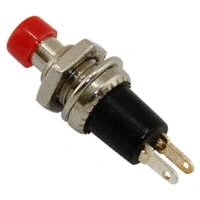
- Push Button Switch
- Resistor
- Standard LED
Parts Of Explanation
Push Button Switch
- Push Button Switch consists of a simple electric switch mechanism, which controls some aspect of a machine or a process. Buttons are typically made out of hard material such as plastic or metal. The surface is usually shaped to accommodate the human finger or hand, so the electronic switch can be easily depressed or pushed. Also, most Push Button Switches are known as biased switches. A biased switch can be also considered, what we call a "momentary switch", where the user will push-for "on" or push-for "off" type. This is also known as a push-to-make (SPST Momentary) or push-to break (SPST Momentary) mechanism.
- Switches with the "push-to-make" (normally-open or NO) mechanism are a type of push-button electrical switch, which operates by the switch making contact with the electronic system when the button is pressed and breaks the current process when the button is released. An example of this is a keyboard button.
- A "push-to-break" (or normally-closed or NC) electronic switch, on the other hand, breaks contact when the button is pressed and makes contact when it is released.
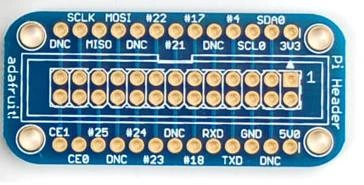
Cobbler breakout board
- Pi Cobbler mini kit comes with a 26 pin ribbon cable, a custom PCB, ribbon cable socket and header pins. A little soldering is required to put it together but its really easy, even a beginner can do it in 15 minutes! Once soldered together, the cable plugs between the Pi computer and the Cobbler breakout.
- The Cobbler can plug into any solderless breadboard (or even a prototyping board like the PermaProto). The Cobbler PCB has all the pins labeled nicely, so you can go forth and build circuits without keeping a pin-out printout at your desk. We think this will make it more fun to expand Pi and build custom circuitry with it.
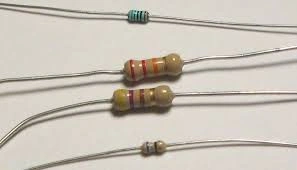
Resistor
- A resistor is a passive two-terminal electrical component, which implements the electrical resistance as a circuit element. In electronic circuits, the resistors are used to reduce current flow, adjust signal levels, to divide voltages, bias active elements, and terminate transmission lines among other uses.
- High-power resistors can dissipate many watts of electrical power as heat may be used as part of motor controls, in power distribution systems, or as test loads for generators. Fixed resistors have resistances that only change slightly with the temperature, time, or an operating voltage.
- Variable resistors can be used to adjust the circuit elements (such as volume control or a lamp dimmer) or as the sensing devices for heat, light, humidity, force, or chemical activity.
- Resistors are common elements of the electrical networks and electronic circuits and are ubiquitous in the electronic equipment. Practical resistors as discrete components can be composed of various compounds and forms. Resistors are also implemented within the integrated circuits.
Standard LED
- A light-emitting diode (LED) is a two-lead semiconductor light source. It is a p–n junction diode, which emits the light when activated.
- When a suitable voltage is applied to the leads, the electrons are able to recombine with the electron holes within the device, releasing energy in the form of photons.
- Light Emitting Diode (LED) can emit light.
- The LED glows when the voltage is applied.
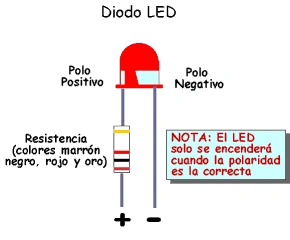
Connection
First step is to connect the Push Button and LED on Raspberry Pi.
LED Connection
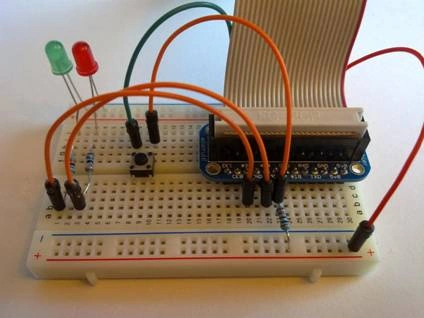
Connect the Positive Pin of the LED to the GPIO 4 on the Raspberry Pi and negative pin to the GND pin.
PushButton Connection
- Connect the Pushbutton with Raspberry Pi in the GPIO pin.
- The positive pin will connect to the 22 of the input pin and a negative pin is also connected on the Gnd side.
The circuit connection
 Programming, GPIO Coding
Explanation
- # gpio_blink.py
- # LED is on pin 4, use a 270 Ohm resistor to ground
- import RPi.GPIO as GPIO
- import time
- GPIO.setwarnings(False)
- GPIO.setmode(GPIO.BCM)
- GPIO.setup(4, GPIO.OUT)
- state = True# endless loop, on / off for 1 second
- while True: GPIO.output(4, True)
- time.sleep(1)
- GPIO.output(4, False)
- time.sleep(1)
- The input signal is connected in the 4 pins of GPIO in the PI circuit.
- We can connect the signal and alternate the LED as the high and low for 1 or 2 sec at the time
- You might expect the push switch to have just two connections, which are either open or closed.
- While some of these tactile Push switches have just two connections, most have four, which shows how these connections are arranged.
Python coding
Explanation
- # gpio_swtich.py
- # LED is on pin 4, use a 270 Ohm resistor to ground
- # Switch is on pin 22, use a pull-down resistor(10 K) to ground
- import RPi.GPIO as GPIO
- import time
- GPIO.setwarnings(False)
- GPIO.setmode(GPIO.BCM)
- GPIO.setup(4, GPIO.OUT)
- GPIO.setup(22, GPIO.IN)# input of the switch will change the state of the LED
- while True: GPIO.output(4, GPIO.input(22))
- time.sleep(0.05)
- This is like the previous script, except that we are designating Pin 22 as an input pin. We set the output of Pin 4 to match the input of Pin 22.
- When Pin 22 goes high, so does Pin 4. The time.sleep(0.05) is there to account for any debouncing in the button.
- This means that when you read the input value, using GPIO.input, False will be returned, if the button is pressed.
- This is a little counterintuitive. GPIO pin has software configurable pull-up and pull-down resistors. When using a GPIO pin as an input, you can configure these resistors, so that one or either or neither of the resistors are enabled.
RajaPosted Nov 17, 2016, 4:53 AM
Good One Thanks For sharing...
Anu VPosted Nov 17, 2016, 1:48 AM
Very nice article. Thanks for sharing.
Vignesh ManiPosted Nov 16, 2016, 3:55 PM
Nice one. Thank you for share..