

In the last session, we are discussing the python concepts. I hope all are understand good. Now, we are seeing some operator's examples and literal collections. The literal collections are the most important topic in python.
Let’s start,
Arithmetic operations using python
This is a very useful part. Because once we know how to handle the arithmetic operations means the data type concept over.
Simple calculation
x=4
y=20
#Directly calculated in print()
print(x+y)
OUTPUT
24
Print using format
x=10
y=x    # now x and y value is equal
print("x={}\ny={}".format(x,y))
x=30
print("x={}\ny={}".format(x,y))
OUTPUT
x=10
y=10
x=30
y=10
Basic Operations using python
x=16
y=4
#print the value
print("The number x is ",x)
print("The number y is ",y)

#Addition
a=x+y
print("Addition:\nx+y=",a)

#Subtraction
b=x-y
print("Subtraction:\nx-y=",b)

#Multiplication
c=x*y
print("Multiplication:\nx*y=",c)

#Division
d=x/y
print("Division: (float) :\nx/y=",d)
OUTPUT
The number x is 16
The number y is 4
Addition:
x+y= 20
Subtraction:
x-y= 12
Multiplication:
x*y= 64
Division :
x/y= 4.0
Differnce Between / and //
print("Division:")

a=int(input("Enter a number :")) # Enter a number  :40
b=int(input("Enter a number :")) # Enter a number  :4

print("a/b")

#Division - Output as Float
x=a/b
print("Float value :",x)

#Division - Output as Integer
y=a//b
print("Integer value :",y)
OUTPUT
Division
Enter a number :40
Enter a number :4
a/b
Float value : 10.0
Integer value : 10
Differnce Between * and **
a=2
b=5

#2*5 - Multiplication of 2 and 5
x=a*b
print("2*5:",x)

#2**5 - 2 to the power of 5
y=a**b
print("2**5:",y)
OUTPUT
2*5: 10
2**5: 32
Simple Calculation using BODMAS
x=200-5*10+100
print("200-5*10+100 = ",x)

y=(200-5*10)+100
print("(200-5*10)+100 = ",y)

z=876-98*68+8/4
print("876-98*68+8/4 = ",z)
OUTPUT
200-5*10+100 = 250
(200-5*10)+100 = 250
876-98*68+8/4 = -5786.0
del keyword
n=100
print("n=",n) #output: n=100

# Using del # del is used to delete variable n here
del n # n variable deleted

# Printing n after using del
print(n) #see the error message in below
OUTPUT
n= 100
Traceback (most recent call last):
File "C:/Users/Name/Desktop/del.py", line 8, in <module>
print(n)
NameError: name 'n' is not defined
Comparison (Relational) Operators
x = 10
y = 5

print(x == y) # The answer is False because 10 is not equal to 5
print(x != y) # The answer is True because 10 is not equal to 5
print(x > y)  # The answer is True because 10 is greater than 5
print(x < y)  # The answer is False because 10 is not less than 5
print(x >= y) # The answer is True because 10 is greater, or equal, to 5
print(x <= y) # The answer is False because 10 is neither less than or equal to 5
Logical operators
x = 6

print(x > 4 and x < 10) # The answer is True because 6 is greater than 4 AND 5 is less than 10
print(x > 4 or x < 5)   # The answer is True because 6 is greater than 4, but 6 is not less than 5
print(not(x > 4 and x < 15)) # The answer is False because not is used to reverse the result
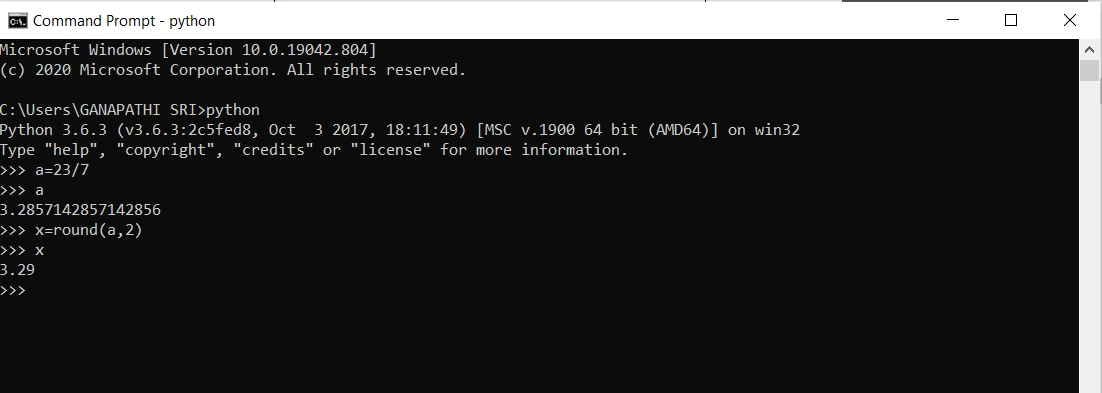
Round off function
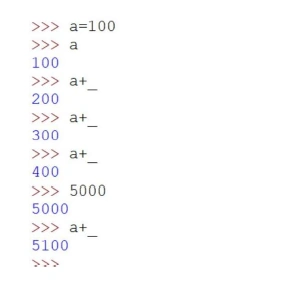
Underscore _ usage in python
TUPLE OPERATIONS
- It can be used to store various items in a single variable. It is enclosed by the parentheses ().
- The elements are separated by the special character like comma (,).
- It is considered to be immutable which means it can't be modified after creation.
- The (del) keyword can delete the tuple completely.
- Tuple items are indexed. For example, the first item is considered as the index [0], the second one as index [1], etc.
Input:

# viewing the data
Tuple= ("apple", "banana", "cherry", "apple", "cherry")
print (Tuple)

# this is used to delete the tuple
del Tuple

Output:
('apple', 'banana', 'cherry', 'apple', 'cherry')
Input:

#To determine how many items a tuple has use the len() function.
number = ("one", "two", "three")
print(len(number))

Output:
3
Input:

#A tuple with strings, integers and boolean #values:
value = ("abc", 34, True, 40, "male")
print(value)

Output:
('abc', 34, True, 40, 'male')
Input:

#Add two tuples
tuple1= ("x", "y", "z")
tuple2 = (1, 2, 3)
tuple3 = tuple1 + tuple2
print(tuple3)

Output:
('x', 'y', 'z', 1, 2, 3)
LIST OPERATIONS
- In this following operation, the list is the most versatile datatype available in the Python program which can be written as a list of comma-separated values
- It is enclosed by "square brackets [...]"
- It is considered to be mutable which means it can be modified after creation.
- We can add or remove the following items after the list has been created.
Input:

list1 = ['Maths', 'English', 2020, 2021]
list2 = [1, 2, 3, 4, 5, 6, 7]

#view the data
print(list1)
print(list2)

Output:
['Maths', 'English', 2020, 2021]
[1, 2, 3, 4, 5, 6, 7]

#separately view the data using index values

print ("list1[0]: ", list1[0])
print ("list1[2]: ", list1[2])
print ("list2[1:7]: ", list2[1:7])

Output:
list1[0]: maths
list1[2]: 2020
list2[1:7]: [3, 4, 5, 6]
Input:

#add and remove operations using list
fruits = ["apple", "banana", "cherry"]

# add a data (orange)
fruits. append("orange")
print(fruits)

Output:
['apple', 'banana', 'cherry', 'orange']

# remove a data (banana)
fruits. remove("banana")
print(fruits)

Output:
['apple', 'cherry', 'orange']
SET OPERATIONS
- It can be used to store multiple items in a single variable.
- A set is a collection of variables that is both "unordered" and "unindexed".
- It can be written with curly brackets "{…}"
- It having unique values and eliminate duplicate items.
Input:

#view the data
number = {"one", "two", "three"}
print(number)

Output:
{'two', 'three', 'one'}
Input:

#This example shows that set eliminate the duplicate values
number = {"one", "two", "three", "one", "one"} print(number)

Output:
{'one', 'three', 'two'}
Input:

fruits={"apple", "banana", "cherry", "watermelon", "banana", "cherry"}
print(fruits)
print(len(fruits))

Output:
{'cherry', 'apple', 'watermelon', 'banana'}
4
DICTIONARY OPERATIONS
- Dictionary is considered to be an unordered set of a key-value pair of items.
- It is enclosed with the curly braces { ... }.
- It is very easy to add or delete the items,
Input:

#view the data
d= {'Tamil':80, 'Enlish':90, 'name1':'joy', 'name2':'mikle'}
print(d)

Output:
{'Tamil': 80, 'English':90, 'name1': 'joy','name2': 'mikle'}
Input:

#key and values
d= {'Tamil':80, 'Enlish':90, 'name1':'joy', 'name2':'mikle'}
print(d.keys())
print(d.values())

Output:
dict_keys (['Tamil', 'English', 'name1', 'name2'])
dict_values ([80, 90, 'joy', 'mikle'])
Input:

#add operations
d= {'Tamil':80, 'Enlish':90, 'name1':'joy', 'name2':'mikle'}
d['maths'] = 100
print(d)

Output:
{'Tamil': 80, 'English': 90, 'name1': 'joy', 'name2': 'mikle', 'maths': 100}

#delete operations
del d['maths']
print(d)

Output:
{'Tamil': 80, 'English': 90, 'name1': 'joy', 'name2': 'mikle'}
I hope you understand about literals briefly. If you have any query please ask me anything. We'll see a more interesting topic in the future.
Aravinth SwamyPosted Jun 10, 2021, 4:31 PM
Superb Ganapathi!!do more.