

Introduction
Today, I will take a new part of Python for my tutorial series. In this part, you will learn Exception Handling.
I already told you the following:
- Installation of Python
- Python Language Tutorial: Part One
- Python Language Tutorial: Part Two
- Python Language Tutorial: Data Structure in List - Part Three
- Python Language Tutorial: Module and Input-Output - Part Four
- Python Language Tutorial: Exception Handling - Part Five
Python language has very good functions for Regular function and their regular expression also useful for searching a text from any statement.
Today I will give you some examples of the regular expression that may help you easily learn the concept of regular expression according to python. Microsoft Word also has regular expression techniques for searching text in the whole document like the below Image.
 Regular Expression Syntax
- \s — White space characters
- \S — Non-white space characters
- \w — Word characters
- \W — Non-word characters
- \d — Digit characters
- \D — Non-digit characters
Methods and Attributes for search characters
- match() - Determine if the RE matches at the beginning of the string.
- search() - Scan through a string, looking for any location where this RE matches.
- findall()- Find all substrings where the RE matches and returns them as a list.
- finditer()- Find all substrings where the RE matches and returns them as an iterator.
Methods and Attributes for match object instances
- group() Return the string matched by the RE
- start() Return the starting position of the match
- end() Return the ending position of the match
- span() Return a tuple containing the (start, end) positions of the match
- Now I’m giving you some examples of regular expressions in Python.
Output: 9785959495
- import re
- message = 'call me at 9785959495'
- regex = re.compile(r'\d+')
- number = regex.search(message)
- print(number.group())
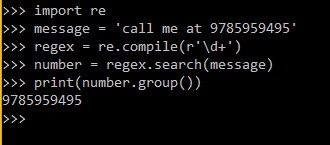 According to the above Example show library re is useful for finding numbers in the message. r’\d+’ here r denotes this is a line and r does not perform escape conversion like \d and \d means search digits and + means total digits.
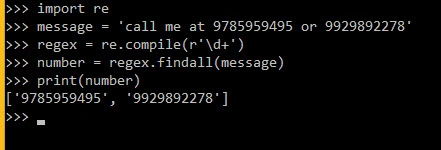
 - Getting All digits from particular statements
Output : ['9785959495', '9929892278']
- import re
- message = 'call me at 9785959495 or 9929892278'
- regex = re.compile(r'\d+')
- number = regex.findall(message)
- print(number)
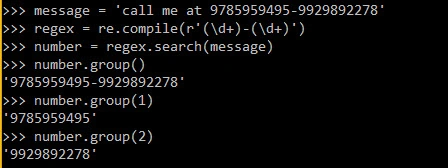
- Getting in multiple groups value
Output : '9785959495-9929892278'
- message = 'call me at 9785959495-9929892278'
- regex = re.compile(r'(\d+)-(\d+)')
- number = regex.search(message)
- number.group()
Output: 9785959495- number.group(1)
Output: 9929892278- number.group(2)

pouria poloukPosted Jun 5, 2016, 9:25 AM
thank you
Sonu ChaudharyPosted May 12, 2016, 11:29 AM
good one
Thiruppathi RPosted May 12, 2016, 1:50 AM
Great ..