

Gradio is an open-source Python library that makes it easy to create web interfaces for machine learning models. With just a few lines of code, we can turn our model into a user-friendly demo that runs in the browser without doing front-end development.
It acts as a bridge between AI models and end users. Instead of showing raw code or command-line outputs, we can present the model in an interactive interface where anyone can test it.
Why Gradio Matters After Fine-Tuning or RAG
Once you have your model running locally—whether it's:
Fine-tuned on your enterprise data, or
Extended with RAG (Retrieval-Augmented Generation) to fetch knowledge from external sources
The next step is, you need a user interface (UI) so that end-users can actually interact with the model.
In a traditional workflow, this often means:
Building a backend with Django or FastAPI
Wiring it up to a frontend with React (or another JavaScript framework)
This process can take days or even weeks of development—especially if your only goal is to test the model. This is where Gradio comes into the picture. With just a few lines of Python code, you can spin up a clean, interactive interface in minutes, without dealing with frontend complexities.
No React needed.
No Django needed.
No deployment pipelines required
Instead, Gradio gives you a ready-to-use UI for testing and sharing your model—whether it's a chatbot, image classifier, or speech recognizer.
Example: Google Gemma 3 + Ollama + Gradio Chatbot
Ollama allows us to run models like Google Gemma 3 (or Microsoft Phi) locally. Once the model is available, we can build a chatbot UI around it using Gradio.
import gradio as gr
import requests

OLLAMA_API_URL = "http://localhost:11434/api/generate"

def chat_with_gemma(message, history):
    # Build prompt from history
    full_prompt = ""
    for user_msg, bot_reply in history:
        full_prompt += f"User: {user_msg}\nGemma: {bot_reply}\n"
    full_prompt += f"User: {message}\nGemma:"

    try:
        response = requests.post(OLLAMA_API_URL, json={
            "model": "gemma3:1b",
            "prompt": full_prompt,
            "stream": False
        })

        if response.status_code == 200:
            result = response.json()
            reply = result.get("response", "").strip()
            return reply  #JUST RETURN THE REPLY
        else:
            return f"Error: {response.status_code} - {response.text}"
    except Exception as e:
        return f"Exception: {str(e)}"

# Set up Gradio ChatInterface properly
chat_interface = gr.ChatInterface(
    fn=chat_with_gemma,
    title="Chat with Gemma (via Ollama)",
    description="Chat with a local Gemma model using Ollama.",
    examples=["Hello!", "Tell me a joke.", "What is the capital of France?"]
)

if __name__ == "__main__":
    chat_interface.launch(share=True)
Once you run the code, check the Terminal
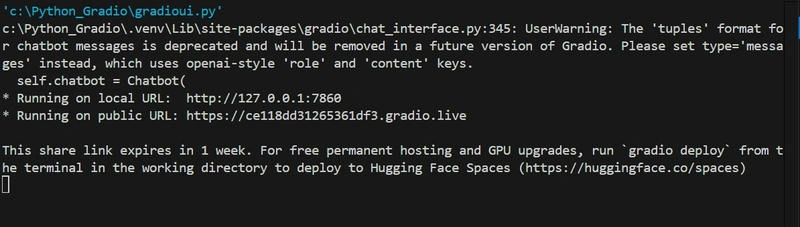
Gradio, by default, runs on a local FastAPI + Uvicorn server under the hood.
Here’s the breakdown:
Backend framework → FastAPI (used to define API endpoints for your model functions).
Server runner → Uvicorn (an ASGI server that actually serves the FastAPI app).
Frontend → A lightweight React-based web UI that Gradio bundles and serves automatically.
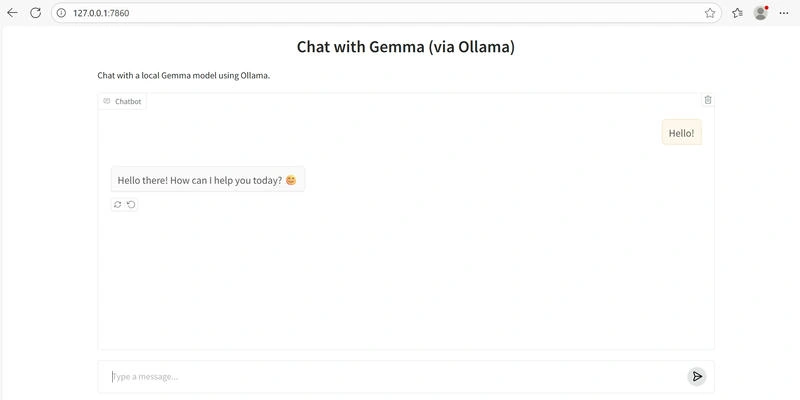
Run the script, open your browser at:
…and start chatting with Gemma 3 through your very own Gradio chatbot.
Conclusion
Gradio is more than a demo tool—it’s a critical bridge between models and users. Whether you’re testing a small NLP model, validating a computer vision pipeline, or running a powerful local LLM like Gemma 3 with Ollama, Gradio helps you:
Prototype faster.
Collect real-world feedback.
Share results across teams.
Ensure AI models are practical and user-ready.
In the rapidly growing world of AI/ML, tools like Gradio aren’t just convenient—they’re essential for building trustworthy and deployable AI solutions.
Join the conversation! Your thoughts help the community grow.