

Introduction
Python Basics cover all the Python Datatypes and Python Tokens. After that, we learned the Python Flow Controls. Let's keep moving forward with Python Functions and Python Class/Objects and Python File Handling.
What is a Function?
A function is a block of organized, reusable sets of instructions used to perform some related actions. A function is a code that might to use again and again at some point in time.
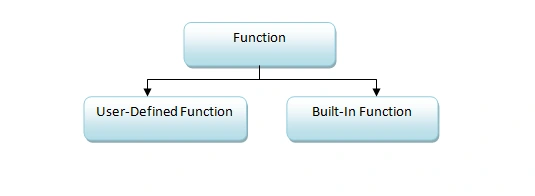
User-Defined Function
It is the function which is defined by the user.
Syntax
- def function_name(arg1, arg2, arg3,…):
- statements….
- return
- [expression]
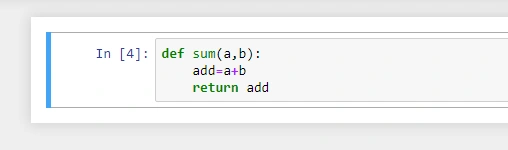
Example
In this example: a and b are arguments and it is stored in sum function.
Built-In Functions
It is the predefined set of functions in Python.
- abs(): It returns the absolute value of a number.
- all(): It returns true if all items in an iterable object are true.
- any(): It returns true if any items in an iterable object are true.
- ascii(): It returns a readable version of an object. It replaces non-ascii characters with an escape character.
- bin(): It returns the binary versions of numbers.
- bool(): It returns the Boolean value of specified objects.
And many more built-in functions are available.
How to call a Function?
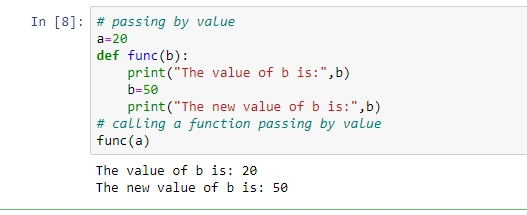
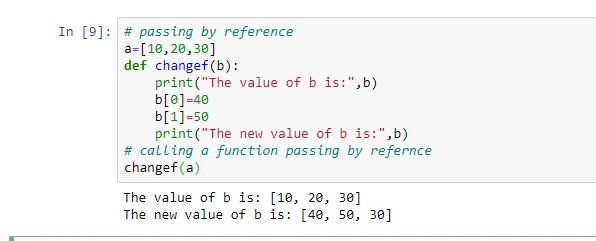
There are two ways to call a function either by PASSING A VALUE or PASSING REFERENCE.
PASSING BY VALUE
Example
PASSING BY REFERENCE
Example
Lambda Function
Lambda function is a small anonymous function of Python. It means it’s not having the name of the function. Lambda function can take any number of arguments but with only one expression.
Note
A lambda function cannot contain more than one expression.
Syntax
- lambda arguments: expression
Example

def Functions VS Lambda Functions
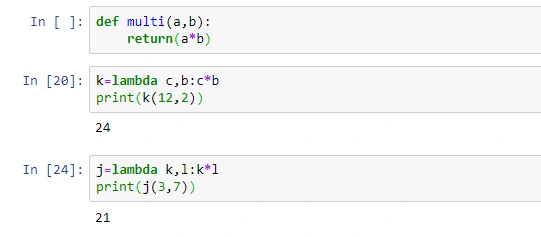
2. A normal function declared with the def keyword.
Anonymous functions are declared with the lambda keyword.
3. We can say that a+b is a normal function. On the other hand, k=a+b is the lambda function.
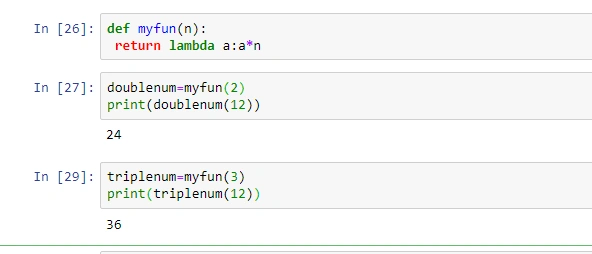
Plus Point of Lambda Function
An anonymous function inside a normal function,
Example
Python Classes/Objects
- Python is an object-oriented programming language.
- Moreover, we can say that everything in Python is an object, with properties and methods.
- A class is a “blueprint” for creating an object.
Syntax
- Define Class
- class class_name:
- define objects/methods/functions
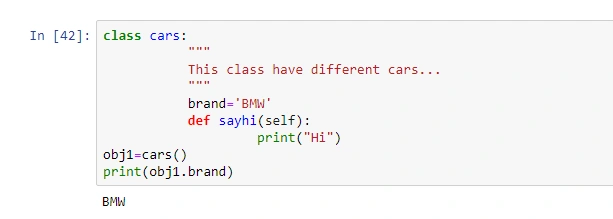
Example
- class py_class:
- a=3
- Call an Object:
- Object_nm=class_name()
- Print statement…
Example
- Obj1=py_class()
- print(Obj1.a)
File Handling in Python
File handling is an important part of a web application.
There are four features of File handling in Python,
- Open
- Read
- Write/Create
- Delete
OPEN
Python users can take open() to open a file. It takes two parameters, filename and mode.
Syntax
- f=open(“Path of the File”,mode)
mode
There are four different types of modes,
- “r” READ: READ mode has a default value. Opens a file for any errors in the file does not exists.
- "a” APPEND: APPEND mode opens a file for appending, creates the file if it does not exists.
- “w” WRITE: WRITE mode opens a file for writing, creates the file if it does not exists.
- “x” CREATE: CREATE mode creates the specified file returns an error if the file with the same name exists
Example
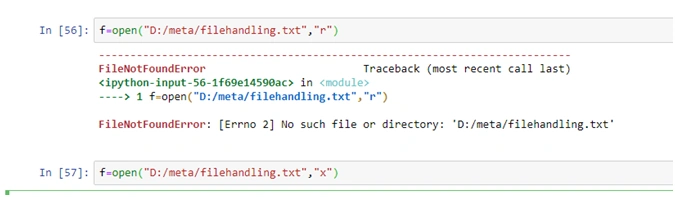
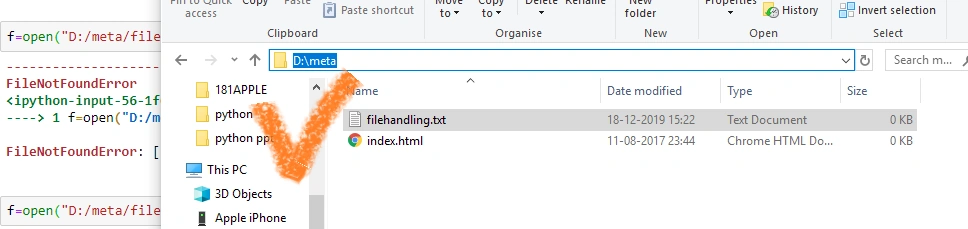
Let’s check that filehandling.txt is created in D:/meta/ folder…
READ
It is to read the contents of the file.
Example
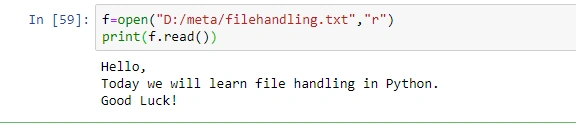
Read some parts of the file,
Example

For example, if we want to read the first 3 characters of the file:
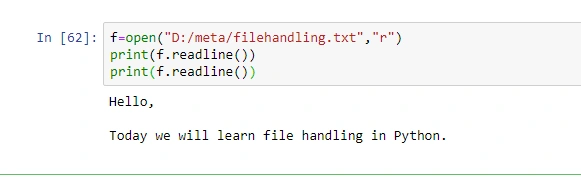
Reading the first line from the file we will use the readline() function,
Example

If I want to read the first two lines of my file then I have to readline() twice.
Example
Loop through the file
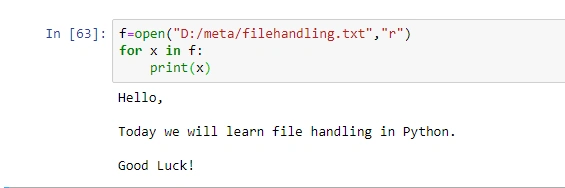
If I want to read my file contents line by line then I have to use a FOR Loop.
Example
WRITE/CREATE
Writing and creating this mode used when we would like to add to the file or create a new file. To write to an existing file, you must add a parameter to the open() function.
- a-Append: will append to the end of the file.
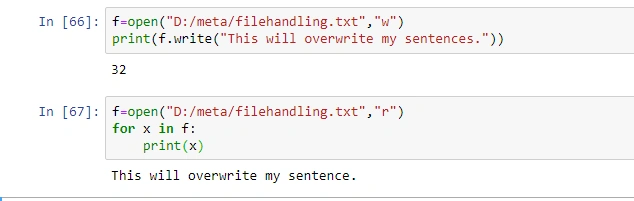
- w-Write: will overwrite any existing content.
Here, the write() function is going to be used.
Example
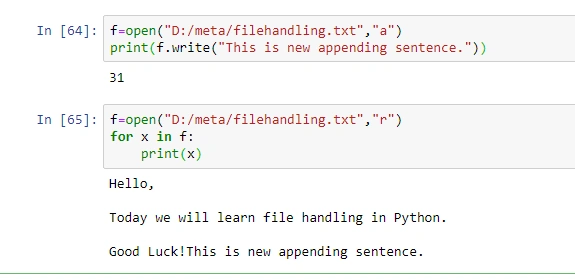
This is for append. Now we will check with write.
Example
Creating a new file
We can create a file using x-create, a-append or w-write modes.
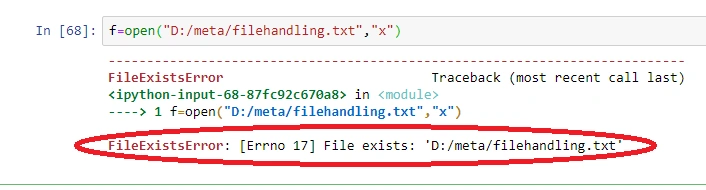
- x-Create: It creates a file, returns an error if the file already exists.
- a-Append: Create a file if the specified file doesn’t exist.
- w-Write: Create a file if the specified file doesn’t exist.
Example
f=open(“D:/meta/filehandling.txt”, “x”) This will create a file myfile.txt, otherwise, it will return an error if it already exists.
DELETE
When we want to import an OS module we have to delete the file. Before deleting a file we must have to close that file. For closing a file we should use the close() function.
Syntax
- import os
- os.remove(“filename with path”)
Example
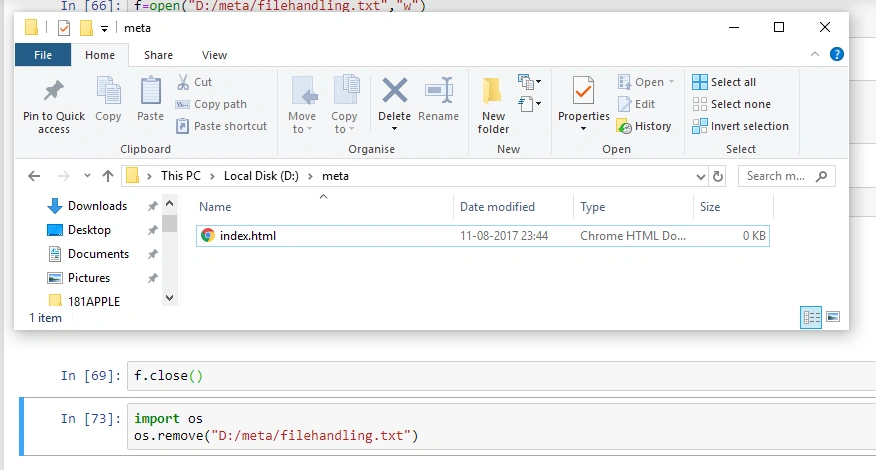
You can see in the folder filehandling.txt is removed.
Note
Find the file attached to this article: funcs_filehandling.rar.
Reference Links
- https://www.w3schools.com/python/
- https://thepythonguru.com/python-lambda-function/
Summary
In this article, we have seen all the major functions with syntax and example with the difference of def function with a lambda function. Moreover, we have seen in detail how file handling works in Python along with its modes.
Vidyadharran GPosted Dec 26, 2019, 8:51 AM
Nice explanation thanks for sharing... :)
Onkar SharmaPosted Dec 24, 2019, 4:14 AM
Very well explained with examples...
Rushi MehtaPosted Dec 23, 2019, 1:01 AM
Very well explained the whole concept.
Subin ThomasPosted Dec 22, 2019, 10:45 PM
Explained very well with all those pictorial examples. good
Ravishankar VelladuraiPosted Dec 22, 2019, 9:11 AM
Good One Dipa Mehta, clear explanation and easily understand
Ankur MistryPosted Dec 22, 2019, 9:00 AM
Good examples easy to learn