

Introduction
Today, I will take a new part of Python Django from my tutorial series. In this part, you will learn the Database model features. I already told you the following:
- Installation Of Django: Python Framework
- Python Django Tutorial: Migration Of Database Models - Part One
- Python Django Tutorial: Operations on Database models - Part Two
- Firstly create a Django project with the Django app.
- Now run the Django project using open command prompt in the root directory and write command: python manage.py runserver.
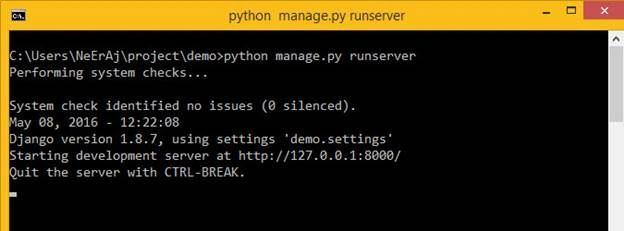
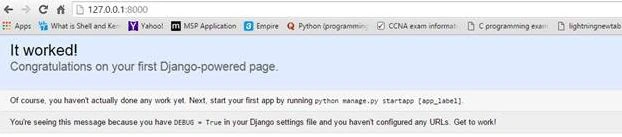
- You have successfully run your Django project.
- Now open views.py file in the Django app folder.
- Write code in views.py as below
- from django.http import HttpResponse,
- # Create your views here.
- def firstView(request):
- data = "<html><body>Hello is new view of django<body></html>"
- return HttpResponse(data)
- Now open urls.py in Django project root folder.
- Write code as below.
- from django.conf.urls import url
- urlpatterns = [
- url(r'^$', 'main.views.firstView', name='home'),
- ]
- After this refresh browser then you will see as below:

- According to views, file code defines the method that has data variable content and some string that will convert by the browser.
- HttpResponce is used for returning to the page. When you want to see results on any page using any function that must return the type of response.
- In URLS.py file code define some part like urlpattern is used to write URL handling in this array. This is used for the store web page URL.
- URL method contains the first parameter that defines a web page URL which works as a regular expression.
- The second parameter ‘main.views.firstView’ is used for locating firstView method that we will use when this URL hits on the browser and the last parameter is used for giving a unique name for identifying a particular URL and you can use this in the view file.
- Now I will show another example of handling URLs and views.
- Now make another method in views.py as below.
- from django.conf.urls import url
- urlpatterns = [
- url(r'^$', 'main.views.firstView', name='home'),
- url(r'^name/$', 'main.views.askName', name='name').
- ]
- Write code in urls.py as below,
- from django.conf.urls import url
- urlpatterns = [
- url(r'^$', 'main.views.firstView', name='home'),
- url(r'^name/$', 'main.views.askName', name='name'),
- ]
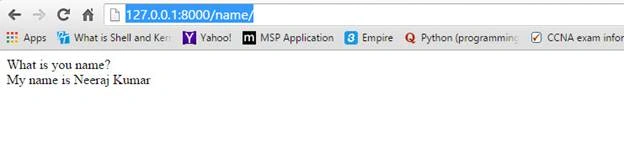
- Now open the browser and go to URL http://127.0.0.1:8000/name/
- You will see the output as below image:
 Django framework provides many features for handling URLs and views as dynamic.Django's most important feature is that Django also has a tag for using in the HTML page as angularJs.But its tag only runs only once when the page is loading.
Ajay MalikPosted May 28, 2016, 4:47 AM
good one..
Sonu ChaudharyPosted May 10, 2016, 7:34 AM
good one
Neeraj KumarPosted May 10, 2016, 12:02 AM
Thank you Vignesh Mani
Vignesh ManiPosted May 9, 2016, 5:59 PM
Nice