

Introduction
Today, I will share one new part of Python Django from my tutorial series. In this part, you will learn how to use an HTML template with Django.
I already told you the following:
- Installation Of Django: Python Framework
- Python Django Tutorial: Migration Of Database Models - Part One
- Python Django Tutorial: Operations on Database models - Part Two
- Python Django Tutorial: Views and URL Handling - Part Three
- Python Django Tutorial: Advanced URL Handling - Part Four
- Python Django Tutorial: Built-in Admin Interface - Part Five
- Python Django Tutorial: Advanced Admin Interface - Part Six
Django has many built-in tags and filters for use in templates with Django. Each tag and filter gives many facilities to show results on the webpage. It almost works as angularjs doe but It can’t work on run time. It works only when It loads the content the first time. But when it loads the first time it has the same features as angularJs.
Now today I want to show how can you use built-in templates HTML pages in Django also some basic built-in tag uses with templates.
- Now create a Django project and after that create the Django app in the project.
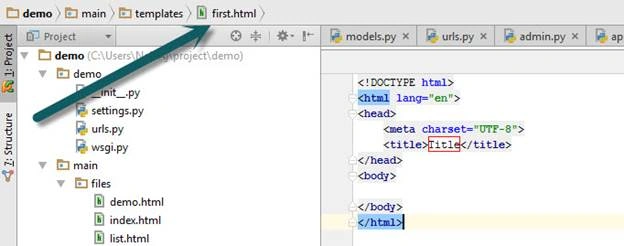
- After that create a new folder in the Django app folder and make an HTML file in this folder.
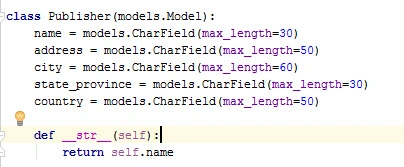
- Now we create a model in models.py file as below.
- Migrate this model. If you don’t know then follow my previous articles.
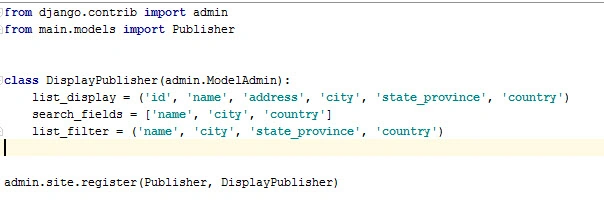
- After that, we go to the admin.py file to use this model in admin for entering the values into this table of database.
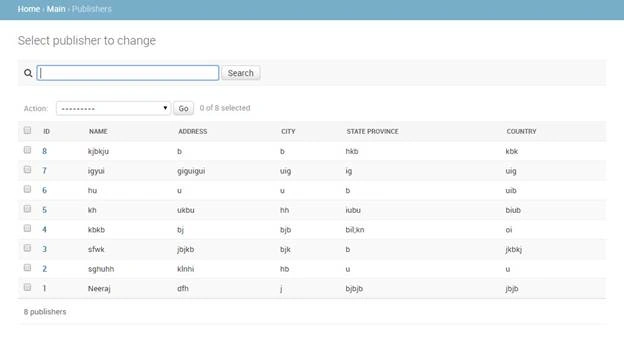
- Now open the admin panel and insert value in Publisher models.
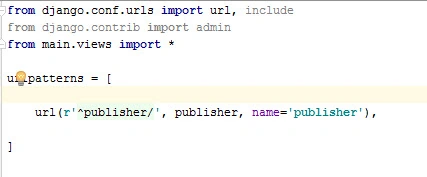
- Now we want to show all the values in our templates. So now we go to urls.py files of the Django app that define URLs.
- Now we go to views.py for access templates and send table data to templates using view file.
- We create method in views.py file as below image:

- Here publisher variable holds the all value of publisher table and ‘templates/first.html’ denotes location HTML file.’publisher’:publisher is the context that we use in templates for accessing data fro this context type variable.
- Now we go to first.html file and write code as below.
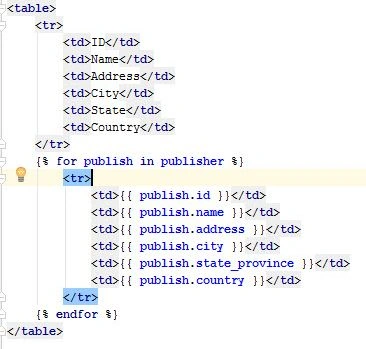
- In this code for loop is used for accessing each row from publisher object. In publish.id, publish.name is attributes of the table.
Note: Attribute name in templates is always the same as the models.py attributes.
- Now go to URL http://127.0.0.1:8000/publisher/. Here you will get all data from the database in print on the webpage.
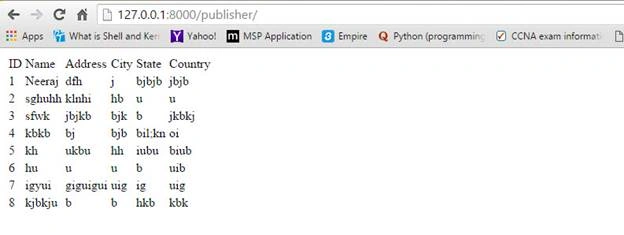
So this is the basic HTML page use. Django has various types of facilities to use HTML pages according to your needs and has many facilities using built-in tags.
Neeraj KumarPosted May 24, 2016, 1:17 AM
Thank you Thiruppathi R
Neeraj KumarPosted May 24, 2016, 1:17 AM
Thank you Debasis Saha
Neeraj KumarPosted May 24, 2016, 1:17 AM
Thank you Kuppurasu Nagaraj
Thiruppathi RPosted May 23, 2016, 3:16 PM
Super..
Debasis SahaPosted May 23, 2016, 1:46 PM
Good One..
Kuppurasu NagarajPosted May 23, 2016, 1:33 PM
Nice Sharing..