

Introduction
Today, I will share one new part of Python Django from my tutorial series. In this part, you will learn how to use the HTML template with Django.
I already told you the following:
- Installation Of Django: Python Framework
- Python Django Tutorial: Migration Of Database Models - Part One
- Python Django Tutorial: Operations on Database models - Part Two
- Python Django Tutorial: Views and URL Handling - Part Three
- Python Django Tutorial: Advanced URL Handling - Part Four
- Python Django Tutorial: Built-in Admin Interface - Part Five
- Python Django Tutorial: Advanced Admin Interface - Part Six
- Python Django Tutorial: Use of Templates - Part Seven
In the Django framework, static files mean the use of CSS, js, images folder location using the static keyword. The static keyword defines the location of these files. But first, we have to configure the path of static file using settings.py file.
- In this article, we will use the bootstrap framework with Django. So firstly for the use of bootstrap we have to configure static files location and then use it in the template.
- Open the settings.py file and add some lines in below of settings.py file as below images.
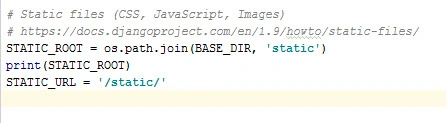
- Now create a static folder in your Django app folder.
- Now download the bootstrap framework zip file.
- Copy all files js, CSS and fonts folder in the static folder.
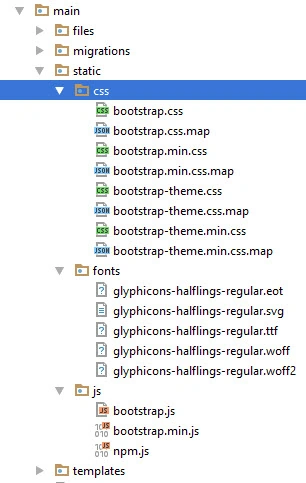
- After this process now we go to HTML files that I already told you about you in tutorial seven.
- Add bootstrap file in HTML using static keywords.
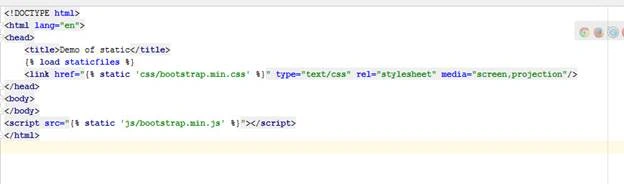
- The above image shows some code in the HTML file.
- {% load staticfiles %} is used for loading all static files here for use and second {% static ‘css/bootstrap.min.css’ %} in link tag is used for giving path of CSS file.that can automatically inherit this CSS file and in below js file is also added using the same syntax so this helps for set path automatically without custom URL.
- Now we create some bootstrap components in this HTML file.
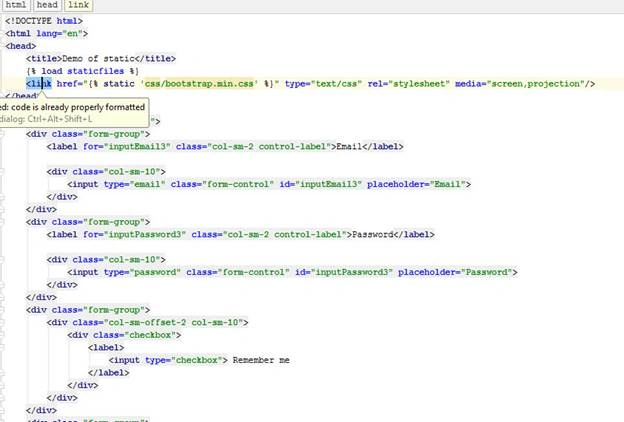
- Now run the Django project and open the URL of using your urls.py ten you will get output on a webpage.
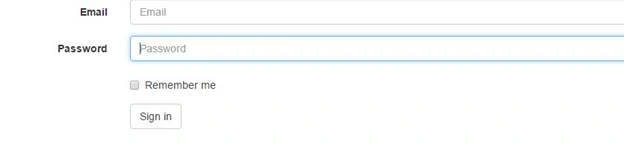
- It means all CSS, js files are working properly and now open and inspect the element of the browser and see the location of files.

- Here static denotes insettings.py files as STATIC_URL=”/static/”
So here you can insert any CSS, js and fonts file and attach using static keyword in HTML file.
Note
When you deploy a Django project on server static file location is very important. Because many times it creates mostly errors on deployment. So when you deploy project you should have knowledge of server OS types and where is the exact location of your project root.
Munesh SharmaPosted May 25, 2016, 12:29 AM
good one
Gowtham RajamanickamPosted May 24, 2016, 1:19 AM
good one
Neeraj KumarPosted May 24, 2016, 1:17 AM
Thank you Vignesh Mani
Neeraj KumarPosted May 24, 2016, 1:16 AM
Thank you Thiruppathi R
Neeraj KumarPosted May 24, 2016, 1:16 AM
Thank you Munesh Sharma
Neeraj KumarPosted May 24, 2016, 1:16 AM
Thank you Debasis Saha
Neeraj KumarPosted May 24, 2016, 1:16 AM
Thank you Kuppurasu Nagaraj
Vignesh ManiPosted May 23, 2016, 3:50 PM
nice one
Thiruppathi RPosted May 23, 2016, 3:15 PM
Good..
Munesh SharmaPosted May 23, 2016, 1:58 PM
great
Debasis SahaPosted May 23, 2016, 1:46 PM
Good One..
Kuppurasu NagarajPosted May 23, 2016, 1:33 PM
Nice Sharing..