

In my previous article, I shared some of the details regarding Python and the installation process. If you haven't installed it yet, please use this link and install it. Please check the below link of my previous article,
How to check Python by CMD
- Press Windows +R on the keyboard
- Type “cmd” and click “ok”
- Type “python” and Press Enter
- Version visible
- Python 3.6.3
- Exit ()
TYPES OF RUNNING METHOD
- Interactive mode [command prompt]
- Script mode [save & run]
- IDLE mode [shell, interactive mode]
- Using tools like Jupyter etc.
EXTENSION OF PYTHON FILE - Filename.py (ex: add.py)
PYTHON TOOLS
IDE → INTEGRATED DEVELOPMENT ENVIRONMENT
- PyCharm IDE
- Visual studio code
- Sublime text
- Jupyter notebook
- Spyder IDE
- IDLE – Integrated Development and Learning Environment
FAMOUS WEBSITES USING PYTHON
- Spotify
- Netflix
- Uber
- Dropbox
- Pinterest
SUPPORTS OF OOPS CONCEPTS
- Class
- Objects
- Method
- Inheritance
- Polymorphism
- Data abstraction
- Encapsulation
CLASS
Creating the objects.
OBJECT - is a real-world entity [Pen, Book, Bed, Keyboard]
METHOD - like a function [Ex: _int_]
INHERITANCE
A class is derived from another class is called inheritance.
- Single inheritance
- Multiple inheritances
- Multilevel inheritance
- Hierarchical inheritance
- Hybrid inheritance
POLYMORPHISM
It is a Graken Language.
Poly=many, morphism =forms
When a process is acting with the different situations differently.
Ex - person – act [school – student], [office – employee].
DATA ABSTRACTION
A process of identifying the essential details and ignoring the non-essential details.
EX - TV Remote.
ENCAPSULATION
A mechanism of hiding the internal details. [security purposes]
EX - Medical capsule.
PYTHON APPLICATIONS
- Web development [ Flask, Django, Pyramid]
- Game development
- Numeric applications [Pandas, NumPy, NLP]
- AI & ML projects
- GUI, PyQt5, Tkinder
- Software development
- Business applications
- Education field
- Operating systems
- Web scrapping
- Image processing [DL]
COMPARISON OF JAVA & PYTHON
| JAVA | PYTHON |
| Compiled language | Interpreted language |
| Statically Type | Dynamically Type |
| Complex learn | Easy learn |
| Curly braces {} | Indentation |
| Slow running | Fast running |
| High code line | Low code line |
| Low packages [Inbuild libraries] |
Lots of packages |
| Notepad, NetBeans, Eclipse, Java | Python, IDLE, Anacondas, Jupyter, Spyder, Tabula |
| Spring, Blade | Django, Flask. |
VARIABLE IN PYTHON
A variable can be used to store some values (in a data format) with a symbolic name. It is to be considered as changeable.
No need to declare that the data type to the variable.
- a = 100
- a => variable
- “= “ => Assignment operator
- 100 = > value
IDLE METHOD
- Start => IDLE => “window open”
- File => new file
- Untitled windows will open
- File=> save
- File name => filename.py [eg: add.py]
- press “save”
- Now, the file will be saved successfully and can be viewed in the title.
- press f5 (or) fn +f5 to run the program
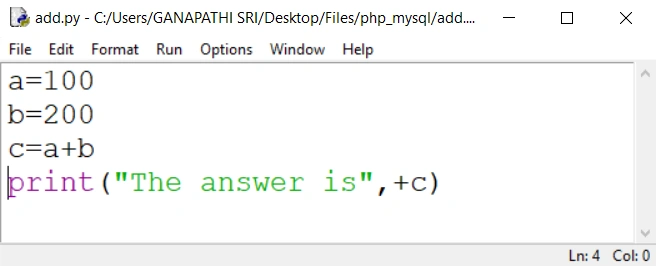
OUTPUT
a,b,c is variables 100,200 is values and finally we are using '+' operator. So, we will get the output of 300.
TOKENS IN PYTHON
Tokens can be defined as the smallest element of a program and it is meaningful to the compiler.
There are some of the types as follows,
- Keywords
- Identifiers
- Literals
- Operators
KEYWORDS
- Python keywords are special (reserved words) that have specific meanings and purposes.
- It can’t be used for any purpose.
- Keywords contain lowercase letters only.
- True, false,
- while, for,
- if, else, elif,
- break, continue, pass,
- def, class, return, with
- try, except, finally,
- import, From, as
IDENTIFIERS
It is a name used to identify a variable, function, class, module, or other objects. Some of the rules are to be specified as follows,
Rules
- In this identifier, the first character of the variable must be in the form of an alphabet or underscore (_).
- Except for the first character remaining variables may be an alphabet that classifies as lower-case(a-z), upper-case (A-Z), underscore, or digit (0-9).
- The name of the identifier may not have any white space or special character (! @, #, %, ^, &, *).
- The identifier name must not be similar to any keyword it must be defined with the language.
- It must be considered case-sensitive.
Example
- Valid identifiers - a123, _n, n_9, etc.
- Invalid identifiers - 1a, n%4, n@ 9, etc.
LITERALS
- String literals
- Numeric literals
- Boolean literals
- Literal Collections
- Special literals
String Literal
- It can be created by writing a text (a group of Characters) and it is surrounded by the single ("), double (" "), or triple quotes.
- By using triple quotes, we can write multi-line strings or it may display in the desired way.
Numeric literals
- Integer - 20,50,450
- Float - 10.2, 40.50,500.16
- Complex - (7+8j)4j
Boolean literals
- true
- false
Literal collection
- List literals
- Tuple literals
- Dict literals
- Set literals
Special Literals
- ‘None’ is used to define a " null variable". If ‘None’ is compared with any other variable than the same, it will return false.
OPERATORS IN PYTHON
- The main operators are used to calculating purpose and comparisons.
- For example, expression 8 + 4 = 12.
- 8 and 4 are called "OPERANDS"
- ‘+’ is called "OPERATOR"
Types of Operator
- Arithmetic Operators (+, -, /, *, %)
- Comparison (Relational) Operators (==, !=, <=, >=, <, >)
- Assignment Operators (=, +=, -=, *=, %=, **=, //=)
- Logical Operators (and, or, not)
- Bitwise Operators (&, |,^ , ~, <<, >>)
- Membership Operators (in, not in)
- Identity Operators (is, is not)
PRINT & QUOTATION STATEMENT
Next, how to print a statement and types of quotations in Python.
Syntax - print (" ")
Types of quotations
- Single Quotation (')
- Double Quotation (")
- Triple Quotation (""")
Example
#Print Statements Using Python
#Single Quotation
print('Hi')
#Double Quotation
print("Hello World")
#Triple Quotation
print('''Welcome''')
#Using " "
print('This is "Python"')
OUTPUT
Hi
Hello World
Welcome
This is "Python"
PYTHON COMMENTS
Python Comment is a fundamental device for developers. Remarks are for the most part used to clarify the code. Assuming the code has the appropriate clarification, we can undoubtedly understand the projects. In the future, any individual may change the code to make or execute the new model. So, a decent developer should utilize the remark, at that point it can done be in a simple way.
- “#” This hash symbol is representing to comments
- Single line comments using the # symbol
- Multiline comments using triple quotations
I hope you understand. If you have any query please ask me anything. We'll see more in the future.
Karthick PoonkodiPosted Jun 9, 2021, 5:10 AM
Great Ganapathi. Do more articles. Keep contribute.