


Welcome to Part II of React from Scratch.
Deploying React on IIS (Internet Information Service) has some tricks.
You need to set up your React project in an Index.html file, configure the IIS pool, choose the Port to run it and copy the web. config, and install the rewrite module on Windows.
Here are the steps to guide you.
Let's start
- Add to the end of the body in Index.html of your react project on the public folder these two scripts below.
<script src="https://unpkg.com/react@18/umd/react.development.js" crossorigin></script> <script src="https://unpkg.com/react-dom@18/umd/react-dom.development.js" crossorigin></script> - When the code is published for production, please alter the .development.js to .production.min.js.
- On your project, run the build command.
npm run build - Copy the files from the build folder to your IIS target folder.
- Add this web. config in the target folder under IIS.
<?xml version="1.0" encoding="UTF-8"?> <configuration> <system.webServer> <rewrite> <rules> <rule name="Static Assets" stopProcessing="true"> <match url="([\S]+[.](html|htm|svg|js|css|png|gif|jpg|jpeg))" /> <action type="Rewrite" url="/{R:1}"/> </rule> <rule name="ReactRouter Routes" stopProcessing="true"> <match url=".*" /> <conditions logicalGrouping="MatchAll"> <add input="{REQUEST_FILENAME}" matchType="IsFile" negate="true" /> <add input="{REQUEST_FILENAME}" matchType="IsDirectory" negate="true" /> </conditions> <action type="Rewrite" url="/index.html" /> </rule> </rules> </rewrite> </system.webServer> </configuration> - To make it work, you must install a rewrite module if you haven't it.
- https://www.iis.net/downloads/microsoft/url-rewrite, choose your language, download, and install it.
- Adjust the pool
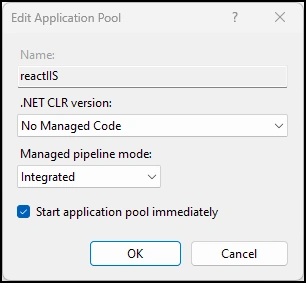
- Adjust your binds and default port.
- Choose Bindings, and click on Edit.
- Choose a Port for your React app to work.
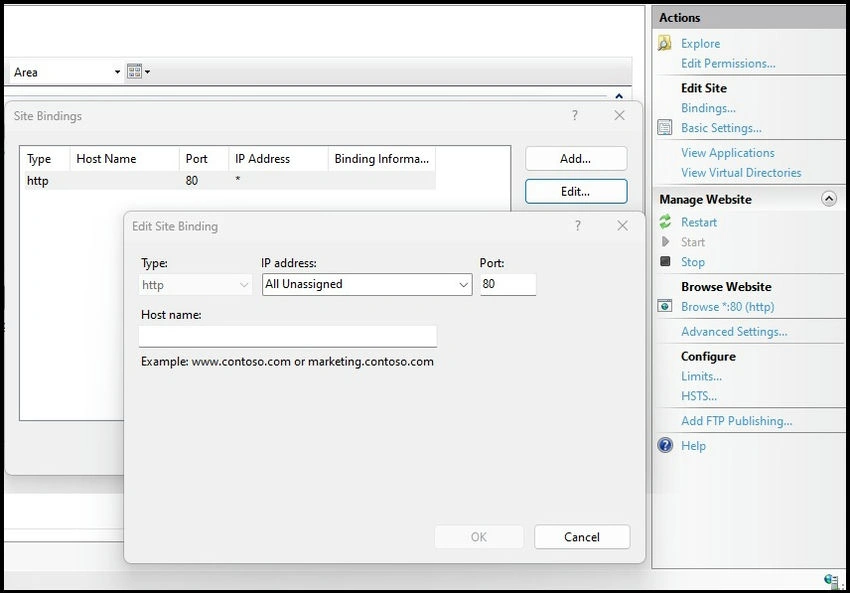
Now, you must have your first React app on IIS working. Good lucky!
I'll guide you in starting a new Telerik UI for the React app in Part III.
Questions you may still have
What two scripts need to be added to the end of the body in Index.html?
You will find helpful information here.
What is the web.config file content that needs to be added to the target folder under IIS?
It would be best if you did this to configure IIS to use the rewrite module to start React.
What are the steps to install and configure the rewrite module?
Download Installer 64x here in your language and execute it. That is all.
Join the conversation! Your thoughts help the community grow.