

Ever thought how we can replace the class instance without recompiling the project in C#? In this article I will discuss how we can use Provider pattern to make extensible software. In one of my articles I have talked about loose coupling and dependency injection. I will use a very simple example to demonstrate how we can replace the functionality of one assembly or class without even compiling the project. This will be done dynamically at run time. I have used C# as the language for this project.
The article first appeared on DotNet For All.
This type of scenario can be useful if we want to replace the assemblies or classes at run time. In this article I will use the example of the Logging framework. Suppose I provide a functionality to change the logging without recompiling the whole project.
If you are not understanding what I am trying to say, please stay with me. I will make everything clear. Please go through the below problem/requirement and solution scenario.
Before going first let’s see the basic project structure. I will be making changes to this structure as we proceed.
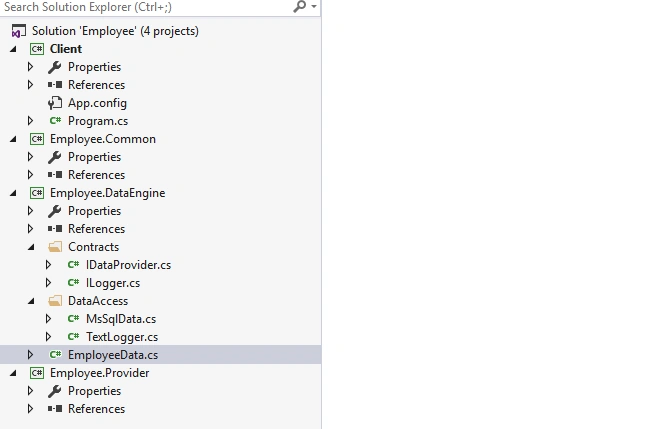
Problem/Requirement: Please take a look at the EmployeeData class in the below code snippet.
- public class EmployeesData
- {
- IDataProvider _dataProvider;
- ILogger _logger;
- public EmployeesData(IDataProvider dataProvider, ILogger logger) {
- _dataProvider = new MSSqlData();
- _logger = new TextLogger();
- }
- public void GetAll() {
- try {
- _dataProvider.GetAll();
- _logger.LogInfo("Returned the Data");
- } catch (Exception ex) {
- _logger.LogInfo(ex.Message);
- }
- }
- public void GetEmployeeByID(int Id) {
- try {
- _dataProvider.GetByID(Id);
- _logger.LogInfo("Retrieved the data");
- } catch (Exception ex) {
- _logger.LogInfo(ex.Message);
- }
- }
- }
- IUnityContainer unity = new UnityContainer();
- unity.RegisterType<IDataProvider, MsSqlData>()
- .RegisterType<ILogger, TextLogger>()
- .RegisterType<IEmployeeData, EmployeesData>();
- IEmployeeData employeeData = unity.Resolve<IEmployeeData>();
- employeeData.GetAll();
- Console.Read();
But I have a requirement of not recompiling the solution every time I change the ILogger implementation. I should be just able to replace the assemblies and class implementation. It should work with these minimal changes. Let's see how we can accomplish it.
Provider Solution
Hope you are clear with the scenario. The solution is to provide the provider in the configuration file of the client App.config. I will show how we can implement the provider.
The Employee.DataEngine should refer to Employee.Common and Employee.Provider project only. The Employee.Common should not refer to any project. The Employee.Provider should only refer to the Employee.Common project. The client should only refer to Employee.Common and Employee.DataEngine. It should not refer to the provider as we should provide the implementation of the Provider by placing the assembly in the project folder. But if we want to debug the project we should refer to the provider.
Step 1
Transfer the ILogger interface to the Employee.Common, as this is the interface for which we have to implement the provider pattern. Move the TextLogger to Employee.Provider. This assembly we can only build and replace in the build folder.
Add one more class named XMLLogger in the same project.
The code for both of them is as following.
- public interface ILogger
- {
- string LoggerName {
- get;
- set;
- }
- void LogInfo(string message);
- }
- public class TextLogger: ILogger {
- public string LoggerName {
- get;
- set;
- }
- public void LogInfo(string message) {
- Console.WriteLine(string.Format("Message from {0} {1}", LoggerName, message));
- }
- }
- public class XMLLogger: ILogger {
- public string LoggerName {
- get;
- set;
- }
- public void LogInfo(string message) {
- Console.WriteLine(string.Format("Message from {0} {1}", LoggerName, message));
- }
- }
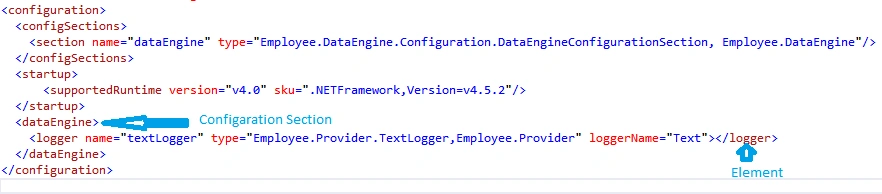
In the above figure I have defined a section named dataEngine. This is done by adding the <section> element in <configSections> part of App.config. Here we need to give the fully qualified name for the type and its assembly. This will infer that any <dataEngine> section should refer to the type provided.
The type of the Logger(<logger> element) is the one which the DataEngine provider will take and create instance. This is the type which we can change if we want to change the Logger without recompiling the solution.
In the above figure <dataEngine> is Section and <logger> is Element of the section.
Step 3
To include a class as Section and Element we need to derive from ConfigurationSection and ConfigurationElement classes. These classes are part of System.Configuration assembly. Include System.Configuration assembly reference to the Employee.DataEngine project.
Define the properties for these classes which I have already defined in the App.config. The properties need to have the ConfigurationProperty attibute. This attribute has the configuration supported property name and other properties.
Create a new folder named Configuration in Employee.DataEngine. Add two classes named DataEngineConfigurationSection.cs and LoggerElement.cs.
- public class DataEngineConfigurationSection: ConfigurationSection
- {
- [ConfigurationProperty("logger", IsRequired = true)]
- public LoggerElement Logger
- {
- get
- {
- return (LoggerElement) base["logger"];
- }
- set {
- base["logger"] = value;
- }
- }
- }
- public class LoggerElement: ConfigurationElement
- {
- [ConfigurationProperty("name", IsRequired = true)]
- public string Name {
- get {
- return (string) base["name"];
- }
- set {
- base["name"] = value;
- }
- }
- [ConfigurationProperty("type", IsRequired = true)]
- public string Type {
- get {
- return (string) base["type"];
- }
- set {
- base["type"] = value;
- }
- }
- [ConfigurationProperty("loggerName", IsRequired = true)]
- public string LoggerName {
- get {
- return (string) base["loggerName"];
- }
- set {
- base["loggerName"] = value;
- }
- }
- }
Step 4: Change the EmployeeData.cs class to accept the ILogger variables instance from the config file as shown below.
- IDataProvider _dataProvider;
- ILogger _logger;
- public EmployeesData(IDataProvider dataProvider)
- {
- _dataProvider = new MsSqlData();
- //_logger = new TextLogger();
- DataEngineConfigurationSection config = ConfigurationManager.GetSection("dataEngine") as DataEngineConfigurationSection;
- if (config != null)
- {
- _logger = Activator.CreateInstance(Type.GetType(config.Logger.Type)) as ILogger;
- _logger.LoggerName = config.Logger.LoggerName;
- }
- }
And I am creating an instance of the ILogger type using the “Logger.Type” property value from app.config. I am using Activator.CreateInstance. It takes Type as parameter to create instances at run time. I am getting type using Type.GetType which takes fully qualifiesd type name(string) as parameter to get the type.
Step 5
Build the project in the release mode. Copy the Employee.Provider.dll from the “ConsoleApplication1\Employee.Provider\bin\Release” folder. Paste it to “ConsoleApplication1\bin\Release” folder. Double click on the ConsoleApplication1.exe in the same folder.
Run the project you will get the message as “Message from Text returned all data”. Signifying that the TextLogger.cs is being used to log messages.
Step 6: Change of the class without rebuilding or recompiling the solution.
Change the Console.Application1.exe (XML Configuration file). Change the type to “Employee.Provider.XMLLogger,Employee.Provider” and name to “XML”. Run the application by clicking the ConsoleApplication1.exe.
The message is “Message from XML returned all data”. This means that XMLLogger.cs is instantiated. This happened without rebuilding or recompiling the solution.
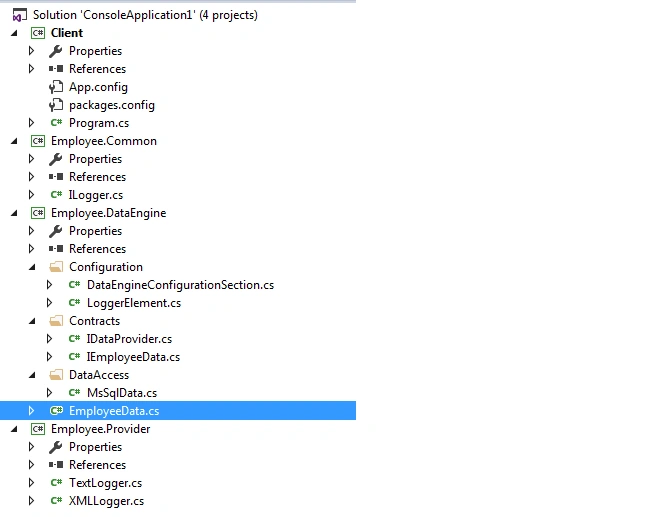
The final structure of the project looks as shown in the figure below.
Conclusion
In this article we have seen how we can use providers in the App.config to write software which are easily pluggable. We have replaced the functionality of one class with the other without recompiling the whole solution. The example solution we have written in C#.
Vignesh ManiPosted Jul 20, 2016, 11:07 AM
Nice
Nikhil SanganiPosted Jul 20, 2016, 7:12 AM
Nice
kalu singh raoPosted Jul 20, 2016, 2:07 AM
Good Job dear
Bhavik PatelPosted Jul 19, 2016, 9:33 PM
Interesting !