

Introduction
Microsoft has made its goals clear and more focused on the web and has implemented a few cool features in Spartan. The salient features that have changed are based on many factors and three of them are described here.
This clearly means that developers will have the same experience as they have with other browsers. This also means that the developers will need to write once and deploy the code everywhere.
The features are new experiences and specs that exist in other browsers and also some new experiences that have been brought forward with time.
This means the minimal difference developers will experience while they are in an app and the browser in Windows.
All the way back in 1995, IE came up with the Trident rendering engine. It was a single-engine for rendering the web page. Not too long after that, Microsoft introduced HTML4, CSS2, and ES3. Trident was then split into two engines that were Quirks and Strict. The Strict engine was responsible for loading HTML4 and the Quirks was kept there to ensure the older contents could run on the web.
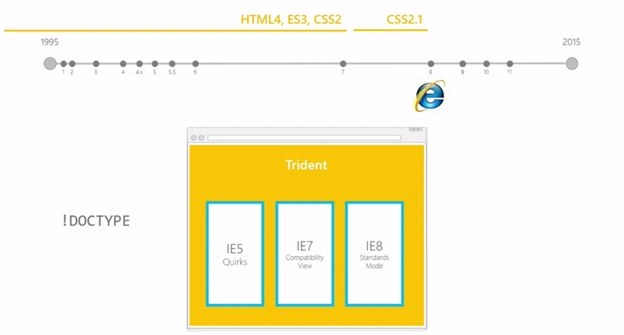 For IE7 and IE8, new specs began emerging and that was when IE began supporting CSS2.1. And thas was split into IE7 Compatibility Mode and IE8 Standard Mode and also kept IE5 Quirks to maintain backward compatibility. It's probably easy for the people to guess that it was not easy for the JavaScript Engine to work with all these various rendering engines.
The trend continued and to make the work a bit simpler, other than the!DOCTYPE, developers provided the liberty to specify “x-ua-compatible” tags to determine which way they wanted the browser to render the page.
For IE7 and IE8, new specs began emerging and that was when IE began supporting CSS2.1. And thas was split into IE7 Compatibility Mode and IE8 Standard Mode and also kept IE5 Quirks to maintain backward compatibility. It's probably easy for the people to guess that it was not easy for the JavaScript Engine to work with all these various rendering engines.
The trend continued and to make the work a bit simpler, other than the!DOCTYPE, developers provided the liberty to specify “x-ua-compatible” tags to determine which way they wanted the browser to render the page.
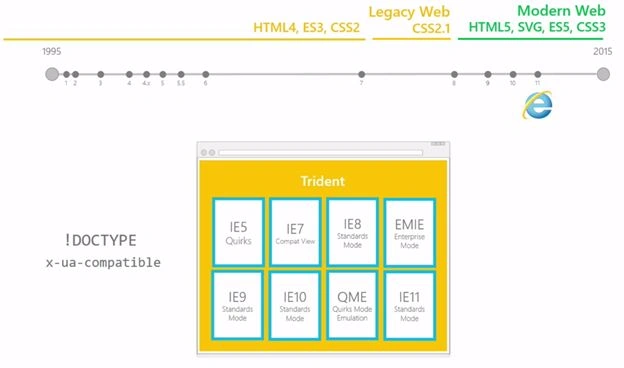 In IE9 and IE10 and finally IE11, IE had multiple rendering engines that help render the page depending on the type of!DOCTYPE you are using or the Metatags that you have added to the page or how the page itself is constructed. In this way, IE was able to render all the various pages as they were intended by the developer. This was a bit difficult for the browser because it had to make too many decisions in a short amount of time. In the meanwhile, Firefox and Chrome took a different route. Instead of having multiple rendering engines, they had one rendering engine that was always up-to-date. This is exactly what Microsoft is doing with Project Spartan.
1. More Interoperability
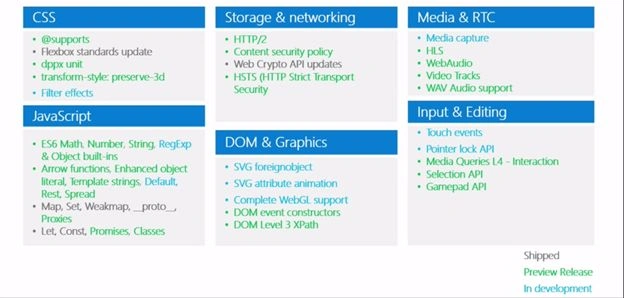
2. New Features
3. Fewer boundaries Between Apps and Web
Evolution of Web
Project Spartan
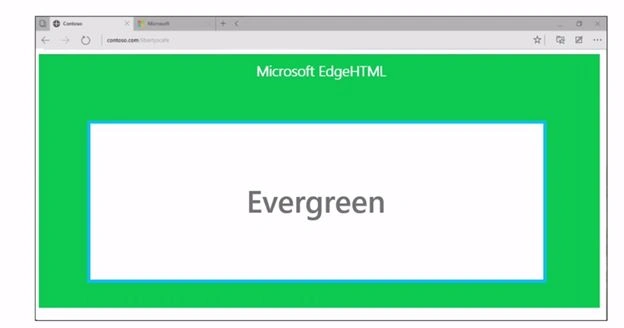
- It has a single rendering engine that will always stay up-to-date.
- So no longer switching modes depending on the page, Spartan will have just one mode that will have compatibility built into it.
The architecture of Spartan AKA Microsoft Edge

Features Added to Spartan
Minimizing the difference between Web and WebApps

Let's go into details on Hosted Web Apps
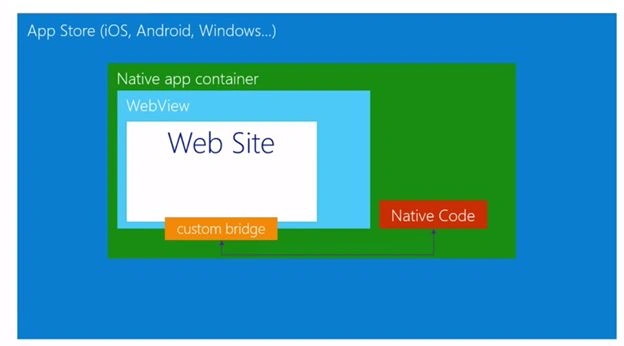
Now in case of Windows 10

Let's build a small demo of a Hosted Web Application.

Creating a new JavaScript Universal Apps.
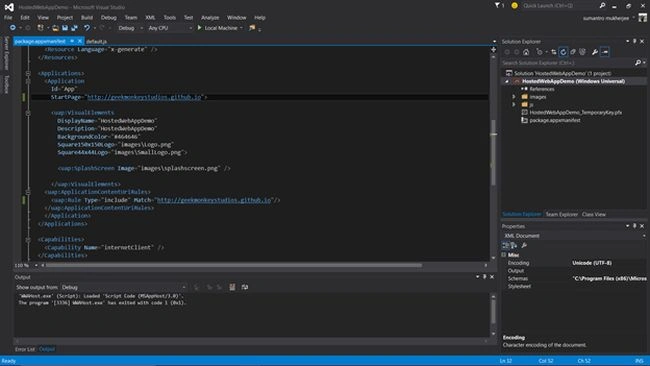
Two Changes
- Changing the Start Page to target the website you want to target.
- Adding a rule and stating that anything that is inside the link is a part of my app and anything that is not is a web and needs to be handled by opening up in a new browser.


Summary
In this article, we learned about project spartan for developers in Windows 10.
NitinPosted Jun 1, 2015, 9:46 AM
good one
Dinesh BeniwalPosted May 31, 2015, 11:52 PM
Thanks for sharing ;)
Mahesh ChandPosted May 30, 2015, 10:48 PM
Spartan is already renamed Microsoft Edge.
Sam HobbsPosted May 30, 2015, 9:32 PM
Note that in the antitrust lawsuit between United States and the Microsoft Corporation, Microsoft won by saying that Windows and Internet Explorer are the same product and are inextricably linked together. If that is not true about Windows 10 then it is a major change. The fact that Microsoft claimed that IE and Windows are the same product is probably a big part of why Microsoft did not replace IE sooner. See: https://en.wikipedia.org/wiki/United_States_v._Microsoft_Corp