

Swapping mouse buttons means swapping the two buttons, making the right button acts like the left one, and vice versa.
This is done -for normal users of course- using the Mouse properties dialog in the control panel. See the next figure.
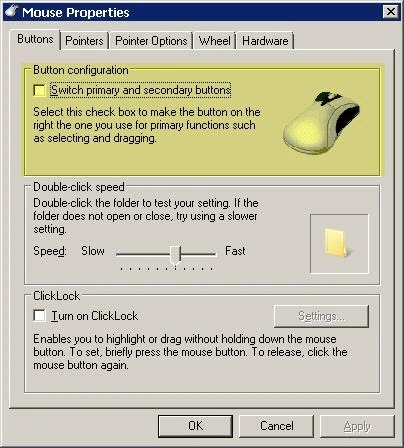
For we developers you need to do this programmatically, and this is done by a very very trivial -not a joke- Win32 API function, SwapMouseButton() which resides on user32.dll.
The syntax of the function -in C- is as follows:
- BOOL SwapMouseButton(BOOL fSwap);
If the function swapped the buttons, then it will return FALSE, otherwise TRUE.
BOOL can take one of values TRUE (non-zero) or FALSE (zero).
In .NET Framework, you need to write a wrapper to this API function and this wrapper is like this:
The DllImportAttribute attribute defines the DLL that contains the function.
- [DllImport("user32.dll")]
- [return: MarshalAs(UnmanagedType.Bool)]
- public static extern bool SwapMouseButton([param: MarshalAs(UnmanagedType.Bool)] bool fSwap);
The MarshalAsAttribute attribute defines how .NET types will be mapped to Win32 types (this process called Marshaling). We applied this attribute to the return value of the function and to the single argument of the function.
The static extern modifiers are required for any PInvoke function.
PInvoke stands for Platform Invokation. It's the process of wrapping an API function to .NET code.
Marshaling is the process of creating a bridge between .NET types and unmanaged types.
For unmanaged BOOL, .NET makes the marshaling process automatically, so you can safely remove the MarshalAsAttribute attributes.
Now it's the time for the code for calling the function.
- public void MakeRightButtonPrimary()
- {
- SwapMouseButton(true);
- }
- public void MakeLeftButtonPrimary()
- {
- SwapMouseButton(false);
- }
Good day!
Join the conversation! Your thoughts help the community grow.