

Introduction
In this article I m going to describe the basics of thread and process which improve your basic knowledge about process and thread.
What is a process?
A process is a program that is running on your computer. This can be anything from a small background task, such as a spell-checker or system events handler to a full-blown application like Internet Explorer or Microsoft Word. Every process have at least one thread.
A computer program is a ive collection of instructions; a process is the actual execution of those instructions. Several processes may be associated with the same program; for example, opening up several instances of the same program often means more than one process is being executed.
How To: Starting Processes From C#
The System.Diagnostics namespace contains functions that allow you to
manage processes, threads, eventlogs and performance information.
The Process class is part of the System.Diagnostics namespace.
A C# program can launch another program using the
process class.You
start another program by instantiating a Process object, setting members of it's
StartInfo property, and invoking it's Start() method.
Add this line to your using list:
using System.Diagnostics;
Example 1
using
System;
using
System.Diagnostics;
namespace
Csharpcornerhow_to_use
{
class
csharpcorner
{
static void
Main(string[] args)
{
Process notepad =
new Process();
notepad.StartInfo.FileName = "notepad.exe";
notepad.StartInfo.Arguments = "csharpcorner.cs";
notepad.Start();
Console.Read();
}
}
}
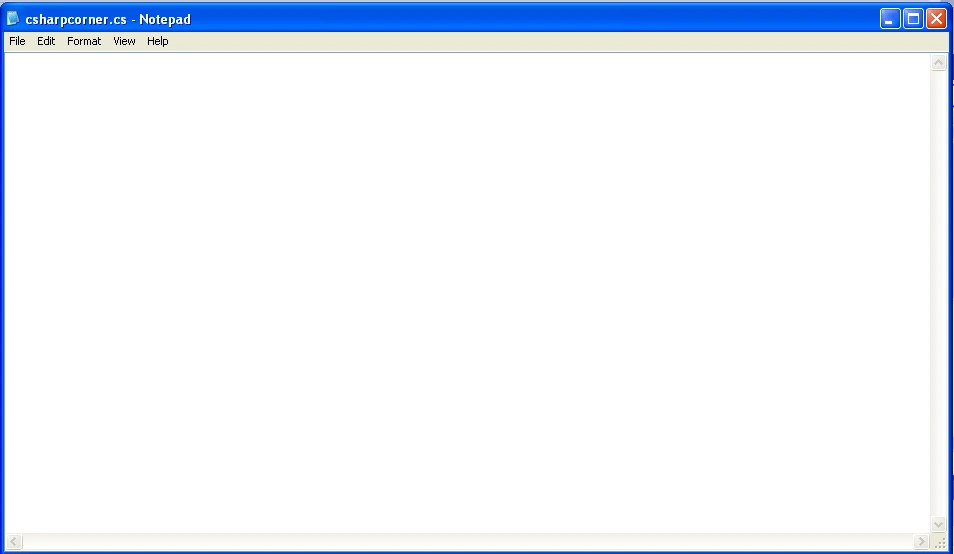
When we run this program, this will open a notepad window with editing mode on the csharpcorner.cs file. The program does instantiate a Process object called notePad
Process notepad =
new Process();
In this next step, we give that what program will be run. This happens to give the
program name to the FileName member of the notePad Process object's StartInfo
property. here we give code for it.
notepad.StartInfo.FileName = "notepad.exe";
The StartInfo property have a ability to take argument, which is used to know command-line options that are give to the program. In the following
example, the string csharpcorner.cs is ed as an argument, so the notepad
application will know what file to open when it is executed:
notepad.StartInfo.Arguments = "csharpcorner.cs";
The program is then executed by invoking the Start() method, as shown here:
notepad.Start();
The results of this program are the same as if the instructions below were typed
on the command-line:
C:>notepad csharpcorner.cs
Example 2 Web browser example
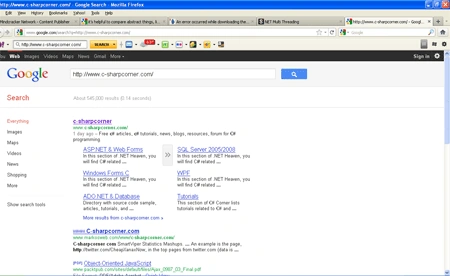
You can specify the URL and send it to Windows. Here we launch a Google search for some search terms, such as "http://www.c-sharpcorner.com/". Your users might run Firefox, Google Chrome, Internet Explorer, Opera, or Safari on Windows. Call the following code with SearchGoogle("http://www.c-sharpcorner.com/");
using
System;
using
System.Diagnostics:
namespace
Csharpcornerhome
{
class
Csharpcorner
{
static void
SearchGoogle(string t)
{
Process.Start("http://google.com/search?q="
+ t);
}
static void
Main(string[] args)
{
// Search Google for this.
SearchGoogle("http://www.c-sharpcorner.com/");
}
}
}
What is thread?
A single thread in a C# application, is an independent execution path that can run simultaneously with the main application thread. A C# client program (Console, WPF, or Windows Forms) starts in a single thread created automatically by the CLR and operating system (the "main" thread), and is made multithreaded by creating additional threads.
Threading enables your C# program to perform concurrent processing so you can do more than one operation at a time. For example, you can use threading to monitor input from the user, perform background tasks, and handle simultaneous streams of input. The System.Threading namespace provides classes and interfaces that support multithreaded programming and enable you to easily perform tasks such as creating and starting new threads, synchronizing multiple threads, suspending threads, and aborting threads.
Creating Threads
Creating a thread in C# is close to simple, but not quite. The only difficult thing about creating a thread is dotNet delegate-classes. Let me explain in few words what is a delegate class. The delegate is a wrapper around a code construct in the dotNet. The code construct could be an object instance, an instance method or a static method. Delegates are used when you want to one of the three code constructs as a parameter to another method.
The .NET framework has thread-associated classes in the System.Threading namespace. The following steps demonstrate how to create a thread in C#.
Step 1: using System.Threading namespace to include classes and interface that support threading.
Step 2: When we create a new thread we have to use the ThreadStart delegate class to wrap the nstance method that will be executed in the newly created thread. The instance method must return void and must not have any parameters.
public void ThreadJob()
Step 3: To create a new thread, first create a new ThreadStart object, ing the instance method of the thread procedure in the constructor. The new delegate object is then ed to the constructor of the Thread.
Thread thread = new Thread(new ThreadStart(obj.ThreadStart));
Step 4: You've now created a new thread, but the thread is not yet started. To start the thread, you call the Thread.Start instance method.
Thread.start();
And that's it. You have a new running thread. A complete console application that creates a thread and outputs a couple messages to the console window as following.
using
System;
using
System.Threading;
|namespace
bestCsharpcorner
{
class
Csharpcorner
{
public void
ThreadJob()
{
for (int
i = 0; i < 10; i++)
{
Console.WriteLine("i
m other thread : {0}", i);
Thread.Sleep(500);
}
}
static void
Main(string[] args)
{
Csharpcorner c=new
Csharpcorner();
ThreadStart job =
new Thread(new
ThreadStart(c.ThreadJob));
Thread.Start();
for (int
i = 0; i < 5; i++)
{
Console.WriteLine("C#corner
is one of the best website for technology seekers: {0}", i);
Thread.Sleep(1000);
}
Console.Read();
}
}
}
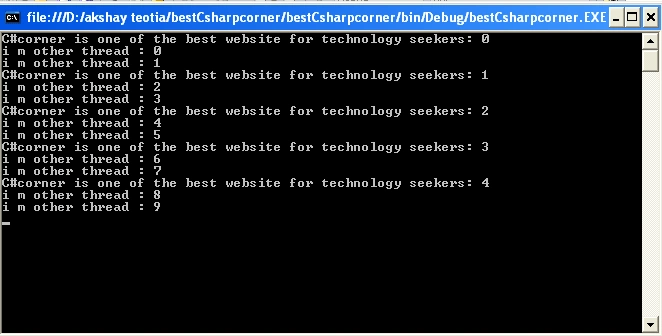
The code creates a new thread which runs the ThreadJob method, and starts it. That thread counts from 0 to 9 fairly fast (about twice a second) while the main thread counts from 0 to 4 fairly slowly (about once a second). The way they count at different speeds is by each of them including a call to Thread.Sleep, which just makes the current thread sleep (do nothing) for the specified period of time. Between each count in the main thread we sleep for 1000ms, and between each count in the other thread we sleep for 500ms. Here are the results from one test run on my machine:
Advantage of threads
One of the advantages of using the threads is that you can have multiple activities happening simultaneously. Another advantage is that a developer can make use of threads to achieve faster computations by doing two different computations in two threads instead of serially one after the other.
Rakesh GohilPosted Sep 10, 2018, 10:34 AM
Hello Akshay,I am trying to learn all the C# concepts with example. This is very good example to understand Process and Thread. While I am trying to execute the same program in C#, it will not execute so I would like to say that the following two lines should be changed. After changing these lines it will work as what you mentioned in output. //Existing lines of code ThreadStart job = new Thread(new ThreadStart(c.ThreadJob)); Thread.Start(); //Changed lines of code Thread job = new Thread(new ThreadStart(c.ThreadJob)); job.Start(); Thank you very much for this explaination.
Sakthi Ramesh RPosted Sep 3, 2018, 7:18 AM
What is default sleep() time of thread?
Alfredo EstradaPosted Jun 17, 2017, 9:43 PM
I have still a question. One proccess can to create one or more threads? or one thread can to create one or more proccess? Thanks for your support.
Gyanendar ManoharPosted Nov 27, 2012, 10:13 PM
Having put the advantages of threading, its would be good you discuss about at what price this comes.