

Assembly in .NET
- Process Assemblies: I'ts having an extension of .exe
- Library Assemblies: It's having an extension of .dll.
Library Assembly is further divided into the following types:
- Private Assembly
- Public or Shared Assembly
- Satellite Assembly
Private Assembly
Public Assembly
Public assembly should install in GAC.
File - Project - Class Library
Give name: PrivateAssembly
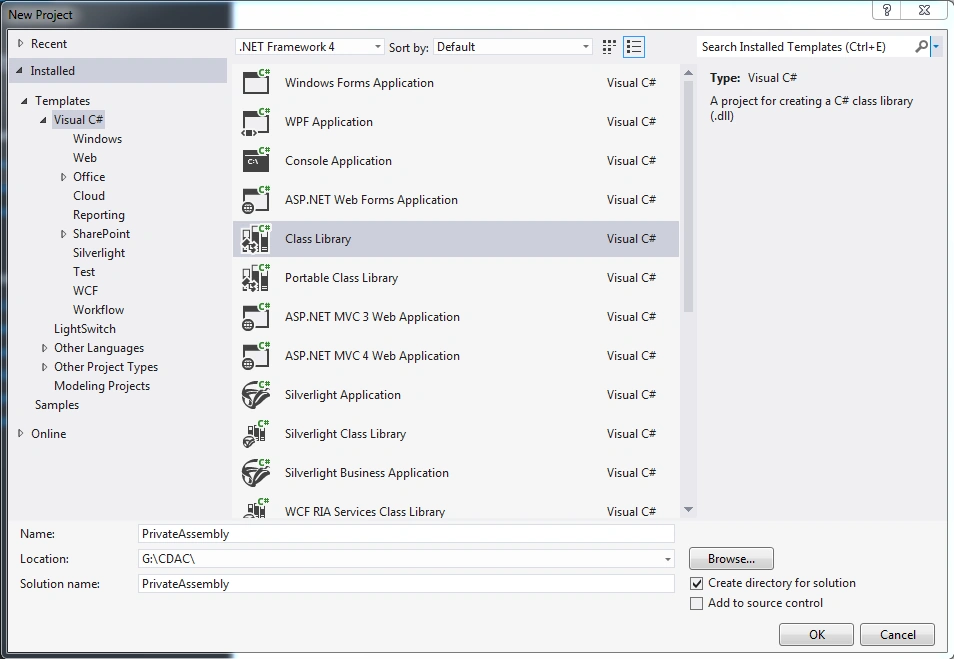
CODE of PRIVATEASSEMBLY.CS
- using System;
- using System.Collections.Generic;
- using System.Linq;
- using System.Text;
- namespace PrivateAssembly
- {
- public class PrivateAssembly
- {
- /// <summary>
- /// return ADDITION result of number1 + number2
- /// </summary>
- /// <param name="number1"></param>
- /// <param name="number2"></param>
- /// <returns></returns>
- public int Addition(int number1, int number2)
- {
- int result = number1 + number2;
- return result;
- }
- /// <summary>
- /// return SUBTRACT result of number1 - number2
- /// </summary>
- /// <param name="number1"></param>
- /// <param name="number2"></param>
- /// <returns></returns>
- public int Subtraction(int number1, int number2)
- {
- int result = number1 - number2;
- return result;
- }
- }
- }
Consume PrivateAssembly
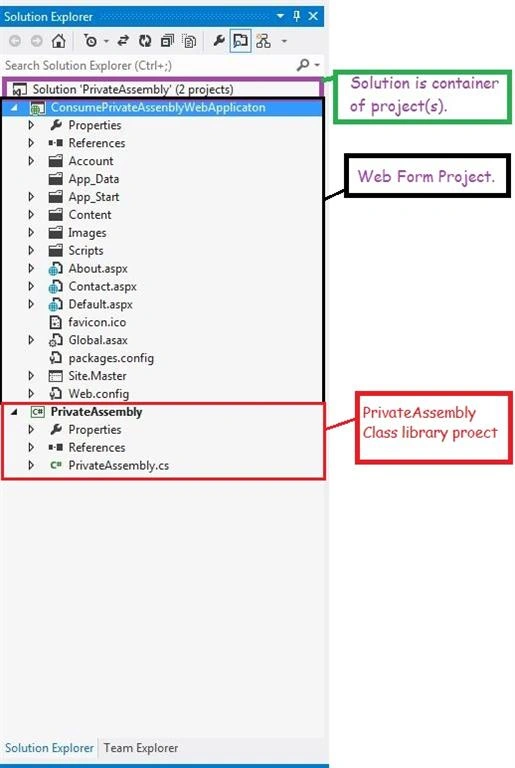
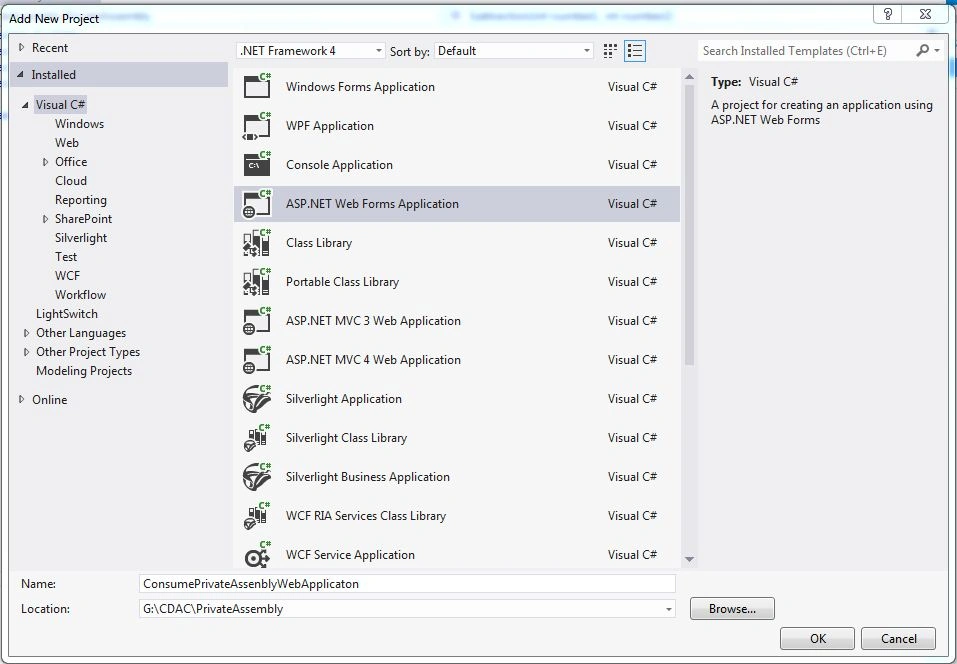
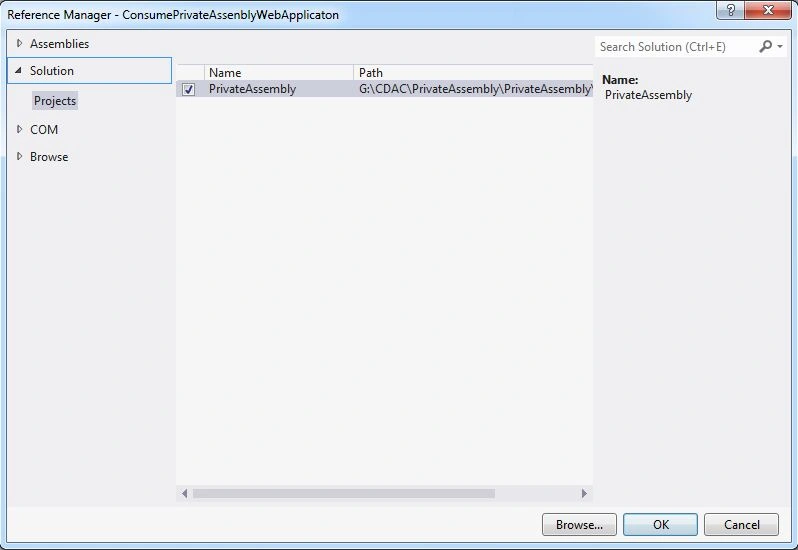
File - New - Project - Asp.Net Web Form Application.
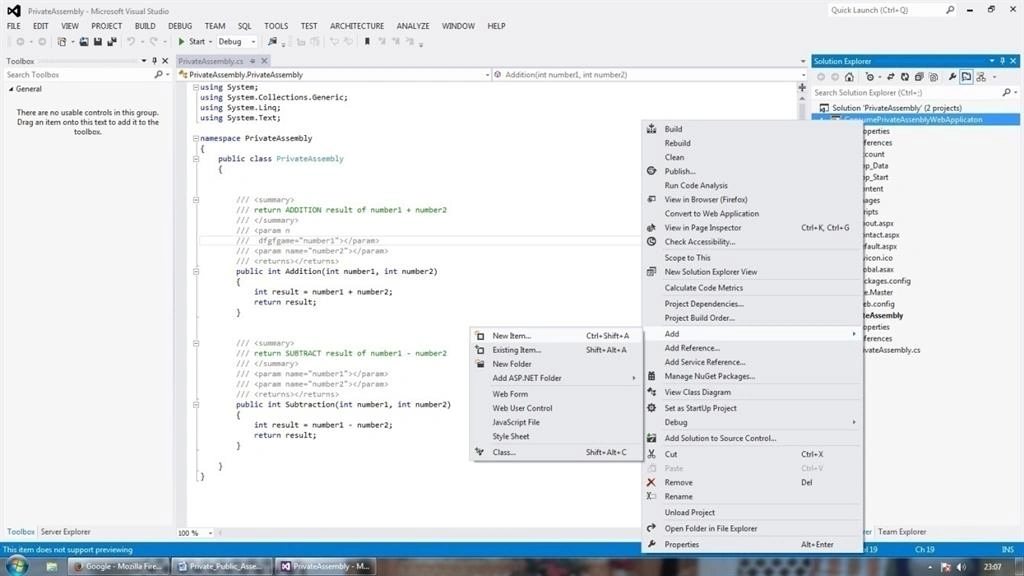
b. Right-click on ConsumePrivateAssemblyWebApplicaton and select option Open Folder in File Explorer.
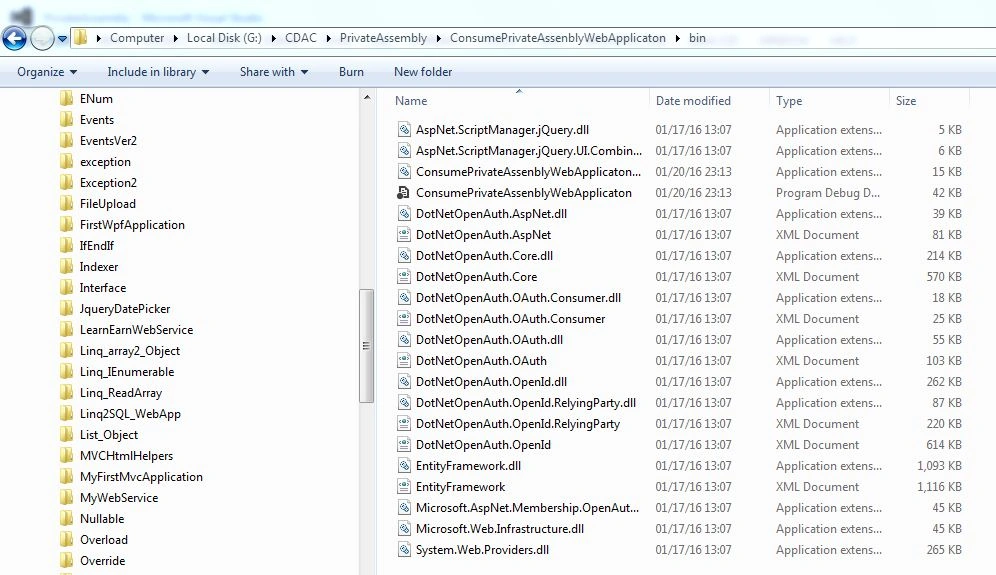
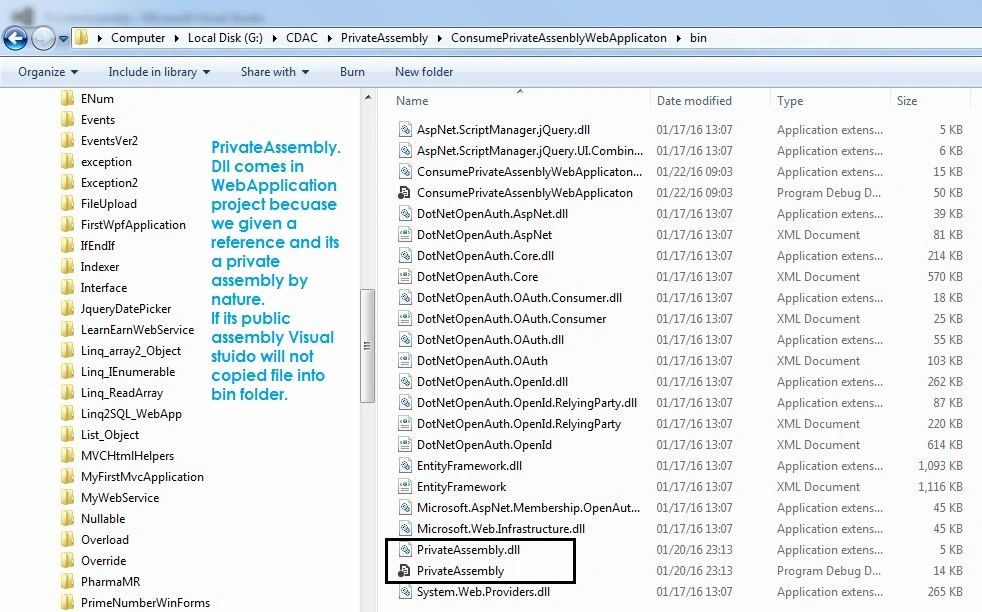
Now again Right-click on ConsumePrivateAssemblyWebApplicaton and select the option Open Folder in File Explorer and check PrivateAssembly file comes in this project after the given reference.
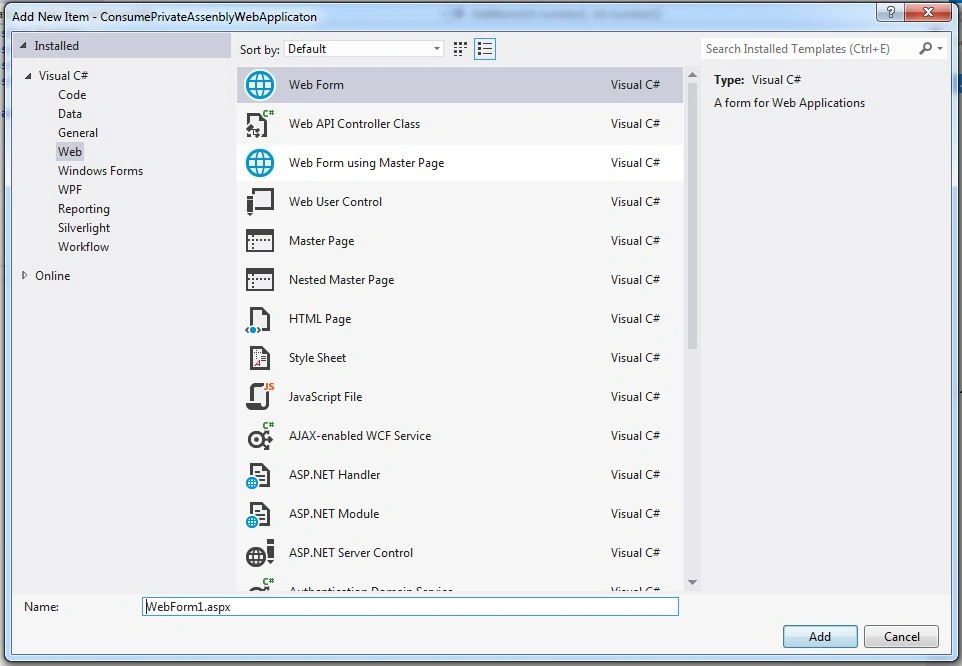
| CONTROL TYPE | CONTROL ID | DESCRIPTION |
| HTML Table |
|
Drag n Drop HTML table from toolbox total 9 rows required |
| TextBox | txtNumber1 | To receive Number1 |
| TextBox | txtNumber2 | To receive Number2 |
| Button | btnAddition | To do the Addition function |
| Button | btnSubtract | To do subtract function |
| Label | lblResult | To display Result function. |
Give reference in WebForm1.aspx.cs (code behind file)
Full Code of WebForm1.aspx
- <%@ Page Language="C#" AutoEventWireup="true" CodeBehind="WebForm1.aspx.cs" Inherits="ConsumePrivateAssenblyWebApplicaton.WebForm1" %>
- <!DOCTYPE html>
- <html xmlns="http://www.w3.org/1999/xhtml">
- <head runat="server">
- <title></title>
- <style type="text/css">
- .auto-style1 {}
- .auto-style2 {
- width: 94px;
- }
- </style>
- </head>
- <body>
- <form id="form1" runat="server">
- <div>
- <table style="width:100%;">
- <tr>
- <td class="auto-style2">Number1</td>
- <td>
- <asp:TextBox ID="txtNumber1" runat="server"></asp:TextBox>
- </td>
- <td> </td>
- </tr>
- <tr>
- <td class="auto-style2">Number2</td>
- <td>
- <asp:TextBox ID="txtNumber2" runat="server"></asp:TextBox>
- </td>
- <td> </td>
- </tr>
- <tr>
- <td class="auto-style2"> </td>
- <td> </td>
- <td> </td>
- </tr>
- <tr>
- <td class="auto-style1" colspan="2">
- <asp:Button ID="btnAddition" runat="server" OnClick="btnAddition_Click" Text="Addition" />
- <br />
- <asp:Button ID="btnSubtract" runat="server" OnClick="btnSubtract_Click" Text="Subtract/Minus" />
- </td>
- <td> </td>
- </tr>
- <tr>
- <td class="auto-style2"> </td>
- <td> </td>
- <td> </td>
- </tr>
- <tr>
- <td class="auto-style2">Result</td>
- <td>
- <asp:Label ID="lblResult" runat="server" Text="[Result]"></asp:Label>
- </td>
- <td> </td>
- </tr>
- <tr>
- <td class="auto-style2"> </td>
- <td> </td>
- <td> </td>
- </tr>
- <tr>
- <td class="auto-style2"> </td>
- <td> </td>
- <td> </td>
- </tr>
- </table>
- </div>
- </form>
- </body>
- </html>
Full Code of WebForm1.aspx.cs
- using System;
- using System.Collections.Generic;
- using System.Linq;
- using System.Web;
- using System.Web.UI;
- using System.Web.UI.WebControls;
- using PrivateAssembly;
- namespace ConsumePrivateAssenblyWebApplicaton
- {
- public partial class WebForm1: System.Web.UI.Page
- {
- protected void Page_Load(object sender, EventArgs e)
- {
- }
- protected void btnAddition_Click(object sender, EventArgs e)
- {
- PrivateAssembly.PrivateAssembly _pvt = new PrivateAssembly.PrivateAssembly();
- lblResult.Text = Convert.ToString(_pvt.Addition(Convert.ToInt16(txtNumber1.Text), Convert.ToInt16(txtNumber2.Text)));
- }
- protected void btnSubtract_Click(object sender, EventArgs e)
- {
- PrivateAssembly.PrivateAssembly _pvt = new PrivateAssembly.PrivateAssembly();
- lblResult.Text = Convert.ToString(_pvt.Subtraction(Convert.ToInt16(txtNumber1.Text), Convert.ToInt16(txtNumber2.Text)));
- }
- }
- }
Step by Step making of Private Assembly
Give name: CalculatorPublicLibrary
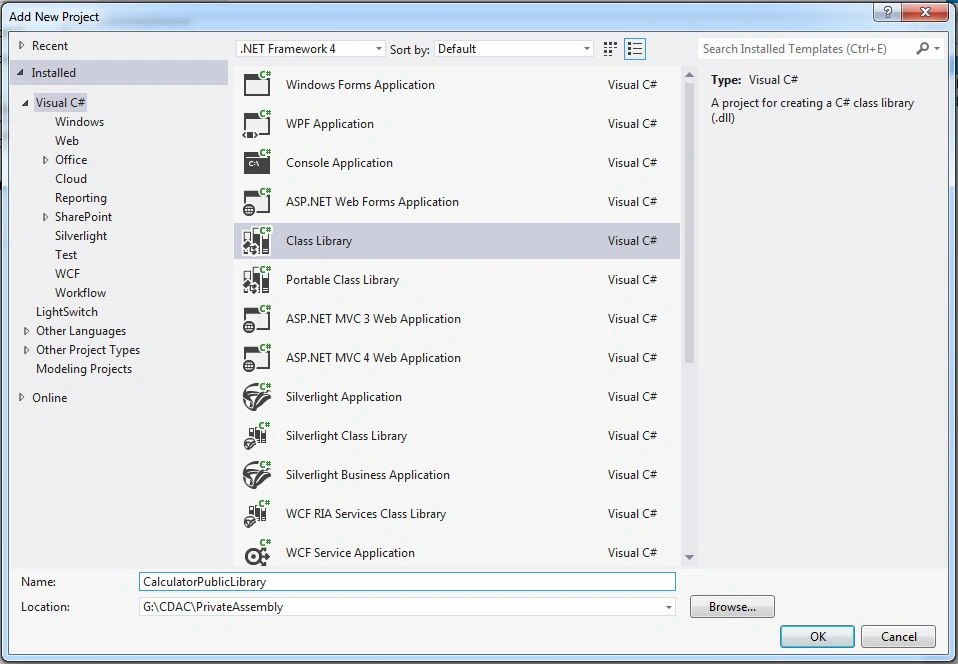
Code of PUBCALCULATOR.CS
- using System;
- using System.Collections.Generic;
- using System.Linq;
- using System.Text;
- namespace CalculatorPublicLibrary
- {
- public class PubCalculator
- {
- /// <summary>
- /// return ADDITION result of number1 + number2
- /// </summary>
- /// <param n
- /// dfgfgame="number1"></param>
- /// <param name="number2"></param>
- /// <returns></returns>
- public int Addition(int number1, int number2)
- {
- int result = number1 + number2;
- return result;
- }
- /// <summary>
- /// return SUBTRACT result of number1 - number2
- /// </summary>
- /// <param name="number1"></param>
- /// <param name="number2"></param>
- /// <returns></returns>
- public int Subtraction(int number1, int number2)
- {
- int result = number1 - number2;
- return result;
- }
- }
- }
2. Now rebuild the CalculatorPublicLibrary project.
3. Now, I am going to convert this library into a public library.
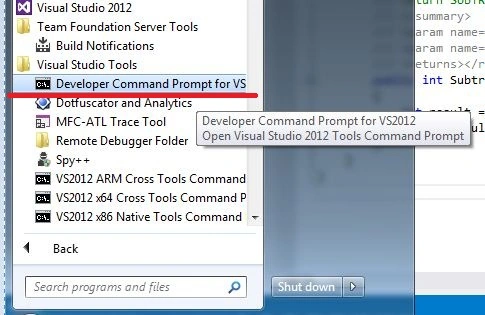
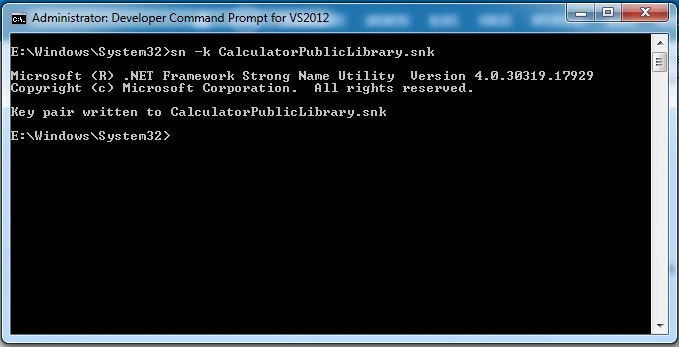
Syntax: SN –K <FileNameToCreate>
Example: SN –K CalculatorPublicLibrary.snk
This will create CALCULATORPUBLICLIBRARY.SNK file.
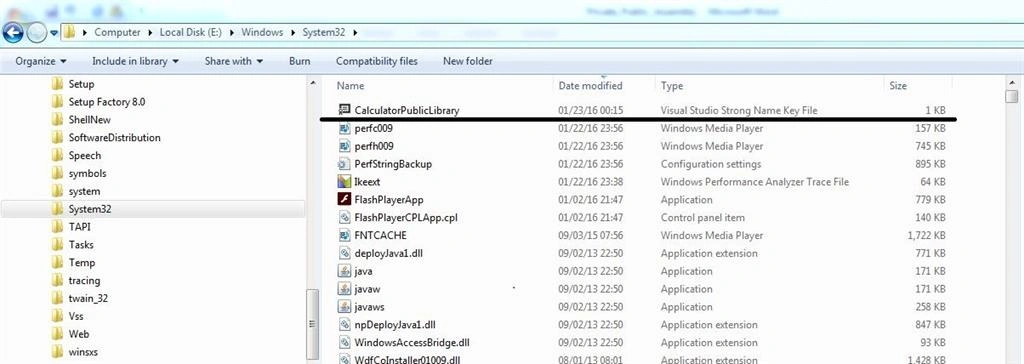
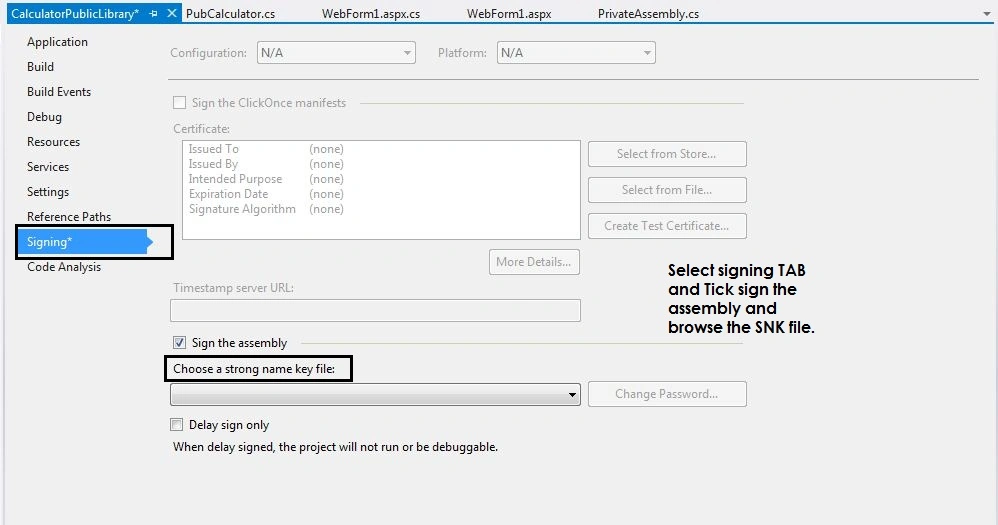
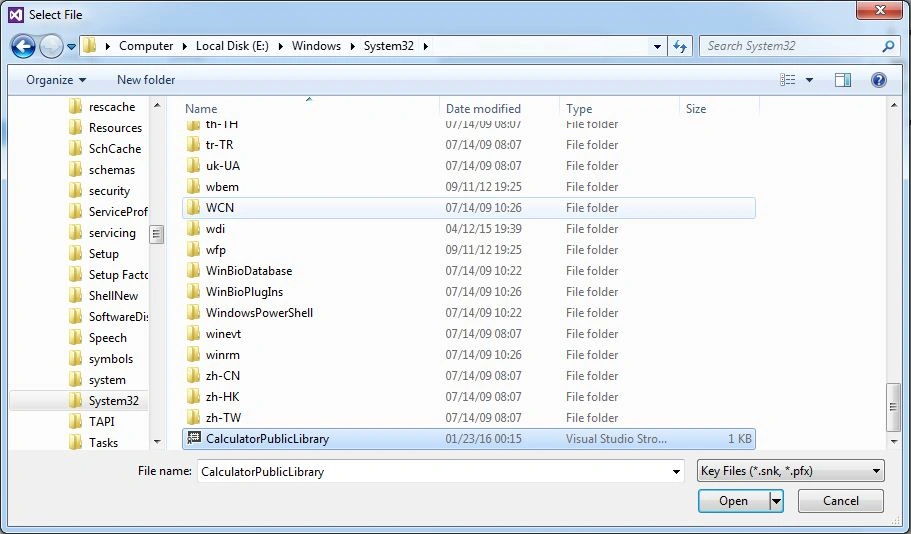
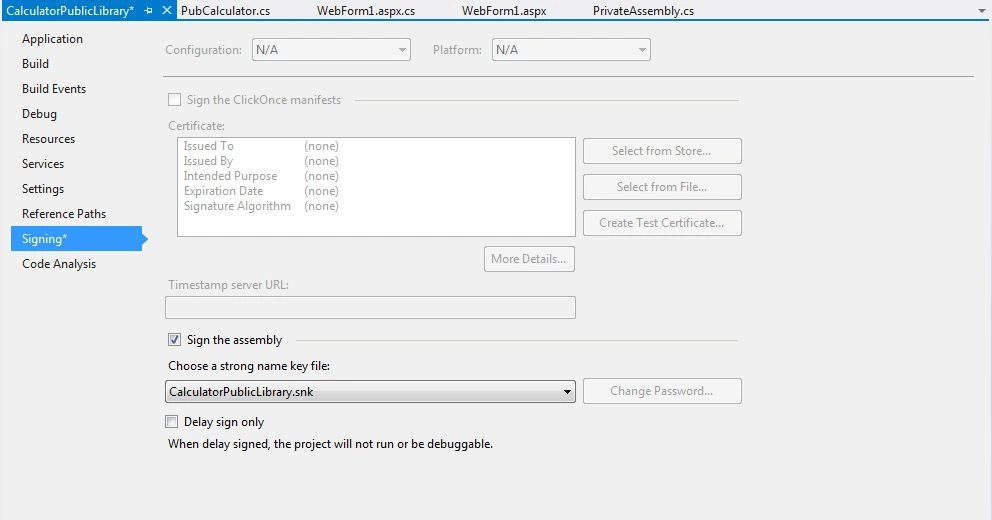
8. Browse the SNK file,
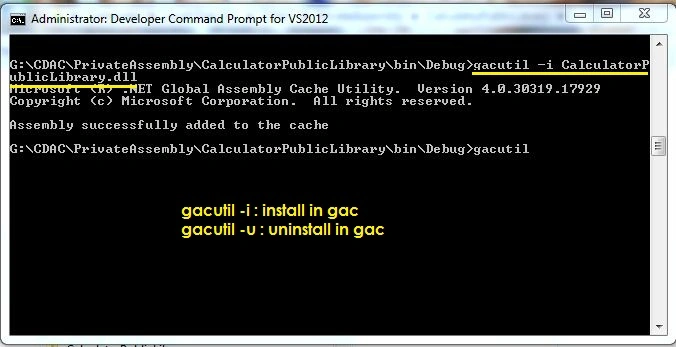
Switch to CalculatorPublicLIbrary project in command prompt and change directory to BIN folder.
gacutil –U <File Name>
[To UnInstall dll from GAC]
(to copy dll into GAC.)
- .NET 1.0 - NET 3.5: c:\windows\assembly (%systemroot%\assembly)
- .NET 4.x: %windir%\Microsoft.NET\assembly
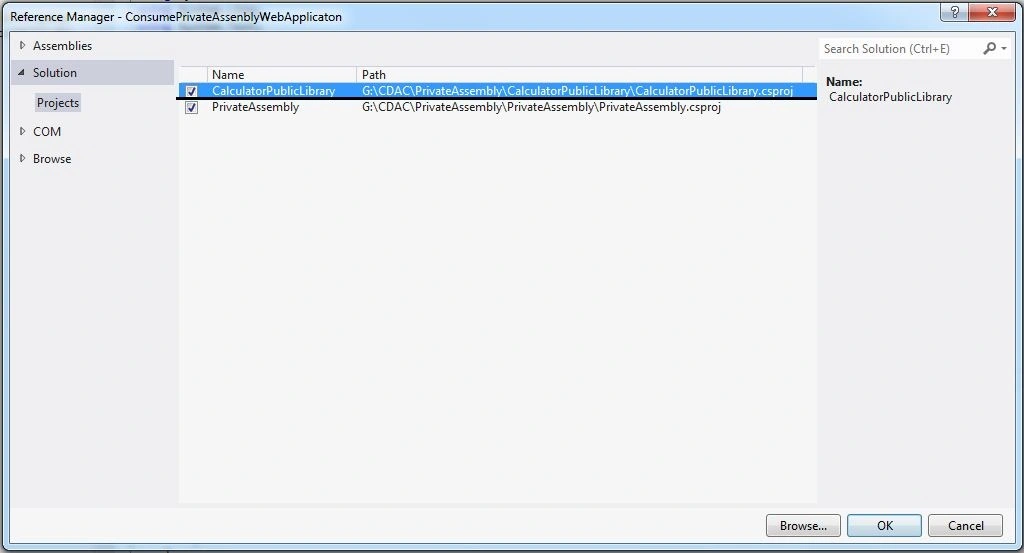
15. Now, I have to give the reference to ConsumePrivateAssemblyWebApplication
18. code of WebForm2.aspx
- <%@ Page Language="C#" AutoEventWireup="true" CodeBehind="WebForm2.aspx.cs" Inherits="ConsumePrivateAssenblyWebApplicaton.WebForm2" %>
- <!DOCTYPE html>
- <html xmlns="http://www.w3.org/1999/xhtml">
- <head id="Head1" runat="server">
- <title></title>
- <style type="text/css">
- .auto-style1 {}
- .auto-style2
- {
- width: 94px;
- }
- </style>
- </head>
- <body>
- <form id="form1" runat="server">
- <div>
- <table style="width:100%;">
- <tr>
- <td class="auto-style2">Number1</td>
- <td>
- <asp:TextBox ID="txtNumber1" runat="server"></asp:TextBox>
- </td>
- <td> </td>
- </tr>
- <tr>
- <td class="auto-style2">Number2</td>
- <td>
- <asp:TextBox ID="txtNumber2" runat="server"></asp:TextBox>
- </td>
- <td> </td>
- </tr>
- <tr>
- <td class="auto-style2"> </td>
- <td> </td>
- <td> </td>
- </tr>
- <tr>
- <td class="auto-style1" colspan="2">
- <asp:Button ID="btnAddition" runat="server" OnClick="btnAddition_Click" Text="Addition" />
- <br />
- <asp:Button ID="btnSubtract" runat="server" OnClick="btnSubtract_Click" Text="Subtract/Minus" />
- </td>
- <td> </td>
- </tr>
- <tr>
- <td class="auto-style2"> </td>
- <td> </td>
- <td> </td>
- </tr>
- <tr>
- <td class="auto-style2">Result</td>
- <td>
- <asp:Label ID="lblResult" runat="server" Text="[Result]"></asp:Label>
- </td>
- <td> </td>
- </tr>
- <tr>
- <td class="auto-style2"> </td>
- <td> </td>
- <td> </td>
- </tr>
- <tr>
- <td class="auto-style2"> </td>
- <td> </td>
- <td> </td>
- </tr>
- </table>
- </div>
- </form>
- </body>
- </html>
19. code of WebForm2.aspx.cs
- using System;
- using System.Collections.Generic;
- using System.Linq;
- using System.Web;
- using System.Web.UI;
- using System.Web.UI.WebControls;
- using CalculatorPublicLibrary;
- namespace ConsumePrivateAssenblyWebApplicaton
- {
- public partial class WebForm2: System.Web.UI.Page
- {
- protected void Page_Load(object sender, EventArgs e)
- {
- }
- protected void btnAddition_Click(object sender, EventArgs e)
- {
- CalculatorPublicLibrary.PubCalculator _pvt = new CalculatorPublicLibrary.PubCalculator();
- lblResult.Text = Convert.ToString(_pvt.Addition(Convert.ToInt16(txtNumber1.Text), Convert.ToInt16(txtNumber2.Text)));
- }
- protected void btnSubtract_Click(object sender, EventArgs e)
- {
- CalculatorPublicLibrary.PubCalculator _pvt = new CalculatorPublicLibrary.PubCalculator();
- lblResult.Text = Convert.ToString(_pvt.Subtraction(Convert.ToInt16(txtNumber1.Text), Convert.ToInt16(txtNumber2.Text)));
- }
- }
- }
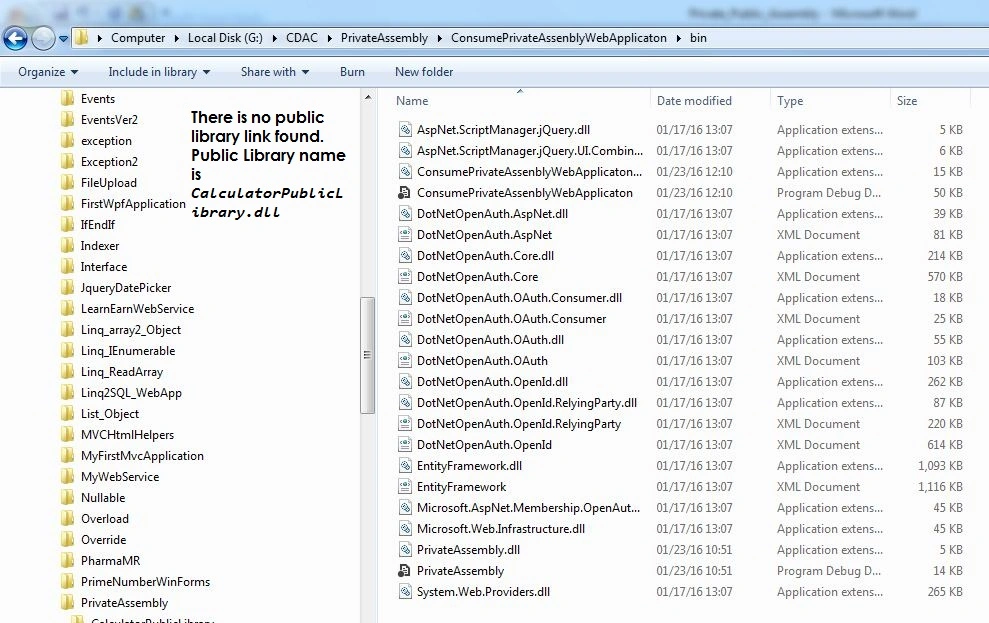
20. Checked there is no public library.
Vasanth RPosted Apr 6, 2023, 6:48 AM
Looks Nice
Kaihusrav NajmiddinovPosted Oct 21, 2021, 1:41 AM
Good explanations
Manoj RathorePosted Sep 16, 2020, 7:48 AM
Good Sir, You clear my doubt.
Sonu ChaudharyPosted Feb 25, 2016, 6:34 AM
good one!
Pawan TiwariPosted Jan 27, 2016, 5:55 AM
Nice article.... like it sir...
Raja TPosted Jan 24, 2016, 11:10 PM
Nice, Thank you for sharing..
Humayun Kabir MamunPosted Jan 24, 2016, 10:50 PM
Nice, sample files can not be downloaded...
Sthitaprajnya Debasis NayakPosted Jan 24, 2016, 2:49 PM
Super.
Muhammad Aqib ShehzadPosted Jan 24, 2016, 11:34 AM
Nice way to describe the Assemblies with example.
Jaco ZwartsPosted Jan 24, 2016, 11:05 AM
Nice Article!
Arul RPosted Jan 24, 2016, 10:28 AM
Nice share
Santhakumar MunuswamyPosted Jan 24, 2016, 10:22 AM
Thanks for nice article. Keep it up
Sujeet SumanPosted Jan 24, 2016, 9:35 AM
Nice Article......
Ankur MistryPosted Jan 24, 2016, 9:06 AM
Very nice sir