

This purpose of this document is to mention the steps to get a SharePoint Document Versioning report for a web application. The reusable script for this job has also attached with this document. This script offers -
- To select the a web application to operate on
- To Select the set of site collection to operate on
- Generate a report in CSV format, which will be helpful for excel reporting.
Business Case
| S. No. | Business Case |
| 1 | Before we go ahead and start doing migration we need to extract many report and insights about the current SharePoint environment. One of those need is to get a SharePoint document versioning report in your SharePoint. This script will allow administrator to do this job easily. |
Targeted Audience
- SharePoint Application Developers
- SharePoint Administrator
- SharePoint Architect
Offerings
- One reusable PowerShell script is provided which needs to be run to get SharePoint Versioning report.
- Generate a report in excel format which includes information like:
- Site Collection Title
- Site Name
- Library
- File Name
- File URL
- File Type
- Last Modified Date
- Number of Versions
- Latest Version Size
- Version Size
- Total size
Technical Details
Below are the technical details for this PowerShell script -
- <?xml version="1.0" encoding="utf-8" ?>
- <Configuration Environment="Dev" Version="1.0.0.0">
- <GlobalWebApplications>
- <GlobalWebApplication url="http://mywebApplicationURL/">
- <SiteCollections>
- <SiteCollection relativeURL="sites/SiteCollectionTitle" />
- <SiteCollection relativeURL="sites/SiteCollectionTitle1" />
- </SiteCollections>
- </GlobalWebApplication>
- </GlobalWebApplications>
- </Configuration>
Execution
Prerequisite:
Login to SharePoint Server as Farm Administrator and copy the required files as per your requirement.
Run:
1. Edit and Update Configurations.xml file as per your need. See below file.
3. Browse the folder path where you have kept this PowerShell script file and execute a command.

Note: Copy and paste the above xml code in a notepad and save it as Configurations.xml.
- #check to see
- if the PowerShell Snapin is added
- if ((Get - PSSnapin | Where
- {
- $_.Name - eq "Microsoft.SharePoint.PowerShell"
- }) - eq $null)
- {
- Add - PSSnapin Microsoft.SharePoint.PowerShell;
- }
- #SharePoint DLL
- [void][System.Reflection.Assembly]::LoadWithPartialName("Microsoft.SharePoint")
- $global: currentPhysicalPath = Split - Path((Get - Variable MyInvocation - Scope 0).Value).MyCommand.Path[xml] $xmlinput = (Get - Content "$global:currentPhysicalPath\Configurations.xml")
- Function SPDocVersionSizeReport
- {
- foreach($configWebApp in $xmlinput.Configuration.GlobalWebApplications.GlobalWebApplication)
- {
- $webApp = Get - SPWebApplication $configWebApp.url - ErrorAction silentlycontinue
- if ($webApp - eq $null)
- {
- Write - host Web Application at url: $configWebApp.url does not Exists.. - foregroundcolor Red
- }
- else
- {
- try
- {
- foreach($siteCollection in $xmlinput.Configuration.GlobalWebApplications.GlobalWebApplication.SiteCollections.SiteCollection)
- {
- $siteCollUrl = $($webApp.url + $siteCollection.relativeUrl)
- $site = Get - SPSite - identity $siteCollUrl - ErrorAction SilentlyContinue
- if ($site - ne $null)
- {#Write the CSV Header - Tab Separated
- $fileName = $site.RootWeb.Title + "_" + "VersionSizeReport" + ".csv"
- "Site Collection Name `t Site Name`t Library `t File Name `t File URL `t File Type `t Last Modified `t No. of Versions `t Latest Version Size(MB) `t Versions Size(MB) `t Total File Size(MB)" | out - file $fileName
- # Fill out the names of those document libraries that should be excluded below
- $forbidden = @("Pages", "Converted Forms", "Master Page Gallery", "Customized Reports", "Documents",
- "Form Templates", "Images", "List Template Gallery", "Theme Gallery", "Reporting Templates",
- "Site Collection Documents", "Site Collection Images", "Site Pages", "Solution Gallery",
- "Style Library", "Web Part Gallery", "Site Assets", "wfpub")
- foreach($web in $site.AllWebs)
- {#Loop through each List
- foreach($List in $Web.Lists)
- {#Get only Document Libraries & Exclude Hidden System libraries
- if (($List.BaseType - eq "DocumentLibrary") - and($List.Hidden - eq $false) - and($SystemLists - notcontains $List.Title))
- {
- foreach($ListItem in $List.Items)
- {##Consider items with 5 + versions And apply Date Filter
- if (($ListItem.Versions.Count - gt 1) - and($ListItem['Modified'] - gt([DateTime]::Now.AddYears(-1))))
- {
- $versionSize = 0# File Versioning details
- foreach($FileVersion in $ListItem.File.Versions)
- {
- $versionSize = $versionSize + $FileVersion.Size;
- }#Calculate Total File Size in MB
- $ToalFileSize = [Math]::Round(((($ListItem.File.Length + $versionSize) / 1024) / 1024), 2)
- $VersionSize = [Math]::Round((($versionSize / 1024) / 1024), 2)
- # Size of the current version
- $CurrentVersionSize = [Math]::Round((($ListItem.File.Length / 1024) / 1024), 2)
- # Log the data to a CSV
- if ($versionSize - gt 0)
- {
- "$($Site.RootWeb.Title) `t $($Web.Title) `t $($List.Title) `t $($ListItem.Name) `t $($Web.Url)/$($ListItem.Url) `t $($ListItem['File Type'].ToString()) `t $($ListItem['Modified'].ToString())`t $($ListItem.Versions.Count) `t $CurrentVersionSize `t $($versionSize) `t $($ToalFileSize)" | Out - File $fileName - Append
- }
- }
- }
- }
- }
- $Web.Dispose()
- }
- $site.Dispose()
- }
- else
- {
- Write - host - ForeGroundColor Red "Site Collection with this name does not exist. Please check if you have typed the URL correctly."
- }
- }#Message to console
- write - host "Versioning Report Generated Successfully!"
- }
- catch [Exception]
- {
- write - output(”Error: ”+$_.Exception.ToString())
- }
- }
- }
- }
- #Call the Function to Generate Version History Report
- SPDocVersionSizeReport $xmlinput
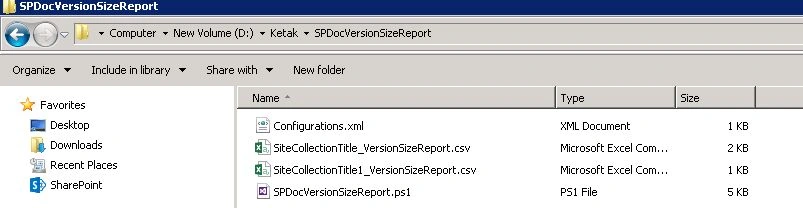
This script will generate a separate report file for every site collection it operates on. See below.
Sharepoint SharepointPosted Mar 16, 2018, 1:38 AM
Export Comments to Excel for Sharepoint list Items please guide me i am new for power shell and how to run the code please guide me...
Ketak BhalsingPosted May 23, 2016, 1:32 AM
Thanks Humayun
Humayun Kabir MamunPosted May 22, 2016, 7:46 AM
Nice...
Ketak BhalsingPosted May 18, 2016, 2:10 AM
Thanks Debasis
Ketak BhalsingPosted May 18, 2016, 2:10 AM
Thanks Bhuvanesh
Debasis SahaPosted May 17, 2016, 9:48 AM
Nice one..
Bhuvanesh MohankumarPosted May 17, 2016, 5:44 AM
Good one Ketak
Ketak BhalsingPosted May 16, 2016, 3:59 PM
Thanks Sony
Ketak BhalsingPosted May 16, 2016, 3:59 PM
Thanks Debasis
Sonu ChaudharyPosted May 16, 2016, 3:20 PM
good one...
Debasis SahaPosted May 16, 2016, 1:49 PM
Nice One..