

In this article, we will show how to get the data from SharePoint in Power BI.
- Using OData Feed.
- Using SharePoint List.
Get SharePoint List/Library Using OData Feed
The Open Data Protocol (OData) is a data access protocol for the web.
- OData provides a uniform way to query and manipulates datasets through CRUD operations (create, read, update, and delete).
- OData defines an abstract data model and a protocol that let the client access the information exposed by SharePoint.
Steps
- Open Power BI Desktop and at Home Tab, click on Get Data > OData Feed.
- Type the OData Feed URL for the SharePoint "http://siteurl/_vti_bin/listdata.svc" and click Connect.
- ListData.svc provides a way of getting information from a list using REST.
- ListData.svc provides a way of getting information from a list using REST.
- In Navigator dialog, select the required list and click Load.
- You should now find the list fields in Fields section, and you should be ready to build your report from SharePoint list items.
Note
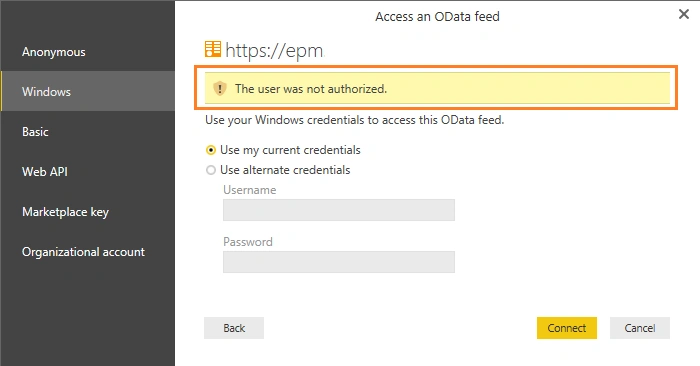
In case the current user is not authorized to connect to the site, you will be prompted to set the right credential as shown below.
Get SharePoint List/Library Using SharePoint List Connection
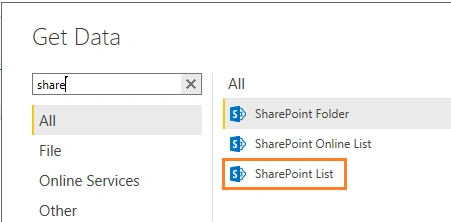
Power BI Desktop also provides a direct data source for the SharePoint list as shown below.
Steps

- Open Power BI Desktop > at Home Tab > Click on Get Data > click More.
- In Get Data dialog, Search for SharePoint > Select SharePoint List > click Connect.
- Provide the SharePoint Site URL > click OK.
- In Navigator dialog, select the required list > click Load.
- You should now find the list fields in Fields section, and you should be ready to build your report from SharePoint list items.
Conclusion
In this article, we have learned how to get the data from SharePoint List/Library in Power BI.
See Also
Madhanmohan DevarajanPosted Oct 19, 2017, 11:46 AM
Good, very useful for creating reports without coding. Thanks for Sharing it.